EducationSoftwareStrategy.com
StrategyCommunity

Knowledge Base

Product

Community

Knowledge Base

TopicsBrowse ArticlesDeveloper Zone

Product

Download SoftwareProduct DocumentationSecurity Hub

Education

Tutorial VideosSolution GalleryEducation courses

Community

GuidelinesGrandmastersEvents
x_social-icon_white.svglinkedin_social-icon_white.svg
Strategy logoCommunity

© Strategy Inc. All Rights Reserved.

LegalTerms of UsePrivacy Policy
  1. Home
  2. Topics

KB439685: "Error An error has occurred. We are sorry for the inconvenience" error occurs when running a Transaction Services Document with Internet Explorer in MicroStrategy Web 10.4.5 and 10.9


Community Admin

• Strategy


This Knowledgebase Article describes an error that can occur in MicroStrategy Transaction Services Documents based on the grid design being used. The "Invalid Argument" error is caused by a column on the transaction grid that was a column width of 0 pixels. This is a known behavior in MicroStrategy Web 10.4.5 and MicroStrategy Web 10.9. There are three possible solutions for the error.

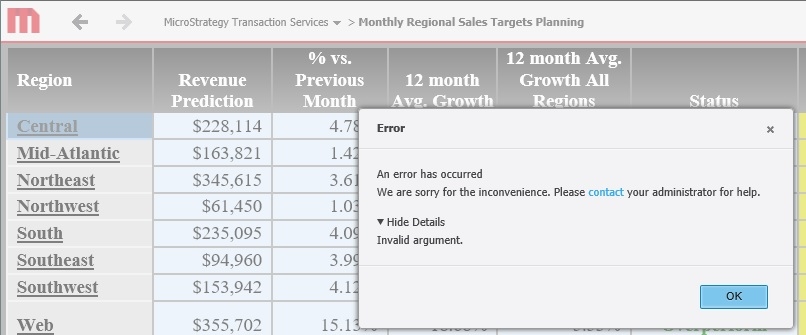
In Strategy Web 10.4.5 and 10.9, when initially rendering Strategy Transaction Services documents in Internet Explorer the following error appears:
ka04W000000ObANQA0_0EM44000000YSlE.jpeg


"Error An error has occurred. We are sorry for the inconvenience. Please contact your administrator for help. Show Details: Invalid Argument"

This error does not occur when rendering the Strategy Transaction Services document in other browser, like Chrome or Firefox. 
STEPS TO REPRODUCE:
Follow these steps to reproduce the issue in a Strategy Tutorial Project. 
Video of generating the error in Internet Explorer:

  1. Using Internet Explorer run the following document:
    Strategy Tutorial > Shared Reports > Strategy Platform Capabilities > Strategy Transaction Services > Monthly Regional Sales Targets Planning  
  2. Upon the initial load the error will present itself.
  3. Using Google Chrome Run the exact same document. Notice no error will occur.

CAUSE:
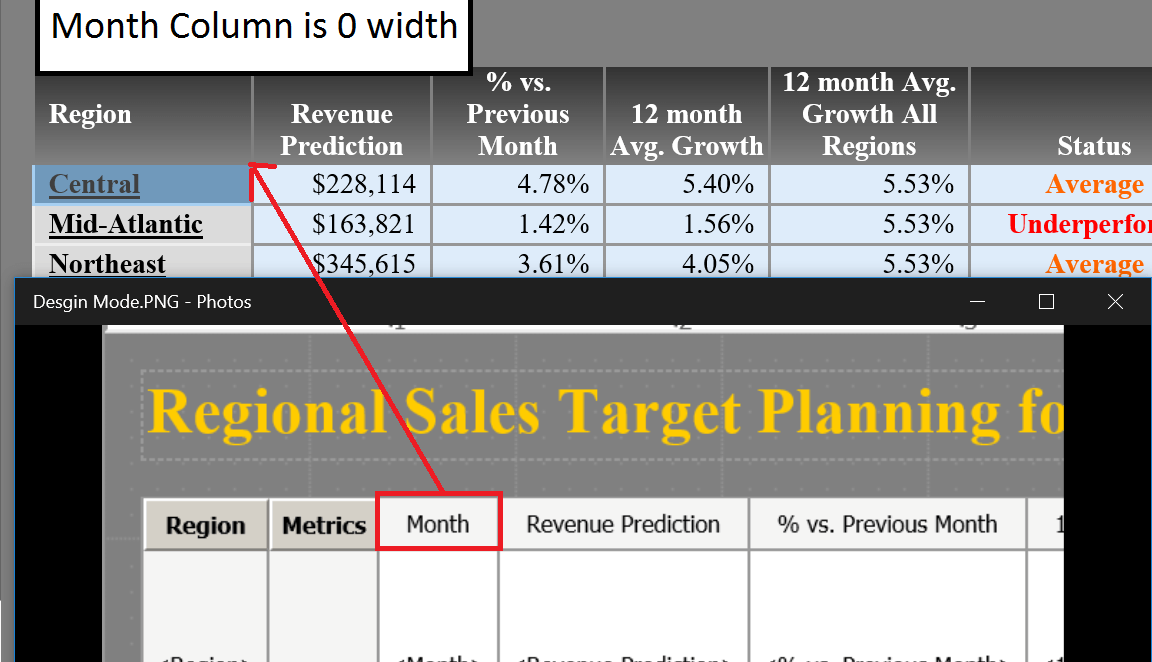
This is an identified defect in Strategy Web 10.4.5 and 10.9. The error is caused by the formatting of the grid, when a column is hidden, i.e. the pixel width being set to 0 pixels, as shown below.
ka04W000000ObANQA0_0EM44000000YSiA.png

ACTION:
This issue has been addressed in Strategy Web 10.4.6 and 10.10. Upgrade to these versions to take advantage of this fix.
WORKAROUND:
There are two possible non-intensive fixes for this behavior:
  1. Use a different browser since the behavior is unique to Internet Explorer. 
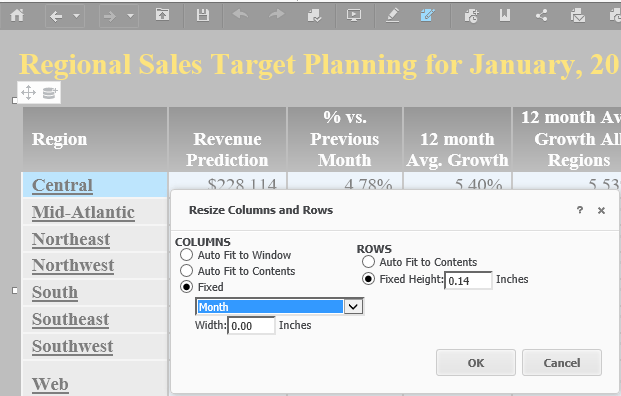
  2. Modify the grid containing the transaction mappings so that there are no columns with size 0.
    This implies to, either expand the column size, or remove the object from the grid altogether.
ka04W000000ObANQA0_0EM44000000YSli.png

Video of grid modification solution for the Strategy Tutorial scenario:
The Strategy Internal Reference Number for this issue is KB439685 KB439685


Comment

0 comments

Details

Knowledge Article

Published:

February 14, 2018

Last Updated:

November 12, 2018