EducationSoftwareStrategy.com
StrategyCommunity

Knowledge Base

Product

Community

Knowledge Base

TopicsBrowse ArticlesDeveloper Zone

Product

Download SoftwareProduct DocumentationSecurity Hub

Education

Tutorial VideosSolution GalleryEducation courses

Community

GuidelinesGrandmastersEvents
x_social-icon_white.svglinkedin_social-icon_white.svg
Strategy logoCommunity

© Strategy Inc. All Rights Reserved.

LegalTerms of UsePrivacy Policy
  1. Home
  2. Topics

KB485768: Error “Error adding Table(s) to the schema. Out of stack space” when trying to add new tables in the Warehouse Catalog in MicroStrategy Developer


Mateus Salmeron

Senior Support Engineer • MicroStrategy


This article narrates the error that users may get when trying to add new tables to the Warehouse Catalog through MicroStrategy Developer.

Symptom


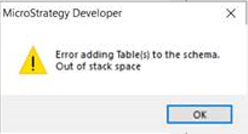
When trying to add one or a few new tables in the Warehouse Catalog through Strategy Developer, users may find the following error “Error adding Table(s) to the schema. Out of stack space”:
ka04W000000OaQEQA0_0EM4W000006Gk7m.jpeg


Cause


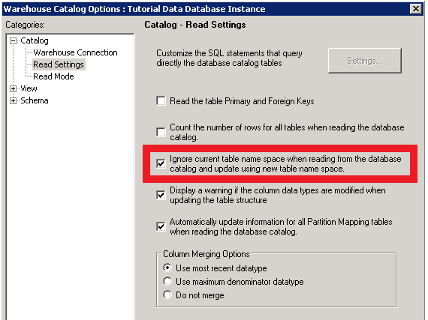
There’s an option not enabled in the Warehouse Catalog Options regarding ignoring table name space when reading from the database catalog.
 

Action


Enable the option “Ignore current table name space when reading from the database catalog and update using new table name space.” in the Warehouse Catalog Options:
ka04W000000OaQEQA0_0EM4W000006Gk8B.jpeg

After enabling this option, restart the machine where you are using Strategy Developer and add the tables again.


Comment

0 comments

Details

Knowledge Article

Published:

November 7, 2022

Last Updated:

November 7, 2022