EducationSoftwareStrategy.com
StrategyCommunity

Knowledge Base

Product

Community

Knowledge Base

TopicsBrowse ArticlesDeveloper Zone

Product

Download SoftwareProduct DocumentationSecurity Hub

Education

Tutorial VideosSolution GalleryEducation courses

Community

GuidelinesGrandmastersEvents
x_social-icon_white.svglinkedin_social-icon_white.svg
Strategy logoCommunity

© Strategy Inc. All Rights Reserved.

LegalTerms of UsePrivacy Policy
  1. Home
  2. Topics

KB424751: “Error from server: error code: '0' error message: 'ExecuteStatement finished with operation state: ERROR_STATE” Error Message Appears When Running a Report in MicroStrategy Developer Against Hortonworks Hadoop Hive Data Warehouse


Sepribo Taylor-Harry

Software Engineer in Test • Strategy


This article describes an issue when running a report in MicroStrategy developer against Hortonworks Hadoop Hive Data Warehouse, the following error message is returned “[Hortonworks][Hardy] (35) Error from server: error code: '0' error message: 'ExecuteStatement finished with operation state: ERROR_STATE”, and a potential solution on how to resolve it.

SUMMARY:
This article describes an issue when running a report in Strategy developer against Hortonworks Hadoop Hive Data Warehouse, the following error message is returned “[Hortonworks][Hardy] (35) Error from server: error code: '0' error message: 'ExecuteStatement finished with operation state: ERROR_STATE”, and a potential solution on how to resolve it.
SYMPTOM:
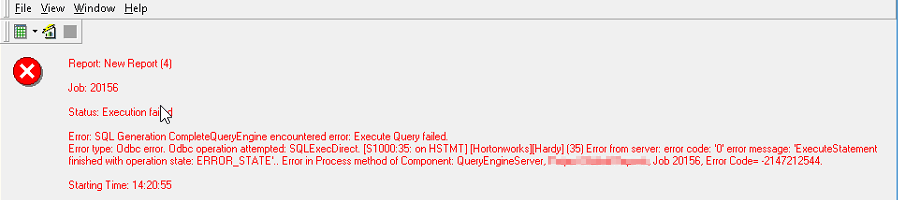
When running a report in Strategy developer against Hortonworks Hadoop Hive Data Warehouse, the following error message might occur:
ka02R000000kb3tQAA_0EM440000002NQG.png


Error: SQL Generation CompleteQueryEngine encountered error: Execute Query failed. Error type: Odbc operation attempted: SQLExecDirect. [S1000:35: on HSTMT] [Hortonworks][Hardy] (35) Error from server: error code: '0' error message: 'ExecuteStatement finished with operation state: ERROR_STATE”...

ADDITIONAL INFORMATION:

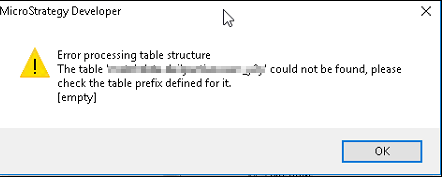
In addition, if the user go into warehouse catalog, right-click on the source table and try to show sample data, the following error message might occur:
ka02R000000kb3tQAA_0EM440000002NQV.png


Error Processing table structure. The table "table name" could not be found, please check the table prefix defined for it [empty]

CAUSE:
In this scenario, the issue was related to user permission. The user credential used in the database instance login in Developer did not seem to have the necessary permission to access the table.
ACTION:
Contact your Hadoop administrator to ensure that the user have permissions to access the table.
Note: Granting permissions to a username may not be sufficient; in some cases, a directory path may also be required.
For more information, see Directories and Permissions​ in Hadoop's knowledge base. 000024751 KB424751


Comment

0 comments

Details

Knowledge Article

Published:

May 31, 2017

Last Updated:

December 27, 2018