EducationSoftwareStrategy.com
StrategyCommunity

Knowledge Base

Product

Community

Knowledge Base

TopicsBrowse ArticlesDeveloper Zone

Product

Download SoftwareProduct DocumentationSecurity Hub

Education

Tutorial VideosSolution GalleryEducation courses

Community

GuidelinesGrandmastersEvents
x_social-icon_white.svglinkedin_social-icon_white.svg
Strategy logoCommunity

© Strategy Inc. All Rights Reserved.

LegalTerms of UsePrivacy Policy
  1. Home
  2. Topics

KB483950: Error "MicroStrategy 2019 has stopped working: windows can check online for a solution to the problem" appears while editing a document in Developer in MicroStrategy 2019 Update 3


Community Admin

• Strategy


This article explains why you may see an error when editing a document in Developer in MicroStrategy 2019 Update 3.

Description

In Strategy 2019 Update 3, you may encounter the following error when editing a document in Developer. The error reads:
"Automation Error: The object invoked has disconnected from its clients."
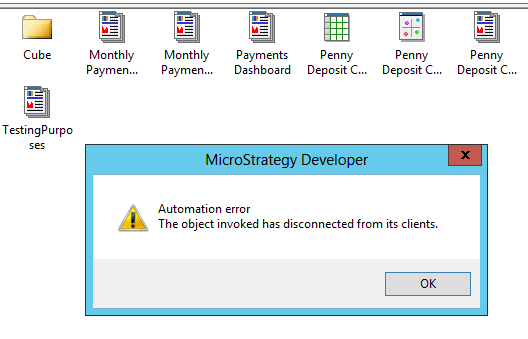
ka04W000001IwurQAC_0EM2R000000nL77.jpeg

Developer may even crash and you may see the error:
 
"Strategy 2019 has stopped working. Windows can check online for a solution to the problem."

ka04W000001IwurQAC_0EM2R000000nL7M.jpeg

Why is this happening?


This issue is related to the layout of the document. If the layout issue is on the document's landing page, that is when Developer will crash.

Solution


This issue is resolved in Strategy 2019 Update 4. Upgrade to Strategy 2019 Update 4 or later to take advantage of the fix.


Comment

0 comments

Details

Knowledge Article

Published:

January 2, 2020

Last Updated:

February 18, 2020