SYMPTOM:
"Error Msg: Fail to execute document in the subscription. Error Code 0x800430A2" found in DSSErrors.log file after some of multiple scheduled dynamic subscription found failed to be delivered. It is not specific subscription that is always failing, but 20-40% of subscriptions found failed frequently.
Error Message:
[Distribution Service][Error] FAILED SUBSCRIPTION 'Subscription_Name': Error Msg: Error in CheckGoverningLimit(). Error Code 0x80043546. Instance ID = xxx, Contact (name, xxx), User (User_Name, xxx). Stop in 'CreateCommandForExecution, DSRequest Component of Distribution Service'.
CAUSE:
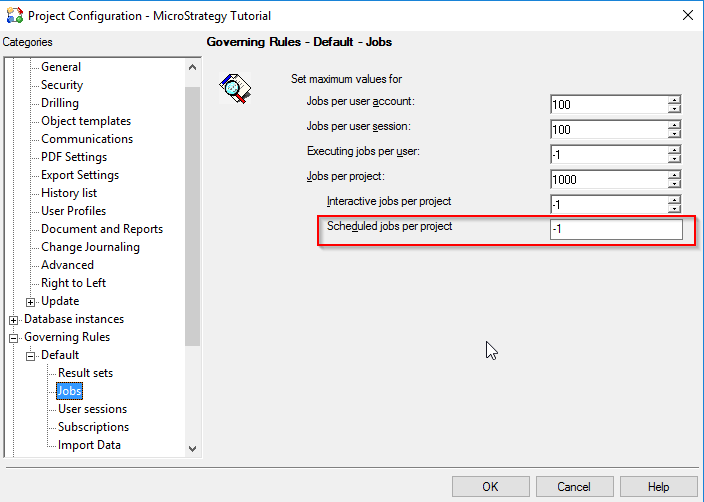
Maximum number of "Scheduled jobs per project" specified in "Project Configurations > Governing Rules > Default > Jobs" exceeds during the execution of the dynamic subscription.
Note: This issue is not specific to email dynamic subscription but could be seen in regular subscriptions as well.
ACTION:
Increase the governing setting to accommodate your needs.
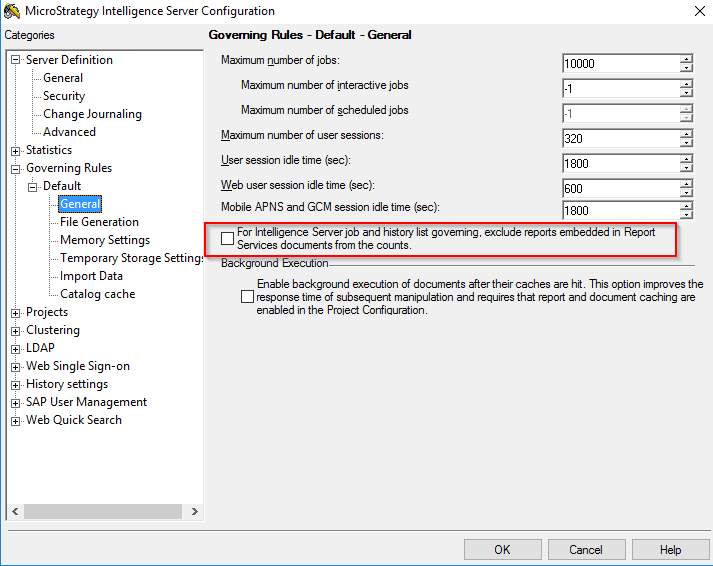
Alternatively, if the subscriptions are defined with Report Services documents or Dashboards, consider enabling the checkbox as shown below:
Intelligence Server Configuration > Governing Rules > Default > General > For Intelligence Server job and history list governing, exclude reports embedded in Report Service documents from the counts.
KB439457
