EducationSoftwareStrategy.com
StrategyCommunity

Knowledge Base

Product

Community

Knowledge Base

TopicsBrowse ArticlesDeveloper Zone

Product

Download SoftwareProduct DocumentationSecurity Hub

Education

Tutorial VideosSolution GalleryEducation courses

Community

GuidelinesGrandmastersEvents
x_social-icon_white.svglinkedin_social-icon_white.svg
Strategy logoCommunity

© Strategy Inc. All Rights Reserved.

LegalTerms of UsePrivacy Policy
  1. Home
  2. Topics

KB441622: “Error: Not enough memory” error occurs when performing Express Install of MicroStrategy 10.6 on Windows


Community Admin

• Strategy


This issue has been classified as work by design behavior by MicroStrategy. The impact is limited to MicroStrategy 10.6 express install. A solution for this issue is available in current releases.

SYMPTOM:
 
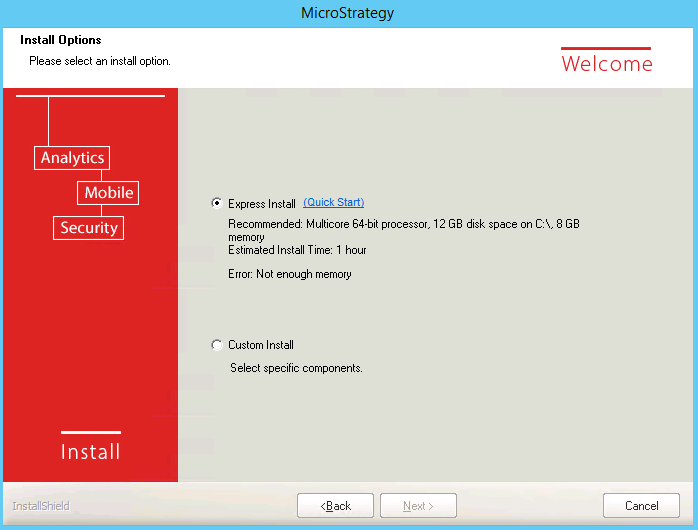
“Error: Not enough memory” error occurs when performing Express Install of Strategy 10.6 on Windows as shown below:
ka04W000000OcUQQA0_0EM44000000Qjjs.png


If switch to Custom Install, there is no error complaining the memory shortage.
 
 
CAUSE:
 
 
This is working as designed.
 
Express installation does allow user to proceed with installation when RAM is 4GB and required is 5GB minimum.
 
 
ACTION:
 
 
Ensure at least 5G memory available to proceed the installation.
 
Article Reference Number: KB441622


Comment

0 comments

Details

Knowledge Article

Published:

September 4, 2018

Last Updated:

November 9, 2018