EducationSoftwareStrategy.com
StrategyCommunity

Knowledge Base

Product

Community

Knowledge Base

TopicsBrowse ArticlesDeveloper Zone

Product

Download SoftwareProduct DocumentationSecurity Hub

Education

Tutorial VideosSolution GalleryEducation courses

Community

GuidelinesGrandmastersEvents
x_social-icon_white.svglinkedin_social-icon_white.svg
Strategy logoCommunity

© Strategy Inc. All Rights Reserved.

LegalTerms of UsePrivacy Policy
  1. Home
  2. Topics

KB485190: Error "Statement 'INSERT INTO PQTX_...' cannot be executed using current API" is returned when using multi-statement Transaction Services documents against Snowflake on JDBC driver


Sergio Sainz Palacios

Software Architect • MicroStrategy


This article explains why an error appears when using multi-statement Transaction Services documents against the Snowflake JDBC driver.

Description 


Multi-statement queries in the context of Strategy Transaction Services are those queries that include more than one INSERT, DELETE, or UPDATE statements. For example:


INSERT INTO PQTX_DATATYPES
(INTEGER_TYPE, NVARCHAR_TYPE, DATE_TYPE)
values (1,'first statement', '2021-01-01');
INSERT INTO PQTX_CUSTOMER
(CUSTOMER_ID, CUST_LAST_NAME, CUST_BIRTHDATE)
values (?, ?, ?);

The error, "Statement 'INSERT INTO PQTX_...' cannot be executed using current API" occurs due to an intersection of three features:

  1. Using JDBC driver to connect to Snowflake. 
  2. Parameterized Queries (aka as Binding Variables) are enabled for current database type and database instance. 
  3. Using multi-statement queries. 

The error example in

DSSError.log
: 

2021-08-30 13:34:33.289-04:00 [HOST:tec-w-1017735][SERVER:CastorServer][PID:7528][THR:1908][Database Classes][Error][UID:0007F65E47D6E347265F47BA0CBB1E4C][SID:E890C3136E86C2AD94AD1C254436BDC4][OID:B772740B4259D894730DC68ACB0557D3][ConnectionKeeper.cpp:77] JdbcParameterizedQuery::Execute failed.

Error type: Jdbc error. Jdbc operation attempted: MIX_JdbcConnection_execParameterizedQuery. [0A000:200042: on SQLHANDLE] Statement '
INSERT INTO PQTX_...' cannot be executed using current API. Connection String: DSN=WH_T17.Snowflake_SEC;JDBC;DRIVER=com.snowflake.client.jdbc.SnowflakeDriver;URL={jdbc:snowflake://Strategy.snowflakecomputing.com/?warehouse=LOAD_EATS&db=EATWH1&schema=TPCH};UID=TPCH;. SQL Statement:  
INSERT INTO PQTX_DATATYPES
(INTEGER_TYPE, NVARCHAR_TYPE, DATE_TYPE)
values (1,'second statement', '1999-10-01');
INSERT INTO PQTX_CUSTOMER
(CUSTOMER_ID, CUST_LAST_NAME, CUST_BIRTHDATE)
values (?, ?, ?);


Why is this happening?


This is a documented limitation of Snowflake JDBC connection in multi-statement queries and parameterized statements:
Preparing statements and using bind variables are not supported for multi-statement queries. See the Snowflake documentation on unsupported features for more information: Snowflake documentation 

Workaround


To work around this error, refer to the following two available options: 

  • Use ODBC connection instead of JDBC connection. Follow the Snowflake official documentation for ODBC configuration and connection parameters : Snowflake documentation 
  • Disable parameterized statements for the database instance, as well as database type. 


The following steps refer to the second option above:
  • Disable parameterized statements for the database instance used in the Transaction Services report:
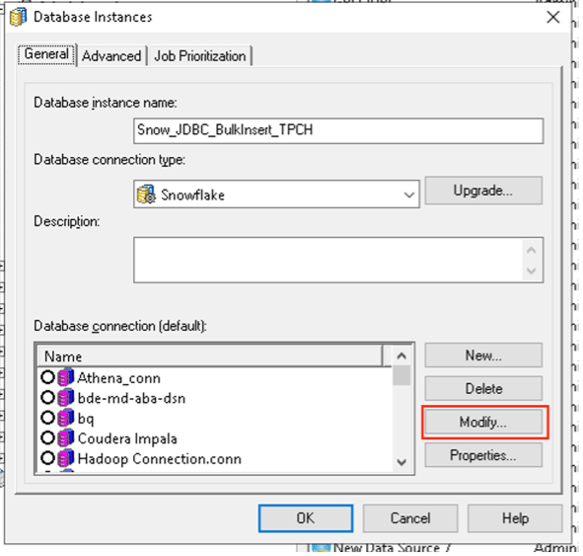
    • Edit the database instance in Strategy Developer. 
ka0PW0000000smnYAA_0EM4W0000038sCO.jpeg
    • Click Modify in the Database Instance Editor.
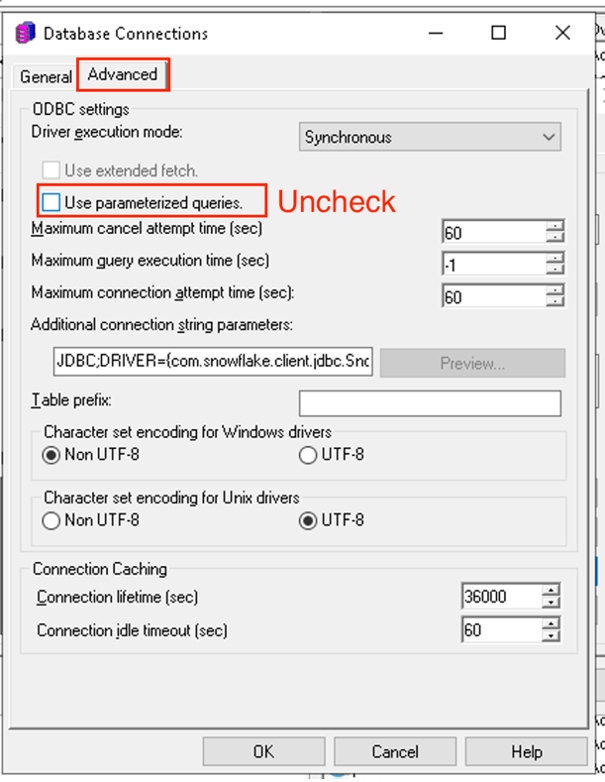
    • Click the Advanced tab.
    • Deselect the Use parameterized queries checkbox.
ka0PW0000000smnYAA_0EM4W0000038sCY.jpeg
    • Click OK in the Database Connection Editor and OK in the Database Instance Editor.
  • Disable parameterized statements for the Snowflake database:
    • In a Windows machine, edit the
      DATABASE.PDS
      file (found in
      C:\Program Files (x86)\Common Files\MicroStrategy\DATABASE.PDS
      ).
    • Find the Snowflake tag:
      <DSSOBJECT TYPE="DBMS" NAME="Snowflake" ID="@dbms233">

    • Under the Snowflake DSSOBJECT tag, find:
      <PROPERTYSET NAME="VLDB Select">

    • Add the following key to resemble the following:
       

      <PROPERTYSET NAME="VLDB Select">
      ...
       

      <PROPERTY NAME="Disable Parameterized Query for Transaction Report" VALUE="1" />

      </PROPERTYSET>
  • Save
    DATABASE.PSD.
  • Update the definition of the Snowflake database type according to the
    DATABASE.PDS
    file. 


          Open Database Instance > Database Connection Type > Click Upgrade  > Click Load >> Move DBMS object to right (If a message saying that the type already exists, click on Yes to update it.) > Click OK
  5. Once the changes are saved, disconnect and reconnect to the project source in two-tier. If an Intelligence Server is connected to this metadata, it should be restarted at this time. See KB5779 

Related Topics

MicroStrategy Transaction Services 
Snowflake Unsupported Features
Snowflake ODBC Connection String
KB5779: How to update the database type in MicroStrategy


Comment

0 comments

Details

Knowledge Article

Published:

October 6, 2021

Last Updated:

February 26, 2024