After upgrading Strategy Web to m2021 Update 4, SAML authentication fails with the following error page:

“Error in login – Please contact your administrator."
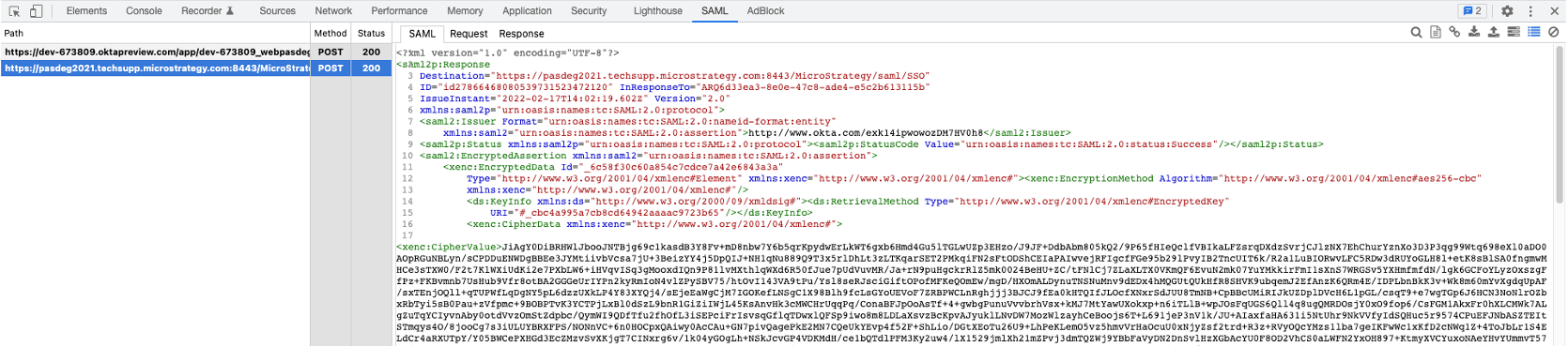
One possible root cause is that the SAML assertion is encrypted but the SAML message is not signed by the Identity Provider. The SAML libraries used for Strategy 2021 Update 4 and above require the SAML message to be signed when SAML assertions are encrypted.
To verify if this scenario applies, analyse the SAML response that is issued by your Identity Provider. One approach to capture SAML responses is to use a browser plugin such as Chrome SAML Panel as seen on the screenshot below:


1. Contact your Identity Provider Administrator to enable SAML message signing.
2. Disable SAML assertion encryption on the Strategy Web SAML configuration page and contact your Identity Provider administrator to apply the change on the Identity Provider side.
