When using the latest Chrome 89 and POST SAML or single sign-on (SSO) is requested, the following error is often returned.
Error in login
Please contact your Administrator.
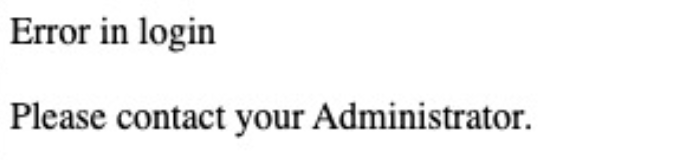
The error is returned because with Chrome 80 and later versions, new JSESSIONID is created when POST SAML/SSO request is returned from SAML IDP.
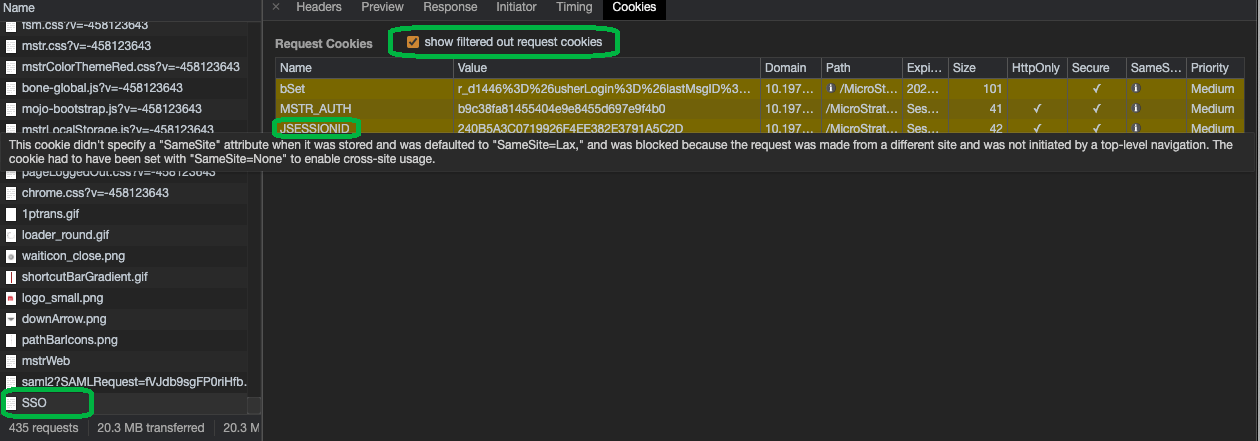
This error can be captured in the Chrome browser's "Developer Tools → Network" page. When POST SAML/SSO request is captured, select this request and go to the "Cookies" page and select the "show filtered out request cookies" checkbox. You can notice the JSESSIONID cookie is filtered out when POST SAML/SSO request is sent.
Set the log level to DEBUG according to SAML Troubleshooting Guide. From the SAML logs, the following error can be seen:
Message XXX not found in session YYY
03/09/2021 06:46:16,776 org.springframework.security.saml.storage.HttpSessionStorage DEBUG - Message a33ge3h8j0752gd95015049fa5f78h7 not found in session C2BB60B75AB70DC7DDC4F14DD8CDE3AE

03/09/2021 06:46:16,776 org.springframework.security.saml.SAMLAuthenticationProvider DEBUG - Error validating SAML message
org.opensaml.common.SAMLException: InResponseToField of the Response doesn't correspond to sent message a33ge3h8j0752gd95015049fa5f78h7
JSESSION C2BB60B75AB70DC7DDC4F14DD8CDE3AEis newly created. It was
64EB7398E27482E08F666CC1A8F00E87in the logs above, for example:
03/09/2021 06:46:16,189 org.springframework.security.saml.storage.HttpSessionStorage DEBUG - Storing message a33ge3h8j0752gd95015049fa5f78h7 to session 64EB7398E27482E08F666CC1A8F00E87
This is a known problem with Spring Framework and Chrome 80. As stated in this article, SAML configured with SP initiated POST Binding is known to be affected if the Strategy application servers are in a different domain from the SAML authentication Identity Provider domain. SAML with GET/Redirect Binding is not affected.
Prerequisite: The application server must support the SameSite cookie changes. Ensure you are running Tomcat Web Server version 9.0.30 or later or version 8.5.50 or later with HTTPS configured.
C:\Program Files (x86)\Common Files\MicroStrategy\Tomcat\apache-tomcat-9.0.31\webapps\MicroStrategy\META-INF\context.xml
<Context>
  <CookieProcessor sameSiteCookies="none"/>
</Context>
sys_defaults.xmlfile, which is typically located:
C:\Program Files (x86)\Common Files\MicroStrategy\Tomcat\apache-tomcat-9.0.31\webapps\MicroStrategy\WEB-INF\xml\sys_defaults.xml
alwaysSecureCookievalue to
1. If the
alwaysSecureCookieparameter is not found, this step may be skipped.
