EducationSoftwareStrategy.com
StrategyCommunity

Knowledge Base

Product

Community

Knowledge Base

TopicsBrowse ArticlesDeveloper Zone

Product

Download SoftwareProduct DocumentationSecurity Hub

Education

Tutorial VideosSolution GalleryEducation courses

Community

GuidelinesGrandmastersEvents
x_social-icon_white.svglinkedin_social-icon_white.svg
Strategy logoCommunity

© Strategy Inc. All Rights Reserved.

LegalTerms of UsePrivacy Policy
  1. Home
  2. Topics

Evanta Presentation by MicroStrategy CEO Michael Saylor - Enterprise Analytics and Mobility in the Age of Converged Technologies 


Hugh Owen

Executive Vice President & Chief Marketing Officer • Strategy


Smartphones caused the mobile wave. Facebook sparked the social wave. Amazon boosted the cloud wave. Each innovation has impacted how businesses operate and interact with their customers. As these technologies mature, organizations must rethink how they gain competitive advantage from massive amounts of newfound data. This presentation explains how next-generation enterprise analytics and mobility solutions can make organizations more efficient and profitable in a constantly evolving business environment. View the presentation in the attachment files of this page!

SYMPTOM:
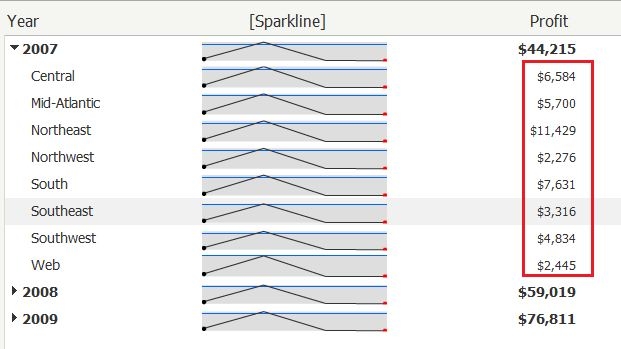
Metric aggregation is not applied in Microcharts when tree display is selected in Strategy Web 9.x, as shown below:
 

ka04W000000Oh29QAC_0EM4400000027SX.jpeg

 
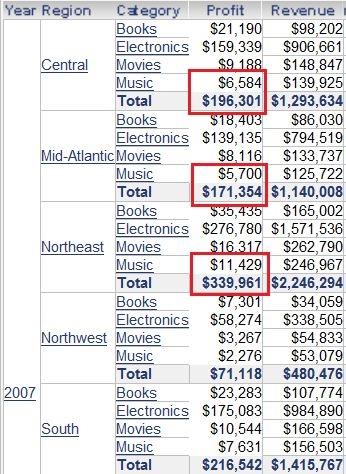
Note that the subtotals for region in microcharts are incorrect, as the grid shown below:
 

ka04W000000Oh29QAC_0EM4400000027SZ.jpeg

 
STEPS TO REPRODUCE:
 
Follow the steps below to reproduce the issue with Strategy Tutorial Project:
  1. Login Strategy Web, create a report with attributes "Year", "Region", "Category" and metrics "Profit", "Revenue"
  2. Save it as "R1" and right-click "R1", select "create document"
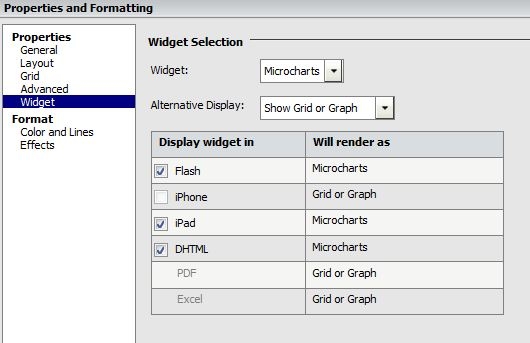
  3. Right-click the grid and select "Properties and formatting", under widget ,select "Microcharts", click OK, as shown below:
ka04W000000Oh29QAC_0EM4400000027SW.jpeg


  • Run this document in flash mode, right-click the document and select "Properties".
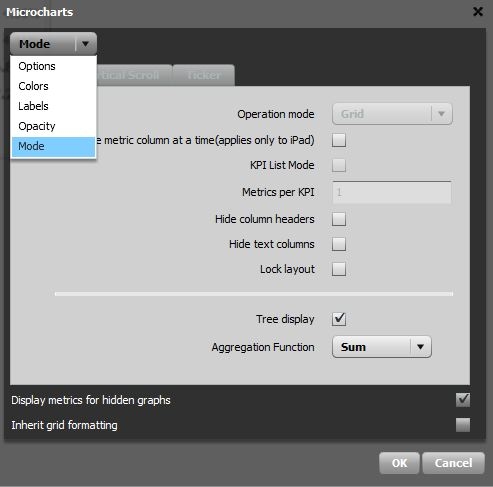
  • Drop down "Options", select mode,  check "tree display" and click "OK", as shown below:
ka04W000000Oh29QAC_0EM4400000027Sb.jpeg

 
CAUSE:
This is a known issue in Strategy Web 9.x.
 
ACTION:
 
Contact Strategy Technical Support for an update regarding this issue.


Comment

0 comments

Details

Knowledge Article

Published:

December 6, 2017

Last Updated:

December 7, 2017