Starting with the release of Strategy ONE (March 2024), dossiers are also known as dashboards.
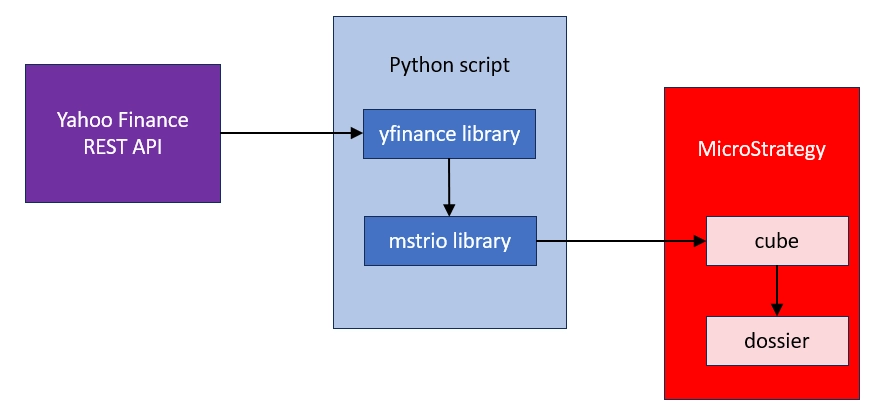
I am using a Python library called 'yfinance ' that simplifies the process of retrieving data from Yahoo REST API. It returns data as a pandas data frame which is perfect input for mstrio. The only change I needed to do was to convert date from index to a regular column and modify data type of this column. This example is based on Strategy 2021 u.10 and mstrio library 11.3.10.101.
This chart shows the data flow from Yahoo Finance, through Python script to the final visualization
Attached are files with Python code and mstr file (example dossier).
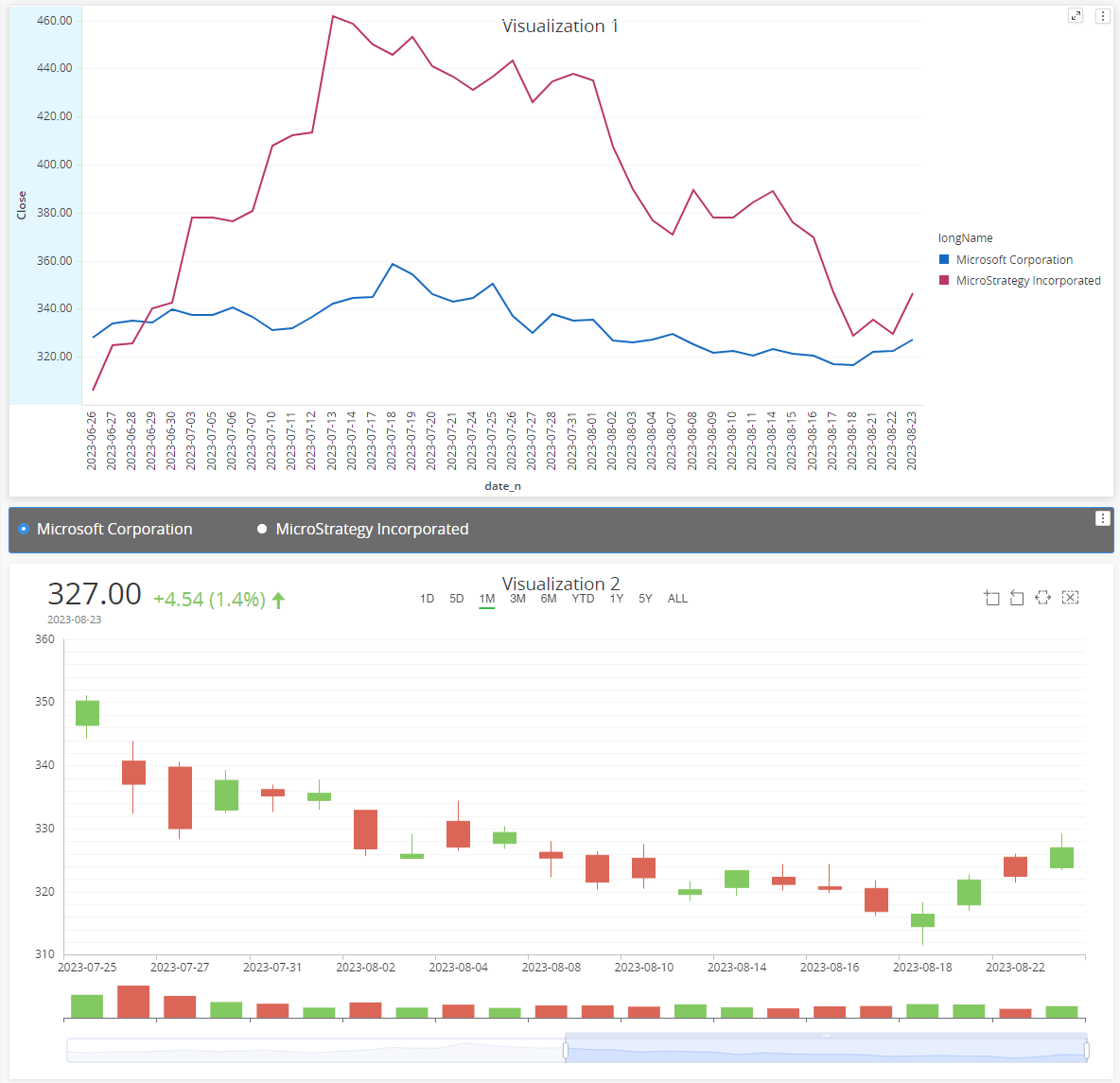
You can use this data to visualize trends in stock history as well as compare multiple stocks trends.
Please note - I've added color formatting in the code below (http://hilite.me/). Code copied from here might not work due to indentation issues. In that case, use attached file with sample code. Also this CRM is adding ';' after URLs.
import yfinance as yf
import getpass
from mstrio.connection import Connection
from mstrio.server import Environment, Project
from mstrio.project_objects.datasets.super_cube import SuperCube

def create_new_cube(mstr_connection, folder_id, cube_name, df, update_policy):
    dataset = SuperCube(mstr_connection, name=cube_name)
    dataset.add_table(name=cube_name, data_frame=df, update_policy=update_policy)
    dataset.create(folder_id=folder_id)
    return dataset.id

def update_cube(mstr_connection, cube_id, cube_name, df, update_policy):
    mstr_dataset = SuperCube(mstr_connection, id=cube_id)
    mstr_dataset.add_table(name=cube_name, data_frame=df, update_policy=update_policy)
    mstr_dataset.update()

ticker_code   = "MSFT"
ticker_period = "2mo"

tckr = yf.Ticker(ticker_code)
# get all stock info
# tckr.info
# get historical market data
hist = tckr.history(period=ticker_period)
hist["date_n"]=hist.index.tz_convert('UTC').tz_localize(None)
hist["longName"]=tckr.info["longName"]
hist["industryDisp"]=tckr.info["industryDisp"]

mstr_username = "mstr"
mstr_password = getpass.getpass(prompt='Password ')
mstr_base_url = "https://env-319699.customer.cloud.Strategy.com"
mstr_url_api  = mstr_base_url+"/StrategyLibrary/api"

# upload to cube
upload_proj_id   = "B7CA92F04B9FAE8D941C3E9B7E0CD754"
upload_folder_id = "C113BFA19445341FDC72358312FAD611"
cube_name        = "yfinance"


# Connection
conn=Connection(mstr_url_api, mstr_username, mstr_password, login_mode=1)
env = Environment(connection=conn)

conn.select_project(project_id=upload_proj_id)

# Create a cube
cube_id=create_new_cube(conn, upload_folder_id, cube_name, hist, "replace")


# Update cube
cube_id="684138E02E4E7438EFEF35B2A3B8D4C3" # provide ID of the cube created in the previous step
update_policy="upsert"

update_cube(conn, cube_id, cube_name, hist, update_policy)
