EducationSoftwareStrategy.com
StrategyCommunity

Knowledge Base

Product

Community

Knowledge Base

TopicsBrowse ArticlesDeveloper Zone

Product

Download SoftwareProduct DocumentationSecurity Hub

Education

Tutorial VideosSolution GalleryEducation courses

Community

GuidelinesGrandmastersEvents
x_social-icon_white.svglinkedin_social-icon_white.svg
Strategy logoCommunity

© Strategy Inc. All Rights Reserved.

LegalTerms of UsePrivacy Policy
  1. Home
  2. Topics

KB485134: "Excel experienced a serious problem with 'microstrategy office' add in" is encountered with the 32-bit MicroStrategy for Office installer in MicroStrategy 2021


Stefanie Polleri

Senior Cloud Support Engineer III • MicroStrategy


This article addresses the error that occurs when using the 32-bit MicroStrategy for Office installer with MicroStrategy 2021. This article also provides a workaround to avoid this error.

Description 


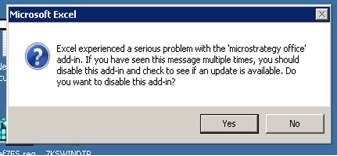
With the 32-bit Strategy for Office installer (legacy Office) delivered with Strategy 2021, the add-in does not load and Excel crashes and/or displays an error message like the following.
Excel experienced a serious problem with the 'Strategy office' add-in. If you have seen this message multiple times, you should disable this add-in and check to see if an update is available. Do you want to disable this add-in? 
ka04W000001IsmuQAC_0EM4W0000037m9i.jpeg

Solution


This issue was addressed in Strategy 2021 Update 3. Please consider upgrading to take advantage of the fix.

Workaround 


Use the 32-bit installer from a previous version, for example, Strategy 2020 Update 4. 


Comment

0 comments

Details

Knowledge Article

Published:

August 11, 2021

Last Updated:

August 11, 2021