EducationSoftwareStrategy.com
StrategyCommunity

Knowledge Base

Product

Community

Knowledge Base

TopicsBrowse ArticlesDeveloper Zone

Product

Download SoftwareProduct DocumentationSecurity Hub

Education

Tutorial VideosSolution GalleryEducation courses

Community

GuidelinesGrandmastersEvents
x_social-icon_white.svglinkedin_social-icon_white.svg
Strategy logoCommunity

© Strategy Inc. All Rights Reserved.

LegalTerms of UsePrivacy Policy
  1. Home
  2. Topics

KB484057: Exporting grids with icons to PDF causes truncated columns and data loss when setting the grid as "Fit to page"


Ni Shen

Product Owner, Principal • MicroStrategy


This article explains why columns may be truncated when exporting a grid with icons to PDF. This article also provides workarounds to prevent this behavior from occurring.

Starting with the release of Strategy ONE (March 2024), dossiers are also known as dashboards.

Description


When exporting a grid to PDF, the last column of the grid may get truncated when the following criteria are met:
 

  • The grid contains an icon in the table, such as "-" in the outline mode. 
  • The grid is scaled to "fit to page," whereas it could be horizontally paginated.
  • The grid should be paginated near the icon before setting it as "fit to page."


If all the conditions above are met, the last column may get truncated and a white gap may be placed before the icon. 
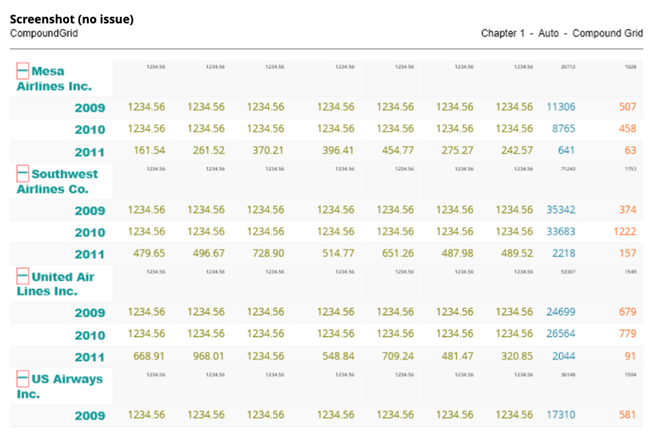
For example, the grid below uses the outline mode containing the "-" icon, before export: 
ka0PW0000001JbbYAE_0EM2R000000nw6f.jpeg


If a smaller paper size is used to export the dossier and the grid is set to "fit to page," a white gap will appear and the last column will be truncated:

ka0PW0000001JbbYAE_0EM2R000000nw7J.jpeg

Why is this happening?


This issue is being experienced due to a known limitation for Chromium. 

Solution


The Strategy Technology Team is monitoring the fixes made by Chromium.
 

Workaround


You should avoid using special icons in your dossier. 
You should use a different paper size to export your dossier, as the issue occurs when the icons are near the paginated columns. 


Comment

0 comments

Details

Knowledge Article

Published:

February 21, 2020

Last Updated:

March 21, 2024