SYMPTOM:
From 2021 Update 8, it’s supported to set the default authentication mode for Strategy Library. Please refer to KB485789 for details.
However, after upgrading to Strategy Update 8 to later, the feature fails to work. If users set for example LDAP as the default authentication mode, when accessing Strategy Library, the default is still the Standard authenticaion mode.

CAUSE:
A possible cause of the problem is that “features.auth.default.autoLogin=true” missing in configDefaults.properties. The file can be found at “/MicroStrategyLibrary/WEB-INF/classes/config/”.
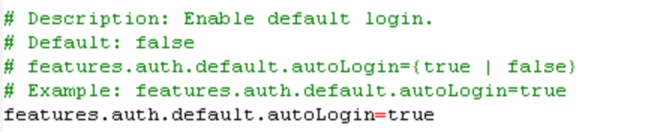
The property is available since 2021 Update 8 and is used to control whether to enable default login for Strategy Library. The property can be found in configDefaults.properties and it is set to true by default.
ACTION:
Make sure “features.auth.default.autoLogin=true” is available in configDefaults.properties.
