EducationSoftwareStrategy.com
StrategyCommunity

Knowledge Base

Product

Community

Knowledge Base

TopicsBrowse ArticlesDeveloper Zone

Product

Download SoftwareProduct DocumentationSecurity Hub

Education

Tutorial VideosSolution GalleryEducation courses

Community

GuidelinesGrandmastersEvents
x_social-icon_white.svglinkedin_social-icon_white.svg
Strategy logoCommunity

© Strategy Inc. All Rights Reserved.

LegalTerms of UsePrivacy Policy
  1. Home
  2. Topics

Failed to open dossier "ABC" errors occur when opening a dossier in MicroStrategy Workstation


Community Admin

• Strategy


Within MicroStrategy Workstation, some of our users have been experiencing an error in opening dossiers. The error will appear as "Failed to open dossier ABC" within the error messages. Many times, the error is prompted due to the user using a prompted dataset. Learn more about the error and next steps with this article!

Starting with the release of Strategy ONE (March 2024), dossiers are also known as dashboards.
Troubleshooting
Failed to open dossier "ABC" errors occur when opening a dossier in Strategy Workstation 10.9 and 10.10
Within Strategy Workstation 10.9 and 10.10, some of our users have been experiencing an error in opening dossiers. The error will appear as "Failed to open dossier ABC" within the error messages. Many times, the error is prompted due to the user using a prompted dataset. Learn more about the error and next steps with this article. 
Steps to reproduce
 

  1. Ensure you have created a dossier with a prompted dataset.
  2. With Workstation 10.9 or 10.10, click on the dossier to open it. 
  3. View the error message that appears when trying to open the dossier.


Failed to open dossier "ABC" . The dossier contains a prompted dataset, which is not support currently.
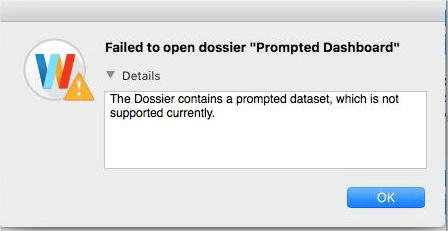
ka0PW0000001JPLYA2_0EM44000000QDKI.png

Why is this happening?
In Workstation 10.9 and 10.10, prompted datasets in dossier had not been supported. These were in the early stages of Workstation. 
Status
ACKNOWLEDGED   IN-PROGRESS   SOLVED  (Version: Strategy 2019)
Next Steps
Trying to figure out next steps? Feel free to comment on this article, start a discussion, or reach out to your Support liaison to create a case!
No matter the case, we have you covered.
 
Want to upgrade to Strategy 2019? Visit the Strategy website!


Comment

0 comments

Details

Knowledge Article

Published:

December 28, 2017

Last Updated:

March 21, 2024