EducationSoftwareStrategy.com
StrategyCommunity

Knowledge Base

Product

Community

Knowledge Base

TopicsBrowse ArticlesDeveloper Zone

Product

Download SoftwareProduct DocumentationSecurity Hub

Education

Tutorial VideosSolution GalleryEducation courses

Community

GuidelinesGrandmastersEvents
x_social-icon_white.svglinkedin_social-icon_white.svg
Strategy logoCommunity

© Strategy Inc. All Rights Reserved.

LegalTerms of UsePrivacy Policy
  1. Home
  2. Topics

KB484430: Behavior change for cube index governing


Cheng Guo

Product Owner, Principal • Strategy


This article describes the availability of 2 registry keys, "Respect Maximum % Growth of an Intelligence Cube due to Indexes" and "CubeGoverningFolder," in MicroStrategy 2020 Hotfix 2 and later releases.

Description 


Starting with the release of Strategy 2020 Hotfix 2, two new registry keys are available. The keys are both related to the Index Governing feature, which will help control the cube size increase in memory.

Purpose of the registry key 


Although the default memory usage limit is 500%, sometimes it can be set as low as 50%. Hence, the cube memory usage will easily exceed the limit and the ReduceCubeMemory method can be invoked frequently. This will influence the user experience. To solve this problem, we introduce a new registry key, "Respect Maximum % Growth of an Intelligence Cube due to Indexes."

ka02R000000btPoQAI_0EM2R000001IFtk.jpeg

The directory to serialize the governed objects is currently set to the same path as cube file, which can be a network file system in a cluster environment. Serializing huge object to such file system can be slow. To solve this problem, we introduce a new registry key, "CubeGoverningFolder," to control the dump folder location.
 

How to enable the registry key 

  • Respect Maximum % Growth of an Intelligence Cube due to Indexes
    We introduce a Long Value registry, "Respect Maximum % Growth of an Intelligence Cube due to Indexes," under
    SOFTWARE\Strategy\Data Sources\CastorServer
     (the same path with other cache governing rules).
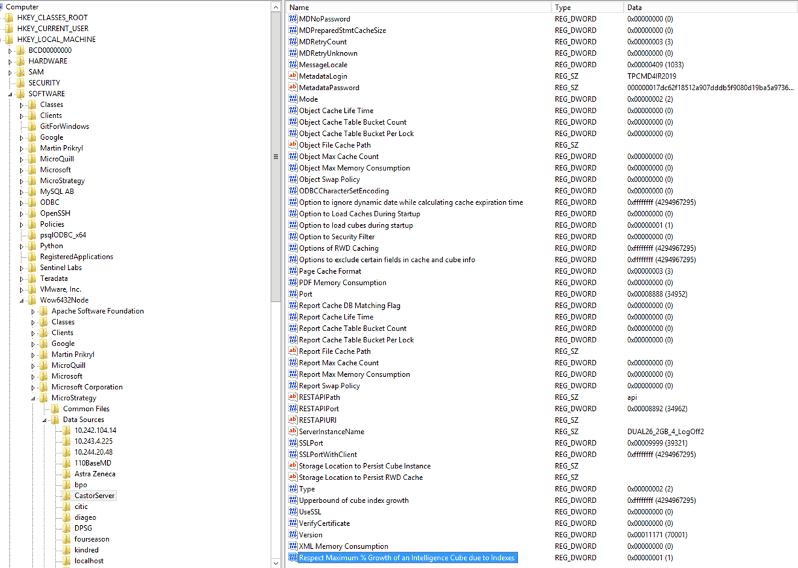
    If the registry is set and the value is not 0, we will still follow the governing setting, "Maximum % of growth of intelligent cube due to indexes." Otherwise, it will increase the percentage to 200% if the "Maximum % of growth of intelligent cube due to indexes" governing rule is set greater than or equal to 0, but less than 200.

    We use the same rule mentioned above for two cube manager maintenance scenarios. One case is initiating the Cube Manager during Intelligence Server startup, we read the setting, update it then set the updated value into cube manager which take effect at runtime. The other case is when Intelligence Server Administrator modifying this governing setting, we set the value based on this registry key, following the rule mentioned above.
ka02R000000btPoQAI_0EM2R000001IFu9.jpeg
  • CubeGoverningFolder
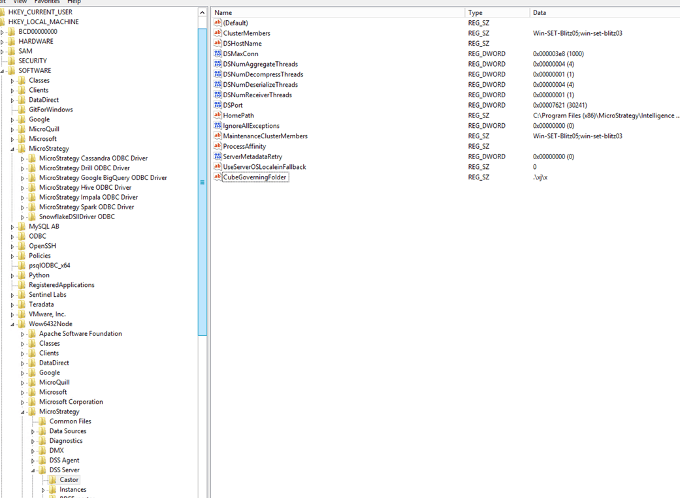
    We introduce a registry setting, "CubeGoverningFolder," under
    SOFTWARE\\Strategy\\DSS Server\\Castor
    . If this registry setting is present, we'll use it as the root folder, like the screenshot shown below.
ka02R000000btPoQAI_0EM2R000001IFuT.jpeg
  • If the registry setting does not exist, we'll use the current local working directory as the root folder.
ka02R000000btPoQAI_0EM2R000001IFuY.jpeg
  • If we are able to obtain the root folder, we'll create a folder structure like:
    [root]\CubeGovern\ServerDef\Server_ComputerName_P[ProjectID]
    for each project.
ka02R000000btPoQAI_0EM2R000001IFud.jpeg
  •  
    If we failed to create the folder above, we'll fall back to the original behavior, to use the cube cache folder. The path can be found via Developer. For the cluster environment shown below, it will be a shared network file system.
ka02R000000btPoQAI_0EM2R000001IFus.jpeg
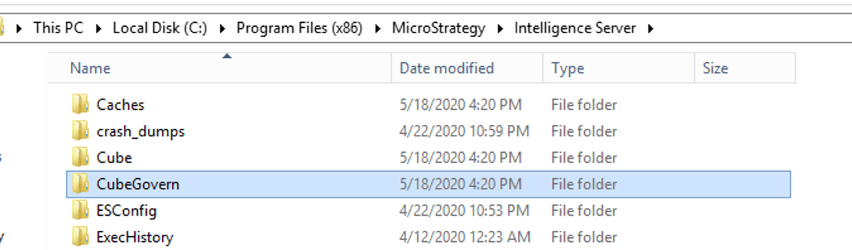
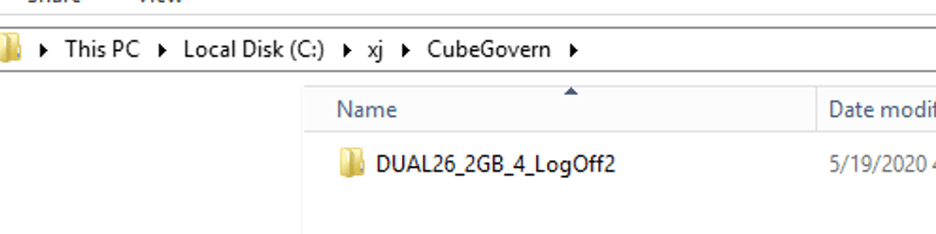
  • The value of the registry can be set as a relative or absolute path. As the example above, if it is a relative path, it will search for the relative path under the current working directory. If it is not found, it will create one according to the relative path. If it is an absolute path, it will create a
    CubeGovern
    folder under the path as below.
ka02R000000btPoQAI_0EM2R000001IFv2.jpeg
ka02R000000btPoQAI_0EM2R000001IFv7.jpeg

Comment

0 comments

Details

Knowledge Article

Published:

July 24, 2020

Last Updated:

July 24, 2020