EducationSoftwareStrategy.com
StrategyCommunity

Knowledge Base

Product

Community

Knowledge Base

TopicsBrowse ArticlesDeveloper Zone

Product

Download SoftwareProduct DocumentationSecurity Hub

Education

Tutorial VideosSolution GalleryEducation courses

Community

GuidelinesGrandmastersEvents
x_social-icon_white.svglinkedin_social-icon_white.svg
Strategy logoCommunity

© Strategy Inc. All Rights Reserved.

LegalTerms of UsePrivacy Policy
  1. Home
  2. Topics

KB483114: Features using REST port fail when SSL is configured for the Intelligence Server


Community Admin

• Strategy


This document presents the solution to error encountered with features using REST port, such as MicroStrategy Library bookmark feature, when SSL is configured, by showing how to manually bind SSL certificate to the REST service port number in Windows.

SYMPTOM
When SSL is configured, features using the REST port, such as the Bookmark feature in Strategy Library, do not work. 
STEPS TO REPRODUCE

  1. Configure the Strategy Intelligence server for SSL as per:
    https://www2.microstrategy.com/producthelp/current/SystemAdmin/WebHelp/Lang_1033/Content/SSL_TLS_Developer_WebAdmin.htm
  2. Attempt to use a REST API, such as the bookmark feature in Strategy Library.
  3. An error appears.


CAUSE
It was discovered that the SSL certificate is not automatically bound to the REST service port number as expected on Windows. 
Note:
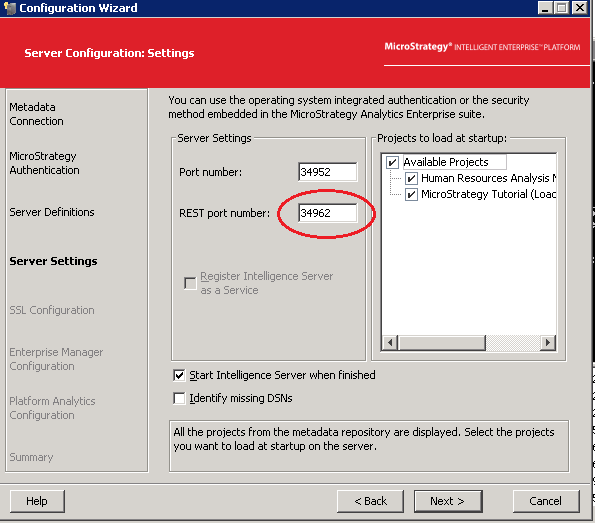
This issue only happens on Windows. Make sure that SSL is already configured and note down the REST port number used, as shown in the screenshot below. We need to use the same REST port number when binding to the SSL certificate.
 

ka04W000001484gQAA_0EM44000000gklG.png

 
Solution
This issue has been addressed in Strategy 2019 Update 2 and above.


Comment

0 comments

Details

Knowledge Article

Published:

April 2, 2019

Last Updated:

April 4, 2019