After upgrade from Strategy 2020 to 2021, filter on "Project" does not take effect in a report with attribute ‘Object’ and metric ‘Jobs’ in Platform Analytics project.
select "a11"."object_id" AS "object_id", max("a12"."object_name") AS "object_name", count(distinct "a11"."parent_tran_id") AS "WJXBFS1" from "platform_analytics_wh"."access_transactions" "a11" join "platform_analytics_wh"."lu_object" "a12" on ("a11"."object_id" = "a12"."object_id") where "a11"."job_id" > 0 group by "a11"."object_id"
Schema change introduced in 2021 Update 3 causes the different behavior.
The metric ‘Jobs’ has the setting of "Remove related report filter elements" checked as shown below:
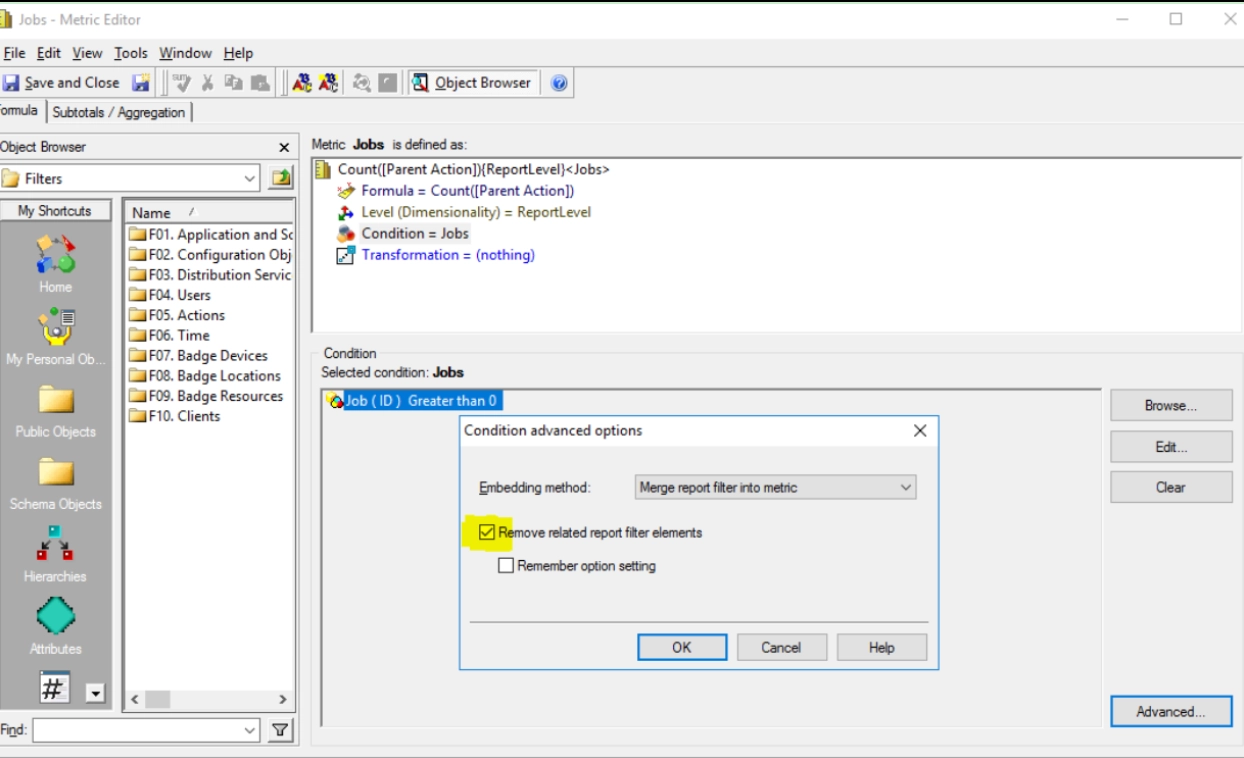
This setting does not take any effect since report filter attribute ‘Project’ and metric ‘Jobs’ because they do not have any relationship.
Jobs is created based on count of Parent Action with filter of attribute ‘Jobs’.
‘Parent Action’ is the child of ‘Job’, which links ‘Project’ and ‘Parent Action’, and the setting of “Remove related report filter elements" takes effect if creating a normal report with report filter on top of it, the filter setting will be ignored. Schema relationship is shown as below:

NOTE: The ‘Remove related report filter elements’ setting influences the interaction between the filter of a report and the filter of a conditional metric.
Related elements are those elements belonging to any attribute having a parent-child relationship with the attribute on which you are placing conditions. When the option is selected, if the report filter contains a qualification based on an attribute related to an attribute in the metric filter qualification, the metric filter qualification takes precedence. This is the default setting.
Refer to online help for a better understanding of the setting. Removing related report filter elements.
Strategy will continue to investigate and post updates as soon as they are available.
Edit this metric ‘Jobs’ and remove the checkmark (this can be modified from either developer or workstation), save it. Then report show expected SQL and correct data:
select "a11"."object_id" AS "object_id", max("a12"."object_name") AS "object_name", count(distinct "a11"."parent_tran_id") AS "WJXBFS1" from "platform_analytics_wh"."access_transactions" "a11" join "platform_analytics_wh"."lu_object" "a12" on ("a11"."object_id" = "a12"."object_id") where ("a11"."job_id" > 0 and "a12"."project_id" in (6910790456762699776)) group by "a11"."object_id" 