EducationSoftwareStrategy.com
StrategyCommunity

Knowledge Base

Product

Community

Knowledge Base

TopicsBrowse ArticlesDeveloper Zone

Product

Download SoftwareProduct DocumentationSecurity Hub

Education

Tutorial VideosSolution GalleryEducation courses

Community

GuidelinesGrandmastersEvents
x_social-icon_white.svglinkedin_social-icon_white.svg
Strategy logoCommunity

© Strategy Inc. All Rights Reserved.

LegalTerms of UsePrivacy Policy
  1. Home
  2. Topics

Garbled Characters in CSV, TXT, and JSON Imports


Xianghua Huan

Software Architect • MicroStrategy


This article describes how to fix imported .csv, .txt, and .json files with garbled characters.

Description

After importing a .json file from disk or URL, some characters are garbled and substituted with the � character (U+FFFD).
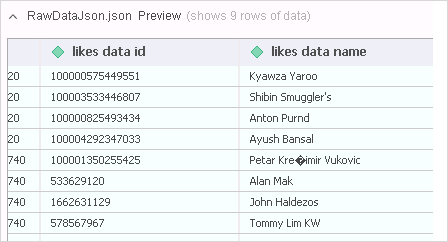
ka02R000000g2sxQAA_0EM2R000000m5fz.jpeg

Why is this happening?

The .csv, .txt, and .json files are actually plain text. Plain text can be any type of encoding. The encoding detection is an imprecisive operation using statistics and heuristics and works best if the first 4k bytes of data is mostly in one language.

Solution

If you are importing the file from disk, use a text editor such as Notepad++ or the iconv command in Linux to convert the file encoding to UTF-8 or UTF-8 BOM.
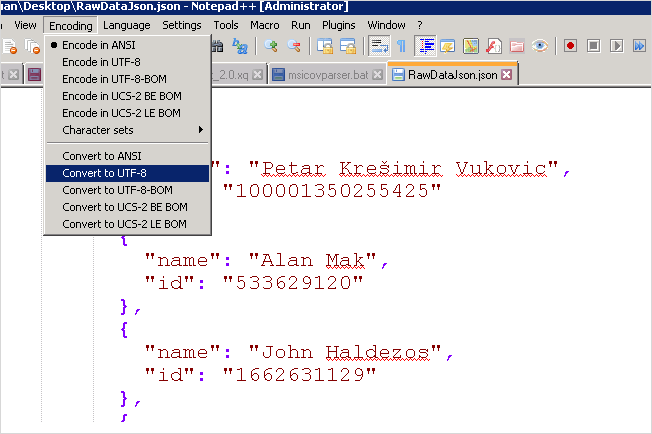
  • Encode your your files as UTF-8, UTF-8 BOM, or UTF-16.
ka02R000000g2sxQAA_0EM2R000000m5gY.jpeg
  • If you are importing from a URL, download the file locally, change the file encoding, save it, and then import it from disk.

Comment

0 comments

Details

Knowledge Article

Published:

September 23, 2019

Last Updated:

September 23, 2019