EducationSoftwareStrategy.com
StrategyCommunity

Knowledge Base

Product

Community

Knowledge Base

TopicsBrowse ArticlesDeveloper Zone

Product

Download SoftwareProduct DocumentationSecurity Hub

Education

Tutorial VideosSolution GalleryEducation courses

Community

GuidelinesGrandmastersEvents
x_social-icon_white.svglinkedin_social-icon_white.svg
Strategy logoCommunity

© Strategy Inc. All Rights Reserved.

LegalTerms of UsePrivacy Policy
  1. Home
  2. Topics

KB438767: "Get a link to MicroStrategy Library" is missing in MicroStrategy Web 10.9 after installing and configuring MicroStrategy Library


Amanda Gordon

Quality Engineer, Senior • MicroStrategy


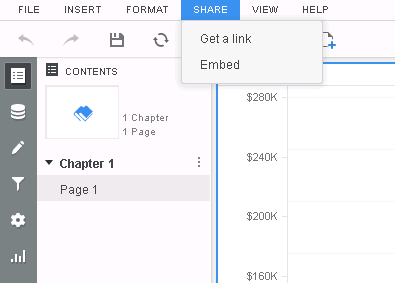
After installing and configuring MicroStrategy Library, users may notice that the option for "Get a link to MicroStrategy Library" is missing from MicroStrategy Web.  As a result, users are unable to add any content to their Library.

Starting with the release of Strategy ONE (March 2024), dossiers are also known as dashboards.
SYMPTOM:
After installing and configuring Strategy Library, users may notice that the option for "Get a link to Strategy Library" is missing from Strategy Web.  As a result, users are unable to add any content to their Library.
ka0PW0000001JTaYAM_0EM44000000Q2JY.png

CAUSE:
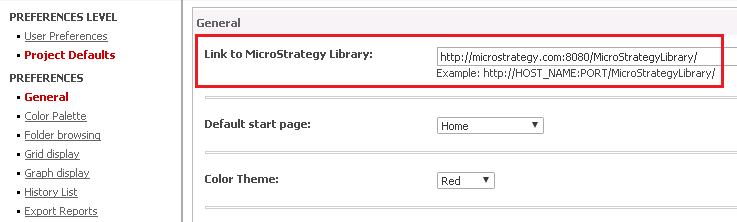
There is no URL configured in Web Preferences for Strategy Library.
ACTION:
Edit Web Preferences, and under Project Defaults specify the URL for Strategy Library.
ka0PW0000001JTaYAM_0EM44000000Q2KW.png

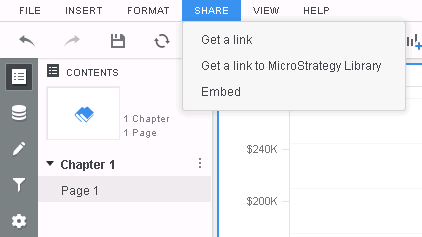
Now users should see the option for "Get a link to Strategy Library" when sharing a Dossier or Report Services Document.
ka0PW0000001JTaYAM_0EM44000000Q2Jd.png

  KB438767


Comment

0 comments

Details

Knowledge Article

Published:

October 16, 2017

Last Updated:

March 21, 2024