SYMPTOM
When checking the status of Strategy Collaboration Server by accessing http://<server-name>:3000/status, it returns the following error:
The following dependent services are unavailable: MongoDB

CAUSE:
The MongoDB service is not started or the connection to MongoDB is not available.
ACTION:
1. Check the following log files to get more details of the error:
2. Start the MongoDB service if it is not in the running status.
3. If MongoDB is already in the Running status and the problem remains:
1) Verify whether the user name and password info in “/Collaboration Server/MongoDB/mongo_init.js” match the ones in config.json. The json file can be found in the installation folder of Collaboration Server.
2) Check whether the database is accessible using the connection info defined in config.json. Users can also use this method to verify whether the user name and password contained in “dburl” is correct. Modify the connection if the issue is caused by the incorrect dburl provided.
dburl Sample:
"dburl": "mongodb://mstr:pwd@localhost:27017/mstr_collab?authSource=admin"
Command can be used to test the connection:
mongo --host mongodb://mstr:pwd@localhost:27017/mstr_collab?authSource=admin
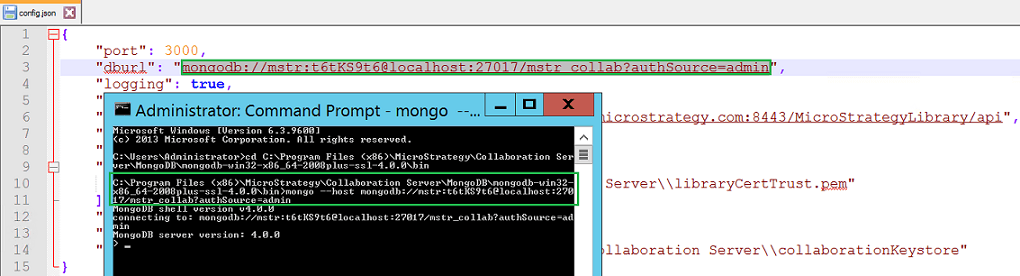
Please refer to the MongoDB manual if you would like to learn more about MongoDB.
4. Check whether the MongoDB port number (27017 by default) is blocked by proxy server, firewall or any other software.
