Starting with the release of Strategy ONE (March 2024), dossiers are also known as dashboards.
When the Strategy users population grows it is important to monitor parent-child relationships between Groups, Subgroups and Users. You need to control what access rights or privileges are inherited by users from their parent groups. When the user population is very large with thousands of users and hundreds of groups it might get tricky.
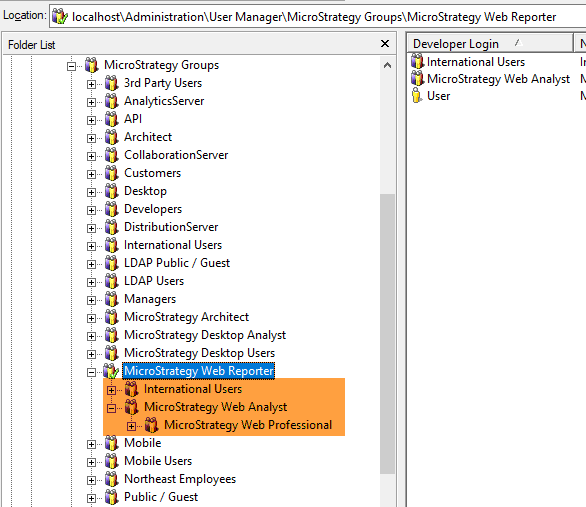
Every parent group might be a beginning of a large, nested hierarchy of subgroups sometimes more than 10 nodes deep. In the example below, if you would like to count and list all the users belonging to group "Strategy Web Reporter" you need to count all direct members of this group as well as all members of subgroups like "International Users" or "Strategy Web Professional" (orange).
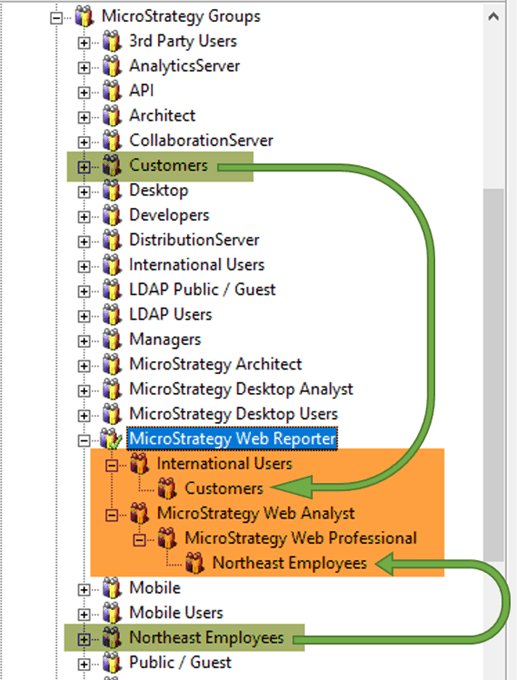
The situation might get even more complicated due to the fact that the relationship between groups can be "many-to-many". A User Group can be a parent to other groups from completely different "regions" of user hierarchy. For example group "Customers" can be a child of group "International Users" and group "Northeast Employees" can be a child of group "Strategy Web Professional". Consequently, groups "Customers" and "Northeast Employees" (green) are children of group "Strategy Web Reporter" (they inherit all the access rights and privileges from that parent group). It might get overlooked if you don’t expand the hierarchy deep enough.
In Strategy Developer or Workstation you can't display a complete list of users belonging (directly or indirectly) to "Strategy Web Reporter" user group. Luckily, you can use REST APIs to crawl even the biggest user hierarchies and create a detailed dataset about parent-child relationships between Groups, Subgroups and Users.
The Python script below was written for that purpose. It connects to Metadata, downloads all needed information and creates four CSV files with information needed to visualize user structure.
A simple dossier has been built to make it easier to analyze collected data. It uses four sample CSV files. You can run the Python script against your Metadata and then replace all four datasets with your data.
Note - I've added color formatting in the code below (http://hilite.me/). Code copied from here might not work due to indentation issues. In that case, use attached file with sample code. Also this CRM is adding ';' after URLs.
import requests
from datetime import datetime
import copy
import itertools
import pandas as pd
import csv

#### Parameters ####
api_login = 'administrator_mstrio'
api_password = 'XXX'
base_url = 'https : //MSTR-SERVER/MicroStrategyLibrary/api/'
env_id = 'GROUPS_' #CSV files will be saved with this prefix

#### FUNCTIONS MSTR ###
def login(base_url,api_login,api_password):
    print("Getting token...")
    data_get = {'username': api_login,
                'password': api_password,
                'loginMode': 1}
    r = requests.post(base_url + 'auth/login', data=data_get)
    if r.ok:
        authToken = r.headers['X-MSTR-AuthToken']
        cookies = dict(r.cookies)
        print("Token: " + authToken)
        return authToken, cookies
    else:
        print("HTTP %i - %s, Message %s" % (r.status_code, r.reason, r.text))

def logout(authToken, cookies):
    headers = set_headers(authToken)
    print("\nLogging out...")
    r = requests.post(base_url + "auth/logout", headers=headers, cookies=cookies)
    if r.ok:
        print("OK")
    else:
        print("HTTP %i - %s, Message %s" % (r.status_code, r.reason, r.text))

def set_headers(authToken):
    headers = {'X-MSTR-AuthToken': authToken, 'Content-Type': 'application/json'}
    return headers

def getGroupsAll(authToken, cookies):
    headers = set_headers(authToken)
    usersAll_url = (base_url  + "usergroups?limit=-1")
    print("\nGetting All User Groups info...")
    r = requests.get(usersAll_url, headers=headers, cookies=cookies)
    if r.ok:
        print("Error: " + str(r.raise_for_status()) + "   ||   HTTP Status Code: " + str(r.status_code))
        groupsAll = r.json()
        print("Number of MSTR groups: ", str(len(groupsAll)), " ")
        return groupsAll
    else:
        print("HTTP %i - %s, Message %s" % (r.status_code, r.reason, r.text))

def getGroupMembers(auth_token, group_id, cookies, print_fl):
    headers = set_headers(auth_token)
    usergroup_url = (base_url  + "usergroups/" + group_id + '/members?includeAccess=false')
    if print_fl:
        print("\nGetting MSTR User Group info...")
    r = requests.get(usergroup_url, headers=headers, cookies=cookies)
    if r.ok:
        usergroup_members = r.json()
        if print_fl:
            print("Error: " + str(r.raise_for_status()) + "   ||   HTTP Status Code: " + str(r.status_code))
            print("Number of users in the selected MSTR group: ", str(len(usergroup_members)), " ")
        return usergroup_members
    else:
        print("HTTP %i - %s, Message %s" % (r.status_code, r.reason, r.text))

#### FUNCTIONS for User Groups ###
def group_children(group_ID, group_list): #provide Group ID and get a list of children
    gc=[]
    for pair in group_list:
        if pair[0]==group_ID:
            gc.append(pair[1])
    return gc

def group_parent(group_ID, group_list): #provide Group ID and get a list of parents
    gp=[]
    for pair in group_list:
        if pair[1]==group_ID:
            gp.append(pair[0])
    return gp

### MAIN
authToken, cookies = login(base_url,api_login,api_password)

# Getting users for each User Group
dt1=datetime.now() # This can be a long process that can take minutes, so we will measure it.
print("\n", dt1)
groupsAll =getGroupsAll(authToken, cookies)
groupsDict={} # this will store ID of every UserGroup and all direct children objects
count_ug=0
for i in groupsAll:
    ug_members=[]
    usergroup_members = getGroupMembers(authToken, i["id"], cookies, False)
    for j in usergroup_members:
        ug_members.append([j['id'],j['name'],j['subtype']])
    groupsDict[i["id"]]=ug_members
    count_ug+=1 # this counter will give you hints how long the whole process will take
    if (count_ug % 100) == 0:
        eta = (len(groupsAll)/count_ug)*(datetime.now()-dt1)
        print(count_ug, "user groups processed / ETA: ", eta)
print("##  Execution time:", datetime.now()-dt1, "\n")


# Creating a few lists for Groups and users. It will make it easier to perform counts.
GG, GU, GUG = [],[],[] #Group-Group, Group_User, Group_(User+Group)
for x in groupsDict:
    for y in groupsDict[x]:
        GUG.append([x, y[0], y[2]]) #both children Users and Groups
        if y[2] == 8704:
            GU.append([x, y[0]]) #only children Users
        if y[2] == 8705:
            GG.append([x, y[0]]) #only children subgroups

#remove groups that are empty dead ends
GG_copy = copy.deepcopy(GG) # working on copies to preserve original lists
GG_dupl = copy.deepcopy(GG_copy)

print("GG pairs= ", len(GG_dupl))
for pair in GG_copy:
    if not group_children(pair[1], GUG): # no children users or groups
        GG_dupl.remove(pair)
print("GG pairs= ", len(GG_dupl))
GG_copy = copy.deepcopy(GG_dupl)


# Assign users from Level X, to one level up: Level X+1
# It will analyze all users of the GG structure bottom up
# It will remove processed group. It will loop until the list is empty
GU_copy = copy.deepcopy(GU)
print("GG pairs= ", len(GG_copy), "  ||  GU pairs =", len(GU_copy))

while len(GG_copy) > 0:
    GG_dupl = copy.deepcopy(GG_copy)
    GU_dupl = copy.deepcopy(GU_copy)

    for pair in GG_copy: # for combination Group-Subgroup
        if not group_children(pair[1], GG_copy): #take Subgroup, take only those without any further subgroups
            new_users=group_children(pair[1], GU_copy) #for that Subgroup check all Users
            for nu in new_users: #for each user add it to the Group from initial FOR loop (materialize indirect relation in GU table)
                if nu not in GU_dupl:
                    GU_dupl.append([pair[0],nu])
            GG_dupl.remove(pair) # after assignment remove GG pair from further calculations

    GG_copy = copy.deepcopy(GG_dupl)
    GU_copy = copy.deepcopy(GU_dupl)
    print("GG pairs= ", len(GG_copy), "  ||  GU pairs =", len(GU_copy))
    #print("GU pairs =", len(GU_copy))


# Remove duplicates Group-User
GU_copy.sort()
GU_copy=list(GU_copy for GU_copy,_ in itertools.groupby(GU_copy))
print("Removing duplicates...")
print("GG pairs= ", len(GG_copy), "  ||  GU pairs =", len(GU_copy))

# Export to CSV
df = pd.DataFrame(GU_copy)
df.to_csv(env_id+'GU_final.csv', index = None,quoting=csv.QUOTE_ALL, header=["Group_ID", "User_ID"])

df = pd.DataFrame(GG)
df.to_csv(env_id+'GG_initial.csv', index = None,quoting=csv.QUOTE_ALL, header=["Parent Group", "Child_Group"])

df = pd.DataFrame(groupsAll)
df.replace(to_replace=[r"\\t|\\n|\\r", "\t|\n|\r"], value=["",""], regex=True, inplace=True)
df.to_csv(env_id+'LU_Groups.csv', index = None,quoting=csv.QUOTE_ALL)

# Get information about ALL users from Everyone user group + ENABLED flag
everyon=getGroupMembers(authToken, 'C82C6B1011D2894CC0009D9F29718E4F', cookies, False)
df = pd.DataFrame(everyon)
df.replace(to_replace=[r"\\t|\\n|\\r", "\t|\n|\r"], value=["",""], regex=True, inplace=True)
df.to_csv (env_id+'LU_Users.csv', index = None,quoting=csv.QUOTE_ALL)

# Log out and finish
logout(authToken, cookies)
