EducationSoftwareStrategy.com
StrategyCommunity

Knowledge Base

Product

Community

Knowledge Base

TopicsBrowse ArticlesDeveloper Zone

Product

Download SoftwareProduct DocumentationSecurity Hub

Education

Tutorial VideosSolution GalleryEducation courses

Community

GuidelinesGrandmastersEvents
x_social-icon_white.svglinkedin_social-icon_white.svg
Strategy logoCommunity

© Strategy Inc. All Rights Reserved.

LegalTerms of UsePrivacy Policy
  1. Home
  2. Topics

KB439288: Google Sankey Diagram does not display after Deploying from Visualization Gallery into MicroStrategy version 10.4 Visual Insight Dashboard


Maria Lourdes Rodriguez Pedrido

Manager, Technical Support • Strategy


This article explains why the Google Sankey Diagram does not display when it is deployed from Visualization Gallery into Microstrategy 10.4 Visual Insight.

SYMPTOM:
When a Google Sankey Diagram is deployed from Visualization Gallery into Strategy 10.4 Visual Insight the icon is not visible.
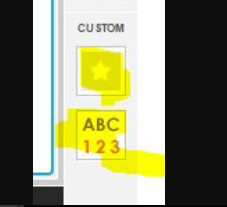
ka044000000kREmAAM_0EM44000000QCYx.png

CAUSE:
The google sankey diagram plugin included is missing a ";" (semicolon) in the file Html5ViPage.css which prevents the icon from showing. 
ACTION:
Please edit the Html5ViPage.cssis file and add semicolon is missing, this is its location:
…
Background-image: url(“../style/image/icon.png”);
…
Once the change has been made, you should be able to see the icon.
  KB439288


Comment

0 comments

Details

Knowledge Article

Published:

December 21, 2017

Last Updated:

December 28, 2018