EducationSoftwareStrategy.com
StrategyCommunity

Knowledge Base

Product

Community

Knowledge Base

TopicsBrowse ArticlesDeveloper Zone

Product

Download SoftwareProduct DocumentationSecurity Hub

Education

Tutorial VideosSolution GalleryEducation courses

Community

GuidelinesGrandmastersEvents
x_social-icon_white.svglinkedin_social-icon_white.svg
Strategy logoCommunity

© Strategy Inc. All Rights Reserved.

LegalTerms of UsePrivacy Policy
  1. Home
  2. Topics

KB485367: “[HY000:131: on SQLHANDLE] [MicroStrategy][BigQuery] (131) Unable to authenticate with Google BigQuery Storage API. Check your account permissions" error appears when executing report after update from MicroStrategy 2020 Update 6


Agnieszka Karolak

Senior Product Specialist • Strategy


Symptom


When running report using Google Big Query after update to  M2020 U6 error appears:
[HY000:131: on SQLHANDLE] [Strategy][BigQuery] (131) Unable to authenticate with Google BigQuery Storage API. Check your account permissions

ka04W000001IwSTQA0_0EM4W000004Y5dc.png

Action


In  Advanced Options in Google Big Query DSN enable "Enable High-Throughput API" option and increase value for "Minimum Query Results Size for HTAPI":
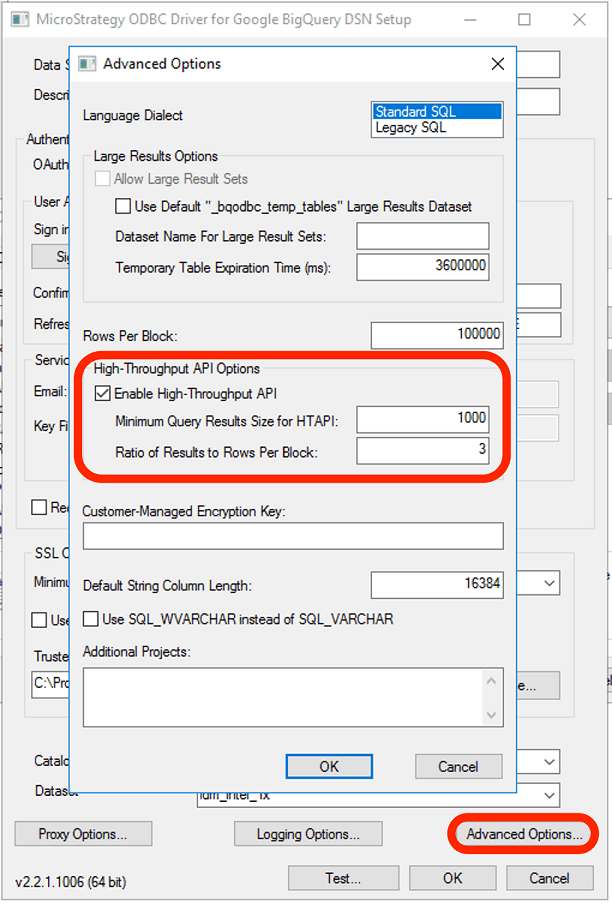
ka04W000001IwSTQA0_0EM4W000004Y5dd.png


Comment

0 comments

Details

Knowledge Article

Published:

February 15, 2022

Last Updated:

August 26, 2022