EducationSoftwareStrategy.com
StrategyCommunity

Knowledge Base

Product

Community

Knowledge Base

TopicsBrowse ArticlesDeveloper Zone

Product

Download SoftwareProduct DocumentationSecurity Hub

Education

Tutorial VideosSolution GalleryEducation courses

Community

GuidelinesGrandmastersEvents
x_social-icon_white.svglinkedin_social-icon_white.svg
Strategy logoCommunity

© Strategy Inc. All Rights Reserved.

LegalTerms of UsePrivacy Policy
  1. Home
  2. Topics

KB484771: Handling user sessions in HyperWeb


Raul de Leon

Product Owner, Principal • MicroStrategy


This article explains how user sessions are created and maintained in HyperIntelligence for Web.

Description


HyperIntelligence for Web, or HyperWeb, creates user sessions with the Intelligence server via the Library server.

Seamless login


When using a Single Sign-on (SSO) authentication mode, like SAML or OIDC, HyperWeb is able to automatically re-create user sessions, assuming that the session with the 3rd party provider is still valid. When it isn’t, a new browser tab should be opened to allow the user to easily log in. Sometimes, HyperWeb may not be able to seamlessly re-connect the user if the relevant timeouts are not properly configured.

Timeouts


Multiple timeouts define how long a user session is valid.
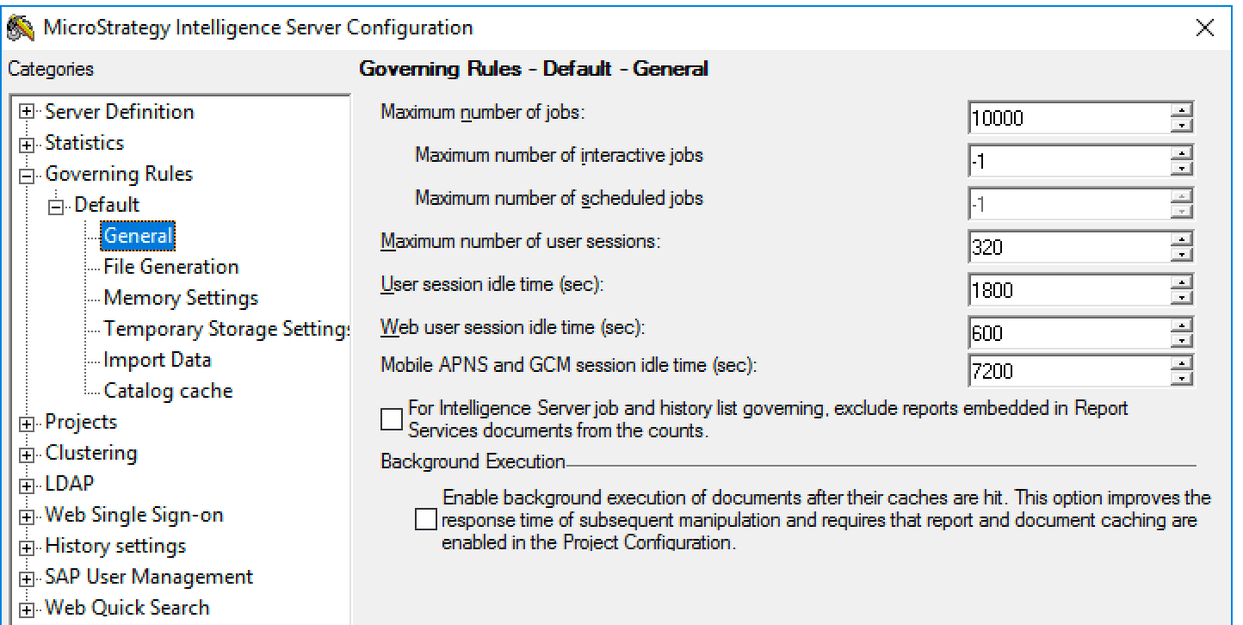
  • The most important one is the Web User Idle Time setting, which is set in Strategy Developer. This value determines how long a session is kept by the Intelligence server after it is last used. Its default value is 10 minutes (600 seconds).
ka04W000000XP38QAG_0EM4W000001K7Wf.jpeg
  • Another relevant timeout is the HTTP session timeout. This is configured in the application server (e.g., Tomcat) directly on the deployed WAR file and its default value is 30 minutes. This value should always be larger than #1.
    This timeout can be configured in
    TOMCAT/webapps/StrategyLibrary/WEB-INF/web.xml
    by modifying the following:
    
    <session-config>
        <session-timeout>30</session-timeout>
    </session-config>
    

    Note: This value controls the duration of the JSESSIONID cookie.
  • When using a load balancer, another timeout that needs to be in-sync with the ones above is the duration of the session stickiness. For security reasons, the reference to the Intelligence server session is stored in the memory of the Library server. Therefore, it is essential to configure sticky sessions in the load balancer to ensure that all client requests are routed to the same web server node for the time that the session exists. Stickiness should be configured to a time that is larger than #2 above. If using an AWS load balancer, you can refer to this documentation for configuring the load balancer.

Comment

0 comments

Details

Knowledge Article

Published:

December 16, 2020

Last Updated:

December 16, 2020