A user sets the width of the column to 0 to hide it in a grid report in Strategy Web 10.x. After exporting the report to Excel, he expects that hidden the column will not be exported. However, it is not the case, the column can be seen in Excel.
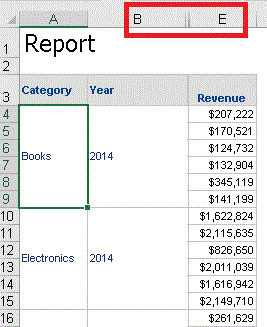

2. Set the width of any column to 0 to hide it on the grid. In this example, “Subscription” column was hidden:
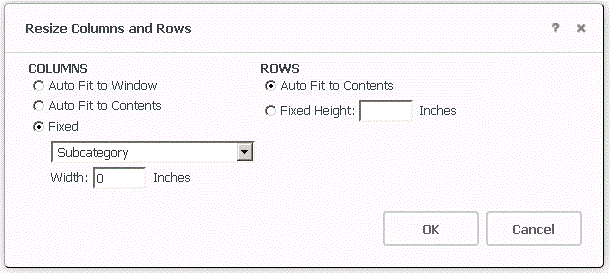
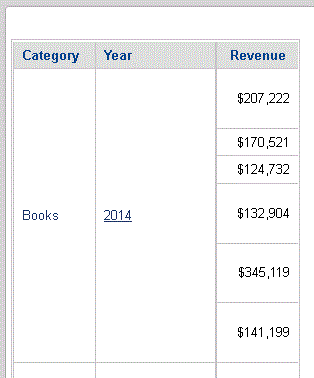
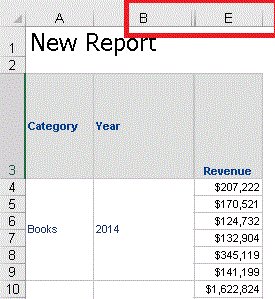
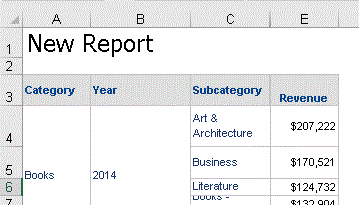
NOTE: The above testing was performed for "Excel 2007 and newer" export option in Web Preferences. Testing "Excel XP" Web Preference, the hidden columns are not exported to Excel, it is not expected; however, it can be used by users as a workaround.
The behavior is by design with Strategy Web 10.x because the hidden columns are still part of the grid, The columns are physically there even though it is not displayed or seen due to the width set to 0. When the report gets exported, it is expected that ALL columns will be in the Excel including the hidden ones.
Remove the attributes that should not be exported to Excel from the grid report if the users are not allowed to discover and see them in Excel.
