EducationSoftwareStrategy.com
StrategyCommunity

Knowledge Base

Product

Community

Knowledge Base

TopicsBrowse ArticlesDeveloper Zone

Product

Download SoftwareProduct DocumentationSecurity Hub

Education

Tutorial VideosSolution GalleryEducation courses

Community

GuidelinesGrandmastersEvents
x_social-icon_white.svglinkedin_social-icon_white.svg
Strategy logoCommunity

© Strategy Inc. All Rights Reserved.

LegalTerms of UsePrivacy Policy
  1. Home
  2. Topics

How to Add Form Categories when Creating a Multi-Form Attribute During Data Import


Marenssi Marenssi

Senior Cloud Support Migrations Engineer I • MicroStrategy


This KB Article describes the steps necessary to add additional Form Categories so that they are available when creating a multi-form attribute during data import.

  • In Developer, edit any attributes that have two or more forms.
  • From the Attribute Editor, select the non-ID form and click Modify.
ka02R000000keK1QAI_0EM2R000000hJNJ.jpeg
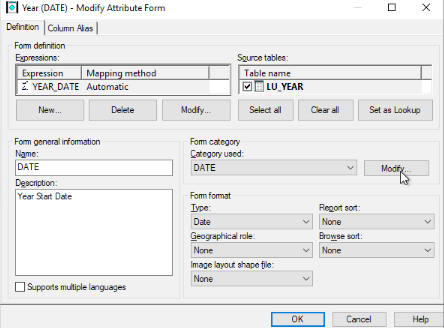
  • From the Form Category section, click Modify.
ka02R000000keK1QAI_0EM2R000000hJNT.jpeg
  • Enter a Form Category Name and click Add > OK.
ka02R000000keK1QAI_0EM2R000000hJNY.jpeg
  • Return to the Attribute editor and Save your changes.


Once you have applied your changes to the Form Categories, update your schema to make them available on Strategy Web.

ka02R000000keK1QAI_0EM2R000000hJO7.jpeg

Comment

0 comments

Details

Knowledge Article

Published:

June 14, 2019

Last Updated:

June 14, 2019