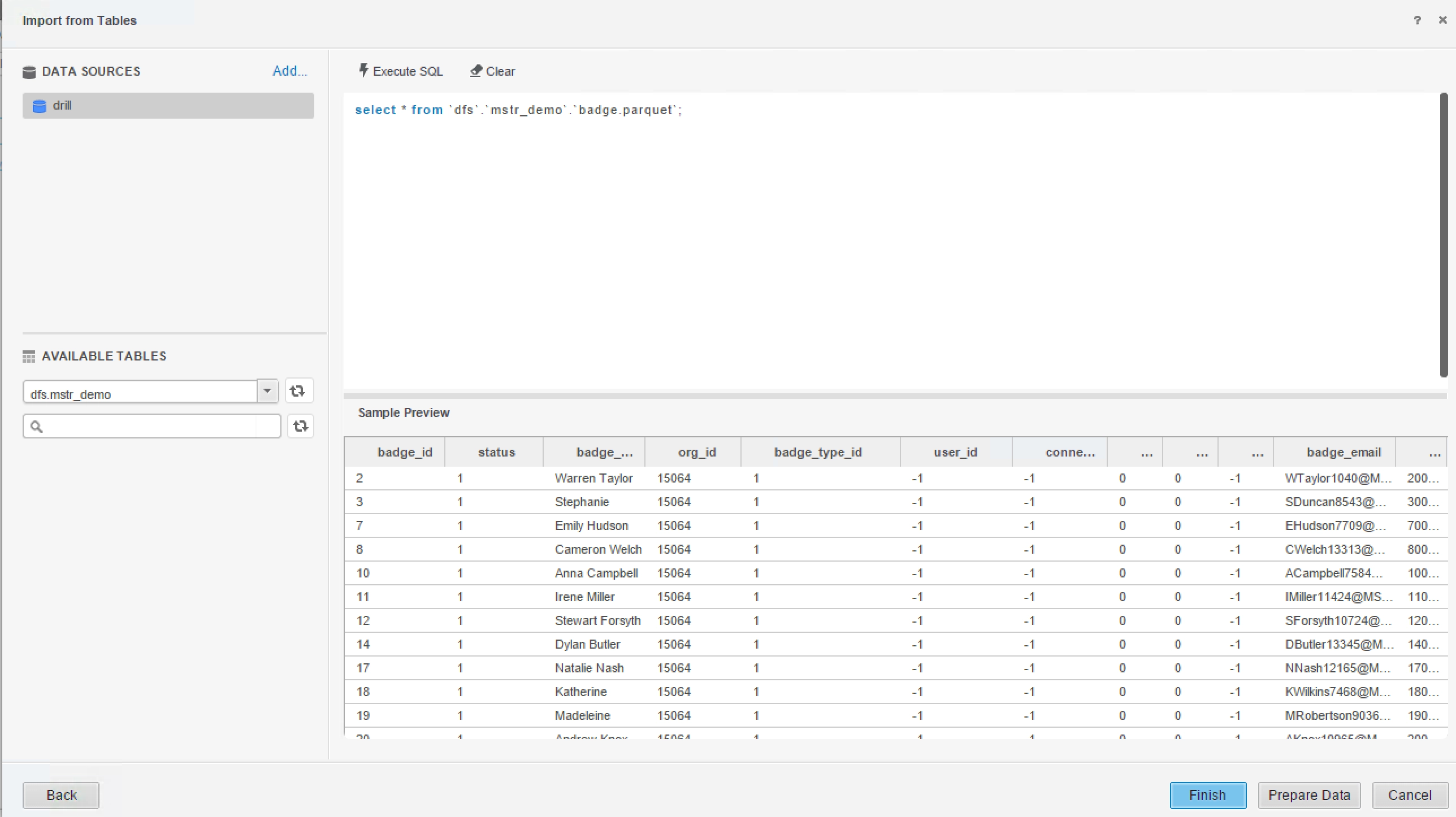
An advantage of drill is to directly query on self-describing and semi-structured data in fly without needing to define and maintain schemas in centralized store. For example: select * from dfs.`/users/drill/testdata`, where testdata can be a file (json, parquet, or text) or a directory name.Strategy accesses drill through ODBC or JDBC. Strategy users can access the data through “Type a Query”, even the data is not visible to ODBC/JDBC.
In following screen shot, the “badge.parquet” file is not visible in “available Tables” panel but it’s accessible by SQL:
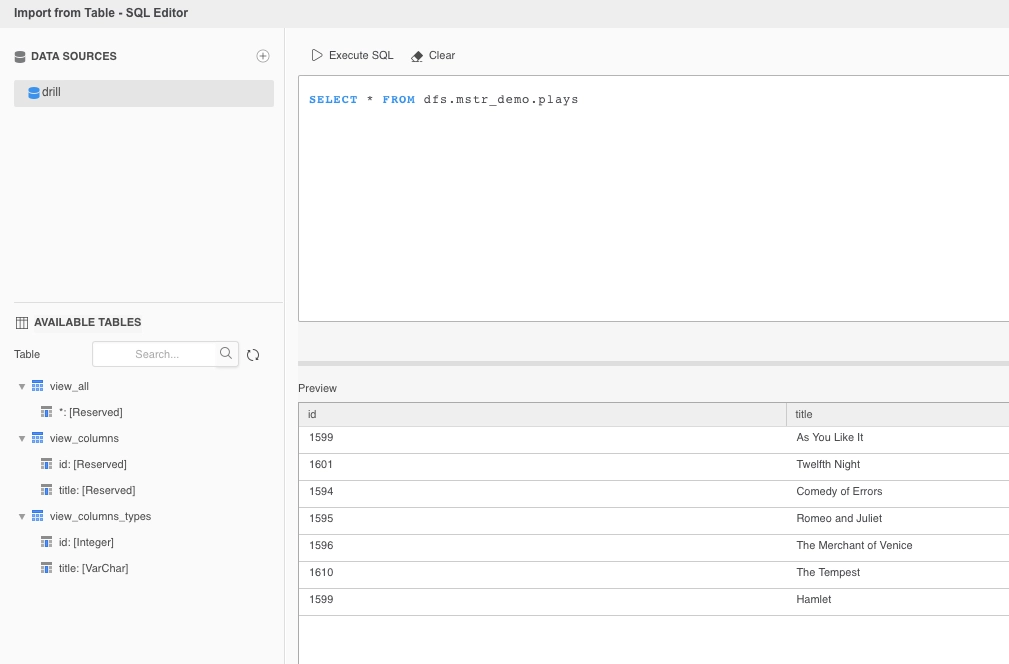
Strategy users can also create views on the data. The view definition is stored in Drill INFORMATION_SCHEMA therefore visible to ODBC/JDBC clients.
Demo data:
select * from plays;
+-------+-------------------------+
|
id
|
title
|
+-------+-------------------------+
|
1599
|
As You Like It
|
|
1601
|
Twelfth Night
|
|
1594
|
Comedy of Errors
|
|
1595
|
Romeo and Juliet
|
|
1596
|
The Merchant of Venice
|
|
1610
|
The Tempest
|
|
1599
|
Hamlet
|
+-------+-------------------------+
create view view_all as select * from plays;
+-------+-----------------------------------------------------------------+
|
ok
|
summary
|
+-------+-----------------------------------------------------------------+
|
true
|
View 'view_all' created successfully in 'dfs.mstr_demo' schema
|
+-------+-----------------------------------------------------------------+
describe view_all;
+--------------+------------+--------------+
|
COLUMN_NAME
|
DATA_TYPE
|
IS_NULLABLE
|
+--------------+------------+--------------+
|
*
|
ANY
|
YES
|
+--------------+------------+--------------+
create view view_columns as select id,title from plays;
+-------+---------------------------------------------------------------------+
|
ok
|
summary
|
+-------+---------------------------------------------------------------------+
|
true
|
View 'view_columns' created successfully in 'dfs.mstr_demo' schema
|
+-------+---------------------------------------------------------------------+
describe view_columns
+--------------+------------+--------------+
|
COLUMN_NAME
|
DATA_TYPE
|
IS_NULLABLE
|
+--------------+------------+--------------+
|
id
|
ANY
|
YES
|
|
title
|
ANY
|
YES
|
+--------------+------------+--------------+
create view view_columns_types as select cast(id as int) id,cast (title as varchar) title from plays;
+-------+---------------------------------------------------------------------------+
|
ok
|
summary
|
+-------+---------------------------------------------------------------------------+
|
true
|
View 'view_columns_types' created successfully in 'dfs.mstr_demo' schema
|
+-------+---------------------------------------------------------------------------+
describe view_columns_types;
+--------------+--------------------+--------------+
|
COLUMN_NAME
|
DATA_TYPE
|
IS_NULLABLE
|
+--------------+--------------------+--------------+
|
id
|
INTEGER
|
YES
|
|
title
|
CHARACTER VARYING
|
YES
|
+--------------+--------------------+--------------+
Known issues:
Currently the ‘Select Tables’ workflow in Strategy data import does not work with Drill.
Strategy 10.8 on Linux can't connect to MapR Drill through DBQuery Tool. Connection times out after some time.
Error message in DSSError log file:
[SERVER:][PID:16449][THR:140677792426176][MultiProcess][Error] Quiting child process because of error: Cannot execute command because there was a hang
[SERVER:][PID:15392][THR:140108778616576][Database Classes][Error] Connect failed. Unable to connect.
Error type: System call error. Error communicating with connection process. Child Process hung: Command ConnectionConnectWithNewParameters. The target data source hasn't responded to the Connect request after 300 seconds. It may be stressed.
This defect is because of a 3rd party library boost REST wrapper which is newly added to Strategy in 10.8. Many of Strategy's server components including MSINet and StrategyCtl depend on this boost. The nature of this crash is from Strategy Drill ODBC driver's internal code that isn't compatible with the latest boost library for REST I-Server in 10.8.
A workaround for this issue is to replace the shipped Drill ODBC driver version 1.2.1.1001 with version 1.3.8.1030 that is shipped in Strategy10.9. Replacing the old driver libraries with the new version fixes this issue. To get the driver patch, please contact Strategy Technical support.
