EducationSoftwareStrategy.com
StrategyCommunity

Knowledge Base

Product

Community

Knowledge Base

TopicsBrowse ArticlesDeveloper Zone

Product

Download SoftwareProduct DocumentationSecurity Hub

Education

Tutorial VideosSolution GalleryEducation courses

Community

GuidelinesGrandmastersEvents
x_social-icon_white.svglinkedin_social-icon_white.svg
Strategy logoCommunity

© Strategy Inc. All Rights Reserved.

LegalTerms of UsePrivacy Policy
  1. Home
  2. Topics

How to Connect to SparkSQL


Norman Matos

Associate Scrum Master • Strategy


This tutorial demonstrates how to connect to SparkSQL through MicroStrategy.

The tutorial covers the following scenarios for connecting to SparkSQL:
1. Connectivity to SparkSQL 2.x via Strategy 10.9
2. DSN-less Connectivity to Spark Thrift server with Strategy Secure Enterprise 10.7 in Linux
3. DSN Connectivity to Spark Thrift Server with Strategy Secure Enterprise 10.7 in Linux
4. Kerberized DSN Connectivity to Spark SQL Thrift Server with Strategy Secure Enterprise in Windows
 

Connectivity to SparkSQL 2.x via Strategy 10.9

The release of Strategy 10.9 provides connectivity to SparkSQL 2.x!
The following demonstrates a DSN connection to SparkSQL 2.x in Strategy Developer in Windows:
To see a demo of a DSN connection through Linux, click here. 
Connectivity was also demonstrated through a DSN-less connection through Strategy Desktop on Windows and on Mac, respectively:
You can also establish a a DSN-less connection through Strategy Web. To see a demo, click here. 
 

DSN-less Connectivity to Spark Thrift serverwith Strategy Secure Enterprise 10.7 in Linux


When connecting to Spark SQL Thrift Server we will need the following information:

  • Spark Thrift Server host: Host where the Spark Thrift Server is running on.
  • Spark Thrift Server port: port used by spark thrift server, default is 10015.
  • Database: Database in Hive metastore we want to access.

If Spark SQL thrift server is kerberized, we will also need the Service Principal Name of the spark thrift server. This will be something like: hive/ip-10-0-0-187.ec2.internal@POCAR.MICROSTRATEGY.COM.
Steps:

  • If Spark Thrift Server is kerberized: 
    1. In Strategy Intelligence Server Linux box, configure Kerberos as explained in tech note: KB19110
    2. In the Strategy Intelligence Server initialize the credentials cache and obtain a service ticket by running the command: "kinit MSTRSVRSvc/ip-10-0-0-25.ec2.internal:34952@POCAR.Strategy.COM". This is also explained in tech note: KB19110, in section 1.3 that reads The user should now run the 'kinit <PrincipalName>' command to obtain a kerberos ticket granting ticket for the principal.
  • Open the "Add external data" menu, mouse over the "Hadoop" option and select the "Spark SQL" option.
  • Click the "Add data source option".
  • In the Data Source form, edit values accordingly:
  • If kerberos is enabled in Spark, click on the "Edit connection string" checkbox to add configuration for Kerberos.
    • Append the kerberos authentication method: "AM=4;"
    • Append the spark thrift server Service Principal name: "SPN=<service principal name>;"
  • Click OK.
  • Select the Spark SQL DB Connection and preview the tables.
  • Select one table and publish cube.

 
Troubleshoot:
If we see error "Unable to dynamically load the client DLL libgssapi_krb5.so" it is likely the GSSClient library is not found. To solve this problem:

  1. Find location of libgssapi_krb5.so, in linux use:
    1. find / -iname "libgssapi_krb5*"
  2. Open the Spark SQL DB connection and add the following to the connection string:
    1. Append the GSSClient library: "GSSClient=<path to library>;"
  3. Sample Connection string:
    1. DRIVER={Strategy ODBC Driver for Apache Spark SQL};HOST=10.0.0.187;PORT=10015;DATABASE=default;MaxStringSize=4000;EnableDescribeParam=1;AM=4;SPN=hive/ip-10-0-0-187.ec2.internal@POCAR.Strategy.COM;GSSClient=/usr/lib64/libgssapi_krb5.so.2;


DSN Connectivity to Spark Thrift Serverwith Strategy Secure Enterprise 10.7 in Linux


When connecting to Spark SQL Thrift Server we will need the following information:
- Spark Thrift Server host: Host where the Spark Thrift Server is running on.
- Spark Thrift Server port: port used by spark thrift server, default is 10015.
- Database: Database in Hive metastore we want to access.
If Spark SQL thrift server is kerberized, we will also need the Service Principal Name of the spark thrift server. This will be something like: hive/ip-10-0-0-187.ec2.internal@POCAR.MICROSTRATEGY.COM.
Steps:

  • If Spark Thrift Server is kerberized: 
    1. In Strategy Intelligence Server Linux host, configure Kerberos as explained in tech note: KB19110
    2. In Strategy Intelligence Server initialize the credentials cache and obtain a service ticket by running the command: "kinit MSTRSVRSvc/ip-10-0-0-25.ec2.internal:34952@POCAR.Strategy.COM". This is also explained in tech note: KB19110, in section 1.3 that reads The user should now run the 'kinit <PrincipalName>' command to obtain a kerberos ticket granting ticket for the principal.
  • In the Strategy Intelligence Server host, go to the Strategy home directory and edit odbc.ini. Add below DSN definition to the odbc.ini:

    Custom group that displays Top 10 Customers and Bottom 5 Items
    EM_ITEM_IDEM_ITEM_NAMEEM_ITEM_TABLE1USEREM_USER2PROJECTIS_PROJ3ATTRIBUTE FORMIS_ATT_FORM4TABLEIS_TABLE5TRANSFORMATIONIS_TRANS6HIERARCHYIS_HIER7COLUMNIS_COL8REPORTIS_REP9DOCUMENTIS_DOC10FILTERIS_FILT11TEMPLATEIS_TEMP12METRICIS_MET13CUSTOM GROUPIS_CUST_GP14CONSOLIDATIONIS_CONS15PROMPTIS_PROMPT16SERVER DEFINITIONIS_SERVER17EVENTIS_EVENT18SCHEDULEIS_SCHED19FACTIS_FACT20ATTRIBUTEIS_ATT21USER GROUPEM_USR_GP22DB INSTANCEIS_DB_INST23DB TABLEIS_DB_TAB24SECURITY FILTERIS_SEC_FILT25TRANSMITTERIS_TRANSMIT26DEVICEIS_DEVICE27DB INSTANCE1IS_DB_INST1101USER_ETLEM_USER102PROJECT_ETLIS_PROJ103ATTRIBUTE FORM_ETLIS_ATT_FORM104TABLE_ETLIS_TABLE105TRANSFORMATION_ETLIS_TRANS106HIERARCHY_ETLIS_HIER107COLUMN_ETLIS_COL108REPORT_ETLIS_REP109DOCUMENT_ETLIS_DOC110FILTER_ETLIS_FILT111TEMPLATE_ETLIS_TEMP112METRIC_ETLIS_MET113CUSTOM GROUP_ETLIS_CUST_GP114CONSOLIDATION_ETLIS_CONS115PROMPT_ETLIS_PROMPT116SERVER DEFINITION_ETLIS_SERVER117EVENT_ETLIS_EVENT118SCHEDULE_ETLIS_SCHED119FACT_ETLIS_FACT120ATTRIBUTE_ETLIS_ATT121USER GROUP_ETLEM_USR_GP122DB INSTANCE_ETLIS_DB_INST123DB TABLE_ETLIS_DB_TAB124SECURITY FILTER_ETLIS_SEC_FILT125TRANSMITTER_ETLIS_TRANSMIT126DEVICE_ETLIS_DEVICE127DB INSTANCE1_ETLIS_DB_INST1CharacterDescription#AThe name of the attribute under which the subtotal appears.#PThe name of the attribute to the left of, or above the attribute under which the subtotal appears.#0All the forms of the parent element.#1The first form of the parent element reading from left to right or from top to bottom.#2The second form of the parent element reading from left to right or from top to bottom.#3The third form of the parent element reading from left to right or from top to bottom.#4The fourth form of the parent element reading from left to right or from top to bottom.

    
    [MySparkDSN]
    Driver=/var/opt/MicroStrategy/install/lib/MYsparkXX.so
    Description=MicroStrategy ODBC Driver for Apache Spark SQL
    ApplicationUsingThreads=1
    ArraySize=16384
    AuthenticationMethod=0
    CryptoProtocolVersion=
    CryptoLibName=
    Database=default
    DefaultLongDataBuffLen=1024
    EnableDescribeParam=1
    EncryptionMethod=
    GSSClient=/lib64/libgssapi_krb5.so.2.2
    HostName=
    HostNameInCertificate=
    IANAAppCodePage=
    KeepAlive=0
    KeyPassword=
    Keystore=
    KeystorePassword=
    LoginTimeout=15
    LogonID=
    MaxStringSize=4000
    MinLongVarcharSize=
    PortNumber=10000
    PRNGSeedFile=
    PRNGSeedSource=
    ProxyUser=
    RemoveColumnQualifiers=0
    ServicePrincipalName=
    SSLLibName=


    MySparkDSN=MicroStrategy ODBC Driver for Apache Spark SQL


    <PROPERTYSET NAME="System SQL Templates">
          <PROPERTY NAME="CatalogTableSQL" VALUE="SHOW TABLES" />
          <PROPERTY NAME="CatalogColumnSQL" VALUE="DESCRIBE #TABLE_LIST#" />
          <PROPERTY NAME="TempTableDropSQL" VALUE="DROP TABLE #T#"/>
          <PROPERTY NAME="CatalogCacheMode" VALUE="3" />
          <PROPERTY NAME="CatalogRetrievalMode" VALUE="0" />
          <PROPERTY NAME="SupportsKerberos" VALUE="1"/>
        </PROPERTYSET>


    <PROPERTYSET NAME="System SQL Templates">
        <PROPERTY NAME="CatalogCacheMode" VALUE="3" />
        <PROPERTY NAME="CatalogRetrievalMode" VALUE="2" />
      </PROPERTYSET>


  • Rename the DSN from "MySparkDSN" to desired name.
  • Also, at the top of the odbc.ini file, add the following header

    Custom group that displays Top 10 Customers and Bottom 5 Items
    EM_ITEM_IDEM_ITEM_NAMEEM_ITEM_TABLE1USEREM_USER2PROJECTIS_PROJ3ATTRIBUTE FORMIS_ATT_FORM4TABLEIS_TABLE5TRANSFORMATIONIS_TRANS6HIERARCHYIS_HIER7COLUMNIS_COL8REPORTIS_REP9DOCUMENTIS_DOC10FILTERIS_FILT11TEMPLATEIS_TEMP12METRICIS_MET13CUSTOM GROUPIS_CUST_GP14CONSOLIDATIONIS_CONS15PROMPTIS_PROMPT16SERVER DEFINITIONIS_SERVER17EVENTIS_EVENT18SCHEDULEIS_SCHED19FACTIS_FACT20ATTRIBUTEIS_ATT21USER GROUPEM_USR_GP22DB INSTANCEIS_DB_INST23DB TABLEIS_DB_TAB24SECURITY FILTERIS_SEC_FILT25TRANSMITTERIS_TRANSMIT26DEVICEIS_DEVICE27DB INSTANCE1IS_DB_INST1101USER_ETLEM_USER102PROJECT_ETLIS_PROJ103ATTRIBUTE FORM_ETLIS_ATT_FORM104TABLE_ETLIS_TABLE105TRANSFORMATION_ETLIS_TRANS106HIERARCHY_ETLIS_HIER107COLUMN_ETLIS_COL108REPORT_ETLIS_REP109DOCUMENT_ETLIS_DOC110FILTER_ETLIS_FILT111TEMPLATE_ETLIS_TEMP112METRIC_ETLIS_MET113CUSTOM GROUP_ETLIS_CUST_GP114CONSOLIDATION_ETLIS_CONS115PROMPT_ETLIS_PROMPT116SERVER DEFINITION_ETLIS_SERVER117EVENT_ETLIS_EVENT118SCHEDULE_ETLIS_SCHED119FACT_ETLIS_FACT120ATTRIBUTE_ETLIS_ATT121USER GROUP_ETLEM_USR_GP122DB INSTANCE_ETLIS_DB_INST123DB TABLE_ETLIS_DB_TAB124SECURITY FILTER_ETLIS_SEC_FILT125TRANSMITTER_ETLIS_TRANSMIT126DEVICE_ETLIS_DEVICE127DB INSTANCE1_ETLIS_DB_INST1CharacterDescription#AThe name of the attribute under which the subtotal appears.#PThe name of the attribute to the left of, or above the attribute under which the subtotal appears.#0All the forms of the parent element.#1The first form of the parent element reading from left to right or from top to bottom.#2The second form of the parent element reading from left to right or from top to bottom.#3The third form of the parent element reading from left to right or from top to bottom.#4The fourth form of the parent element reading from left to right or from top to bottom.

    
    [MySparkDSN]
    Driver=/var/opt/MicroStrategy/install/lib/MYsparkXX.so
    Description=MicroStrategy ODBC Driver for Apache Spark SQL
    ApplicationUsingThreads=1
    ArraySize=16384
    AuthenticationMethod=0
    CryptoProtocolVersion=
    CryptoLibName=
    Database=default
    DefaultLongDataBuffLen=1024
    EnableDescribeParam=1
    EncryptionMethod=
    GSSClient=/lib64/libgssapi_krb5.so.2.2
    HostName=
    HostNameInCertificate=
    IANAAppCodePage=
    KeepAlive=0
    KeyPassword=
    Keystore=
    KeystorePassword=
    LoginTimeout=15
    LogonID=
    MaxStringSize=4000
    MinLongVarcharSize=
    PortNumber=10000
    PRNGSeedFile=
    PRNGSeedSource=
    ProxyUser=
    RemoveColumnQualifiers=0
    ServicePrincipalName=
    SSLLibName=


    MySparkDSN=MicroStrategy ODBC Driver for Apache Spark SQL


    <PROPERTYSET NAME="System SQL Templates">
          <PROPERTY NAME="CatalogTableSQL" VALUE="SHOW TABLES" />
          <PROPERTY NAME="CatalogColumnSQL" VALUE="DESCRIBE #TABLE_LIST#" />
          <PROPERTY NAME="TempTableDropSQL" VALUE="DROP TABLE #T#"/>
          <PROPERTY NAME="CatalogCacheMode" VALUE="3" />
          <PROPERTY NAME="CatalogRetrievalMode" VALUE="0" />
          <PROPERTY NAME="SupportsKerberos" VALUE="1"/>
        </PROPERTYSET>


    <PROPERTYSET NAME="System SQL Templates">
        <PROPERTY NAME="CatalogCacheMode" VALUE="3" />
        <PROPERTY NAME="CatalogRetrievalMode" VALUE="2" />
      </PROPERTYSET>


  • Find Driver path
    • In the Intelligence server host, search for the file "MYsparkXX.so":
    • find $(pwd) -iname "MYsparkXX.so"
    • Copy the result and paste in the "Driver" key of the DSN.
  • Add Spark Thrift Server Host, Spark Thrift Server Port and database
    • Add the Spark Thrift Server Host to "HostName" key.
    • Add the Spark Thrift Server Port to the "PortNumber" key.
    • Add the database to the "Database" key.
    • If the Spark Thrift Server is Kerberized, set service principal name and authentication mode
      • Add the Spark Thrift Server service principal name in the "ServicePrincipalName" key. An example is hive/ip-10-0-0-187.ec2.internal@POCAR.MICROSTRATEGY.COM
      • Set kerberos authentication method by setting the "AuthenticationMethod" to 4.
        • Other values for authentication method is 0 for user/password and -1 for no authentication.
  • Test connectivity using mstrtodbcx tool:
    • In the bin folder inside the Strategy installation home folder, type "./mstrtodbcx"
    • Connect to the DSN by using the command ".connect -d <DSN name> -u <user name> -p <password>"

  • Create DB connection from Strategy Web:
    • Open Strategy Web, select the option "Add external data"
    • Mouse over the "Hadoop" tile and from the drop down list select "Spark SQL". Select an import option (for example "pick tables").
    • In the "Import from tables" dialog, click the "Add" button. In the "Data sources" dialog select the DSN created above "MySparkDSN", choose the Version "Spark SQL 1.5+ (Certified for DSN)" and fill in user and password. Click Ok on the "Data Source" dialog.
    • Select the database connection created previously "Spark SQL from Web", then pick tables to analyze. Click finish or prepare data to start analysis.
  • Create DB connection from Strategy Developer:
    • Find the DATABASE.PDS file in the Strategy common files folder. For example, c:\Program Files (x86)\Common Files\Strategy\DATABASE.PDS 
    • Copy DATABASE.PDS to DATABASE_Spark.PDS
    • Edit DATABASE_Spark.PDS and find the section for <DSSOBJECT TYPE="DBMS" NAME="Spark SQL 1.5+" ID="@dbms237"> tag.
    • Replace the contents of the tag "System SQL Templates" from:

      Custom group that displays Top 10 Customers and Bottom 5 Items
      EM_ITEM_IDEM_ITEM_NAMEEM_ITEM_TABLE1USEREM_USER2PROJECTIS_PROJ3ATTRIBUTE FORMIS_ATT_FORM4TABLEIS_TABLE5TRANSFORMATIONIS_TRANS6HIERARCHYIS_HIER7COLUMNIS_COL8REPORTIS_REP9DOCUMENTIS_DOC10FILTERIS_FILT11TEMPLATEIS_TEMP12METRICIS_MET13CUSTOM GROUPIS_CUST_GP14CONSOLIDATIONIS_CONS15PROMPTIS_PROMPT16SERVER DEFINITIONIS_SERVER17EVENTIS_EVENT18SCHEDULEIS_SCHED19FACTIS_FACT20ATTRIBUTEIS_ATT21USER GROUPEM_USR_GP22DB INSTANCEIS_DB_INST23DB TABLEIS_DB_TAB24SECURITY FILTERIS_SEC_FILT25TRANSMITTERIS_TRANSMIT26DEVICEIS_DEVICE27DB INSTANCE1IS_DB_INST1101USER_ETLEM_USER102PROJECT_ETLIS_PROJ103ATTRIBUTE FORM_ETLIS_ATT_FORM104TABLE_ETLIS_TABLE105TRANSFORMATION_ETLIS_TRANS106HIERARCHY_ETLIS_HIER107COLUMN_ETLIS_COL108REPORT_ETLIS_REP109DOCUMENT_ETLIS_DOC110FILTER_ETLIS_FILT111TEMPLATE_ETLIS_TEMP112METRIC_ETLIS_MET113CUSTOM GROUP_ETLIS_CUST_GP114CONSOLIDATION_ETLIS_CONS115PROMPT_ETLIS_PROMPT116SERVER DEFINITION_ETLIS_SERVER117EVENT_ETLIS_EVENT118SCHEDULE_ETLIS_SCHED119FACT_ETLIS_FACT120ATTRIBUTE_ETLIS_ATT121USER GROUP_ETLEM_USR_GP122DB INSTANCE_ETLIS_DB_INST123DB TABLE_ETLIS_DB_TAB124SECURITY FILTER_ETLIS_SEC_FILT125TRANSMITTER_ETLIS_TRANSMIT126DEVICE_ETLIS_DEVICE127DB INSTANCE1_ETLIS_DB_INST1CharacterDescription#AThe name of the attribute under which the subtotal appears.#PThe name of the attribute to the left of, or above the attribute under which the subtotal appears.#0All the forms of the parent element.#1The first form of the parent element reading from left to right or from top to bottom.#2The second form of the parent element reading from left to right or from top to bottom.#3The third form of the parent element reading from left to right or from top to bottom.#4The fourth form of the parent element reading from left to right or from top to bottom.

      
      [MySparkDSN]
      Driver=/var/opt/MicroStrategy/install/lib/MYsparkXX.so
      Description=MicroStrategy ODBC Driver for Apache Spark SQL
      ApplicationUsingThreads=1
      ArraySize=16384
      AuthenticationMethod=0
      CryptoProtocolVersion=
      CryptoLibName=
      Database=default
      DefaultLongDataBuffLen=1024
      EnableDescribeParam=1
      EncryptionMethod=
      GSSClient=/lib64/libgssapi_krb5.so.2.2
      HostName=
      HostNameInCertificate=
      IANAAppCodePage=
      KeepAlive=0
      KeyPassword=
      Keystore=
      KeystorePassword=
      LoginTimeout=15
      LogonID=
      MaxStringSize=4000
      MinLongVarcharSize=
      PortNumber=10000
      PRNGSeedFile=
      PRNGSeedSource=
      ProxyUser=
      RemoveColumnQualifiers=0
      ServicePrincipalName=
      SSLLibName=


      MySparkDSN=MicroStrategy ODBC Driver for Apache Spark SQL


      <PROPERTYSET NAME="System SQL Templates">
            <PROPERTY NAME="CatalogTableSQL" VALUE="SHOW TABLES" />
            <PROPERTY NAME="CatalogColumnSQL" VALUE="DESCRIBE #TABLE_LIST#" />
            <PROPERTY NAME="TempTableDropSQL" VALUE="DROP TABLE #T#"/>
            <PROPERTY NAME="CatalogCacheMode" VALUE="3" />
            <PROPERTY NAME="CatalogRetrievalMode" VALUE="0" />
            <PROPERTY NAME="SupportsKerberos" VALUE="1"/>
          </PROPERTYSET>


      <PROPERTYSET NAME="System SQL Templates">
          <PROPERTY NAME="CatalogCacheMode" VALUE="3" />
          <PROPERTY NAME="CatalogRetrievalMode" VALUE="2" />
        </PROPERTYSET>


    • To:

      Custom group that displays Top 10 Customers and Bottom 5 Items
      EM_ITEM_IDEM_ITEM_NAMEEM_ITEM_TABLE1USEREM_USER2PROJECTIS_PROJ3ATTRIBUTE FORMIS_ATT_FORM4TABLEIS_TABLE5TRANSFORMATIONIS_TRANS6HIERARCHYIS_HIER7COLUMNIS_COL8REPORTIS_REP9DOCUMENTIS_DOC10FILTERIS_FILT11TEMPLATEIS_TEMP12METRICIS_MET13CUSTOM GROUPIS_CUST_GP14CONSOLIDATIONIS_CONS15PROMPTIS_PROMPT16SERVER DEFINITIONIS_SERVER17EVENTIS_EVENT18SCHEDULEIS_SCHED19FACTIS_FACT20ATTRIBUTEIS_ATT21USER GROUPEM_USR_GP22DB INSTANCEIS_DB_INST23DB TABLEIS_DB_TAB24SECURITY FILTERIS_SEC_FILT25TRANSMITTERIS_TRANSMIT26DEVICEIS_DEVICE27DB INSTANCE1IS_DB_INST1101USER_ETLEM_USER102PROJECT_ETLIS_PROJ103ATTRIBUTE FORM_ETLIS_ATT_FORM104TABLE_ETLIS_TABLE105TRANSFORMATION_ETLIS_TRANS106HIERARCHY_ETLIS_HIER107COLUMN_ETLIS_COL108REPORT_ETLIS_REP109DOCUMENT_ETLIS_DOC110FILTER_ETLIS_FILT111TEMPLATE_ETLIS_TEMP112METRIC_ETLIS_MET113CUSTOM GROUP_ETLIS_CUST_GP114CONSOLIDATION_ETLIS_CONS115PROMPT_ETLIS_PROMPT116SERVER DEFINITION_ETLIS_SERVER117EVENT_ETLIS_EVENT118SCHEDULE_ETLIS_SCHED119FACT_ETLIS_FACT120ATTRIBUTE_ETLIS_ATT121USER GROUP_ETLEM_USR_GP122DB INSTANCE_ETLIS_DB_INST123DB TABLE_ETLIS_DB_TAB124SECURITY FILTER_ETLIS_SEC_FILT125TRANSMITTER_ETLIS_TRANSMIT126DEVICE_ETLIS_DEVICE127DB INSTANCE1_ETLIS_DB_INST1CharacterDescription#AThe name of the attribute under which the subtotal appears.#PThe name of the attribute to the left of, or above the attribute under which the subtotal appears.#0All the forms of the parent element.#1The first form of the parent element reading from left to right or from top to bottom.#2The second form of the parent element reading from left to right or from top to bottom.#3The third form of the parent element reading from left to right or from top to bottom.#4The fourth form of the parent element reading from left to right or from top to bottom.

      
      [MySparkDSN]
      Driver=/var/opt/MicroStrategy/install/lib/MYsparkXX.so
      Description=MicroStrategy ODBC Driver for Apache Spark SQL
      ApplicationUsingThreads=1
      ArraySize=16384
      AuthenticationMethod=0
      CryptoProtocolVersion=
      CryptoLibName=
      Database=default
      DefaultLongDataBuffLen=1024
      EnableDescribeParam=1
      EncryptionMethod=
      GSSClient=/lib64/libgssapi_krb5.so.2.2
      HostName=
      HostNameInCertificate=
      IANAAppCodePage=
      KeepAlive=0
      KeyPassword=
      Keystore=
      KeystorePassword=
      LoginTimeout=15
      LogonID=
      MaxStringSize=4000
      MinLongVarcharSize=
      PortNumber=10000
      PRNGSeedFile=
      PRNGSeedSource=
      ProxyUser=
      RemoveColumnQualifiers=0
      ServicePrincipalName=
      SSLLibName=


      MySparkDSN=MicroStrategy ODBC Driver for Apache Spark SQL


      <PROPERTYSET NAME="System SQL Templates">
            <PROPERTY NAME="CatalogTableSQL" VALUE="SHOW TABLES" />
            <PROPERTY NAME="CatalogColumnSQL" VALUE="DESCRIBE #TABLE_LIST#" />
            <PROPERTY NAME="TempTableDropSQL" VALUE="DROP TABLE #T#"/>
            <PROPERTY NAME="CatalogCacheMode" VALUE="3" />
            <PROPERTY NAME="CatalogRetrievalMode" VALUE="0" />
            <PROPERTY NAME="SupportsKerberos" VALUE="1"/>
          </PROPERTYSET>


      <PROPERTYSET NAME="System SQL Templates">
          <PROPERTY NAME="CatalogCacheMode" VALUE="3" />
          <PROPERTY NAME="CatalogRetrievalMode" VALUE="2" />
        </PROPERTYSET>


    • Save the changes to DATABASE_Spark.PDS
    • In Strategy Developer, go to Administration > Configuration Managers > Database Instances. Create new database instance:
    • In the "Database Instances" dialog, click on "Upgrade" button. "Upgrade database type" dialog appears, select the file "DATABASE_Spark.PDS" file as script file. Click "Load".
    • On the left hand side list of database type, select "Spark SQL 1.5+" database type, and click the ">" button. A prompt saying "Database type 'Spark SQL 1.5+' already exists. Do you want to replace it with the new one?" , click yes here. Finally, click ok.
    • In the "Database Instances" dialog, set the name, select Spark SQL 1.5+ database type and click New to create a new database connection.
    • In the "Database Connection" dialog, set the DB connection name, the DSN (the one we created before), and click "New" to create a DB Login. Set the user and password in the DB Login. Finally click Ok on the "Database Connection" dialog. Click ok on the "Database Instances" dialog.
    • Open Warehouse Catalog and import the needed tables from the newly created database instance:

Kerberized DSN Connectivity to Spark SQL Thrift Serverwith Strategy Secure Enterprise in Windows

 
When connecting to Spark SQL Thrift Server we will need the following information:

  • Spark Thrift Server host: Host where the Spark Thrift Server is running on.
  • Spark Thrift Server port: port used by spark thrift server, default is 10015.
  • Database: Database in Hive metastore we want to access.


If Spark SQL thrift server utilizes Kerberos (is kerberized), we will also need the Service Principal Name of the spark thrift server. An example of a service principal name is as follows: 
hive/ip-10-0-0-187.ec2.internal@POCAR.MICROSTRATEGY.COM.
Steps

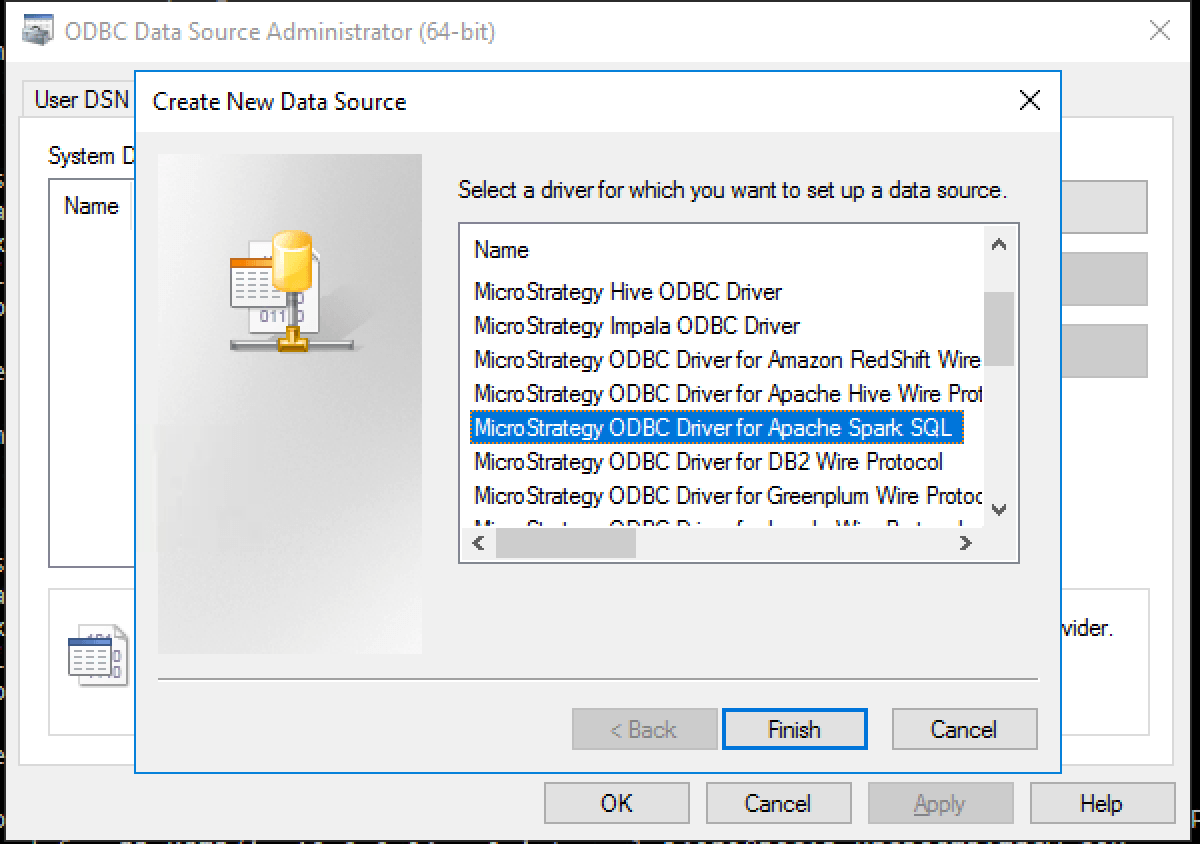
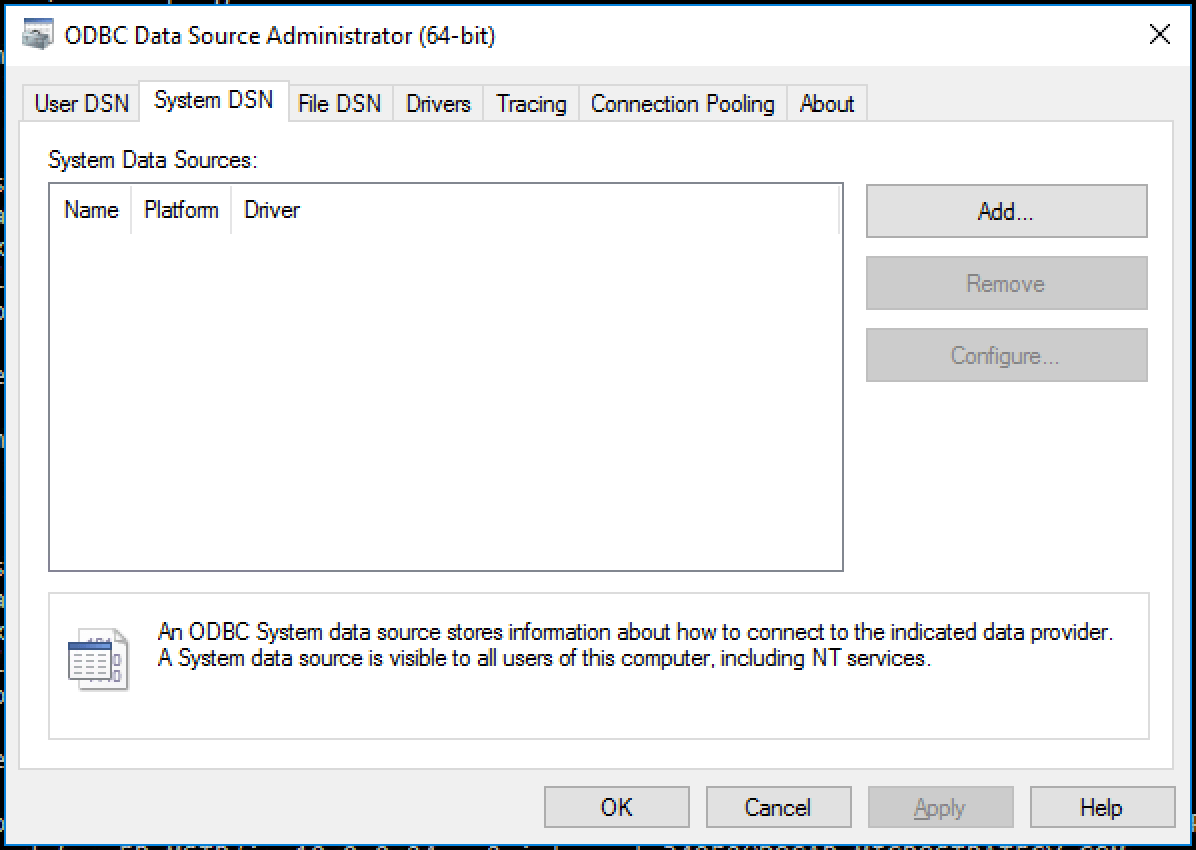
  1. Start the "ODBC Data Source Administrator (64-bit)". Go to search and type "odbc data sources (64-bit)".
  2. Click on "System DSN" , then click in "Add".


ka02R000000btXsQAI_0EM440000002Wk4.png
  1. Select "Strategy ODBC Driver for Apache Spark SQL"


ka02R000000btXsQAI_0EM440000002Wk9.png
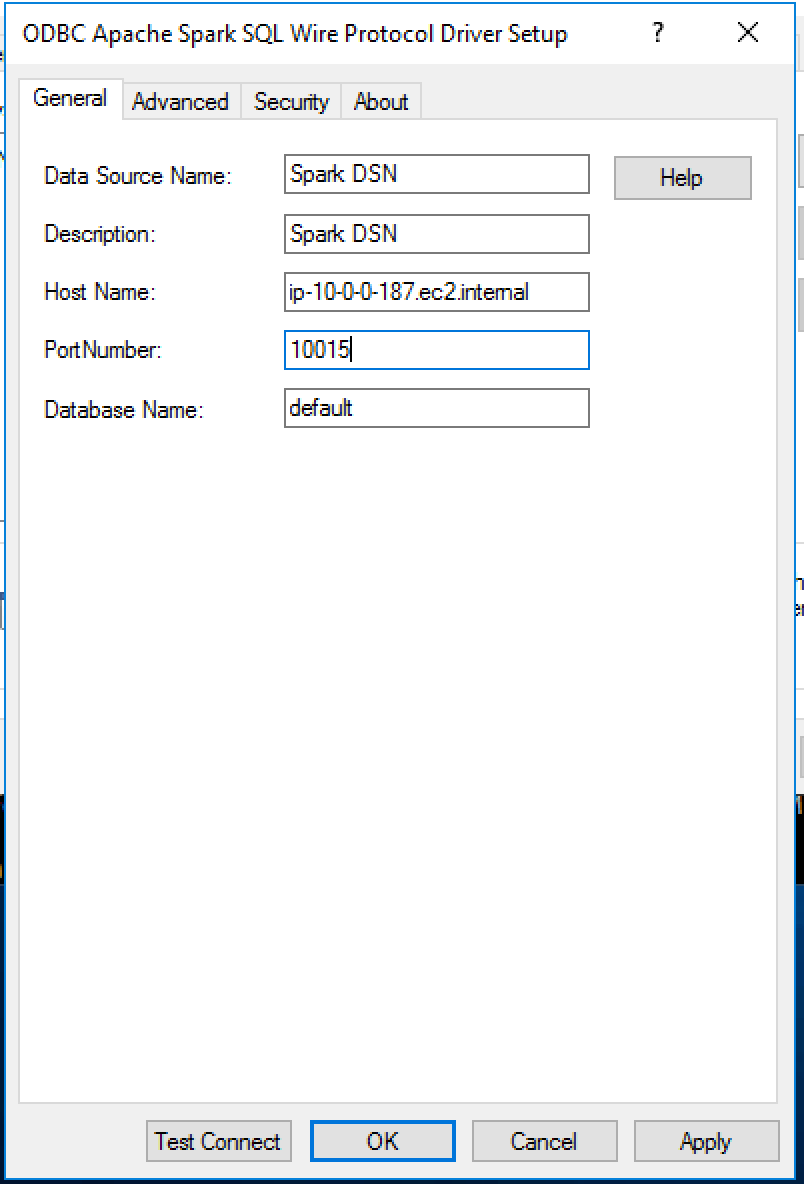
  1. In the new screen add the Data source name, Host, Port and database:


ka02R000000btXsQAI_0EM440000002WkE.png
  1. In case your Spark Thrift Server is not kerberized, these steps should suffice. Click "Apply", click "Test Connection" and we should see the "Connection established!" message.
  2. In case your Spark Thrift Server is kerberized, please follow next steps:
  3. Save  DSN configuration we have done so far by clicking OK in the "ODBC Apache Spark SQL Wire Protocol Driver Setup" dialog.
  4. Download and install the MIT Kerberos client for windows from this website: http://web.mit.edu/kerberos/dist/index.html
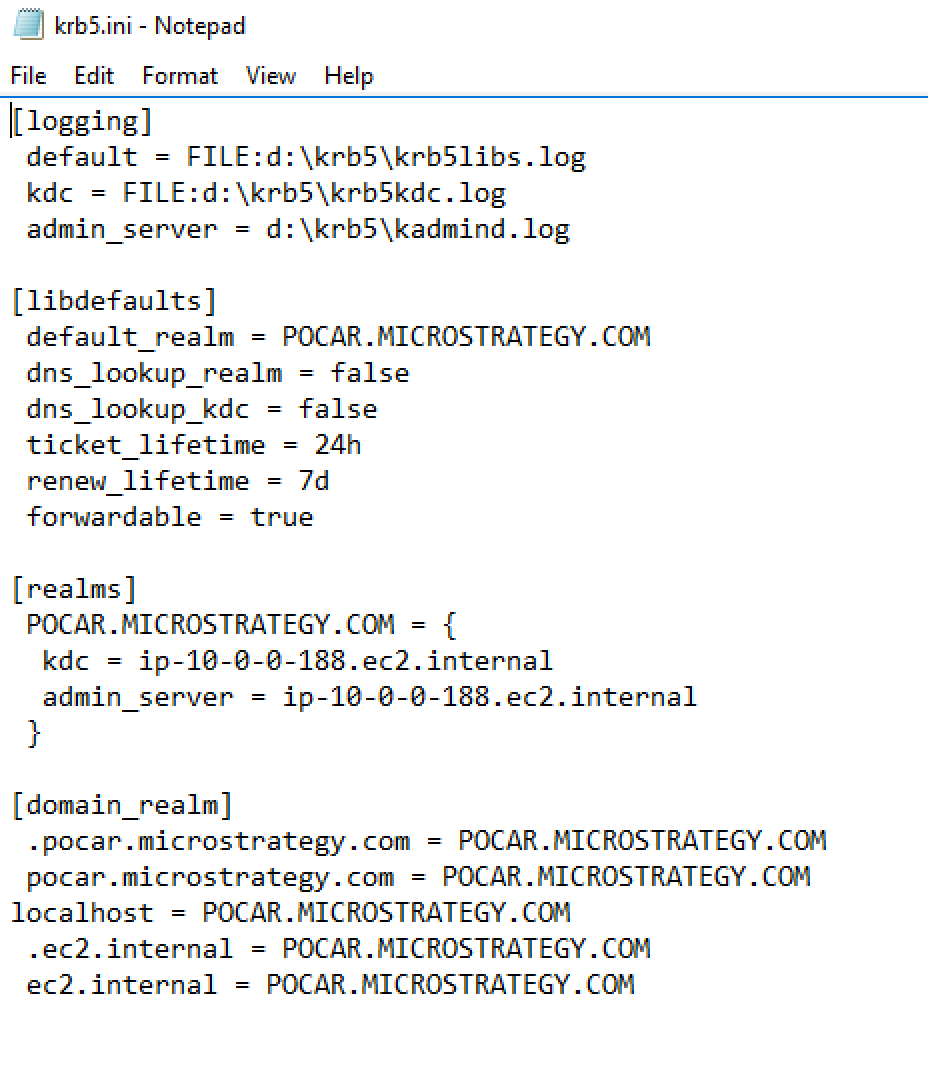
  5. Obtain from your IT administrator the krb5.ini configuration file for the kerberos REALM. For example:


ka02R000000btXsQAI_0EM440000002WkJ.png
  • Create a folder in your windows server to hold the krb5.ini file. For example, name it "D:\krb5". and move krb5.ini into it.
  • Go to the environment variables dialog: For Windows Server 2016, the path is: Seach > type "Control Panel" > System and Security > System > Advanced system settings > In System properties dialog, click the Advanced tab > Environment variables.
  • Create two System environment variables:
    1. KRB5_CONFIG = D:\krb5\krb5.ini
    2. KRB5CCNAME=D:\krb5\krb5cache
  • Restart the machine for changes to take effect.
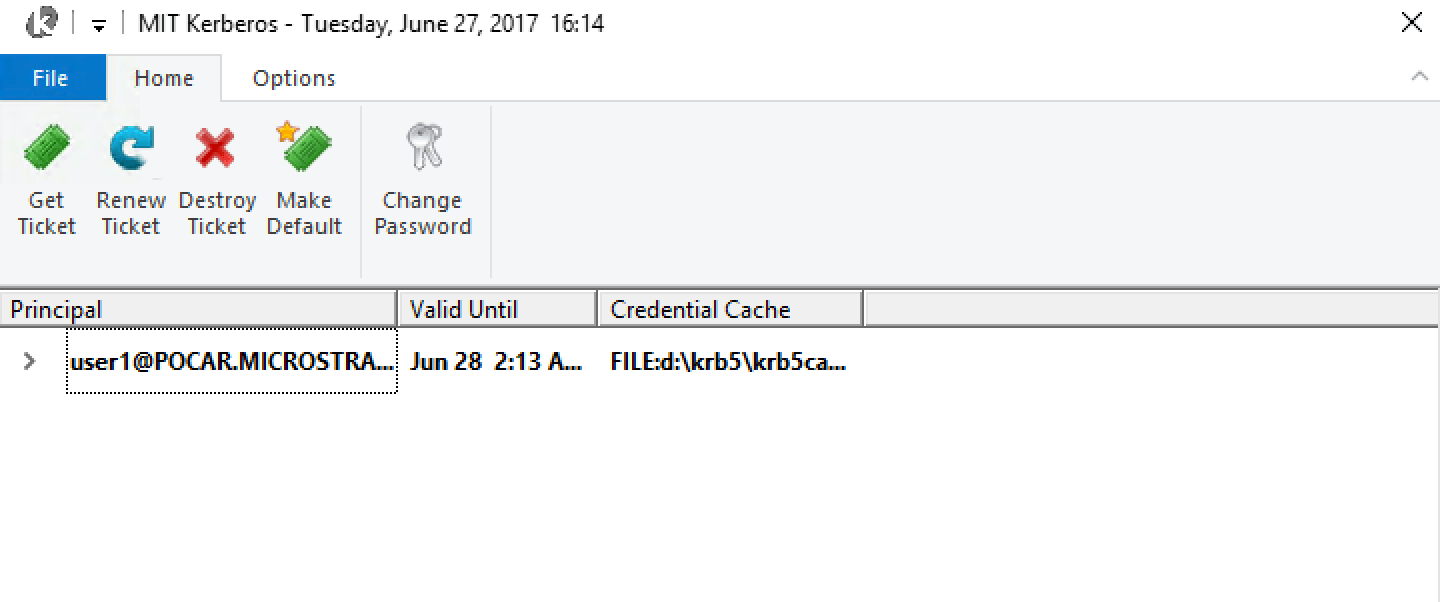
  • Open the MIT Kerberos graphical user interface (if installed in the default folder will be in C:\Program Files\MIT\Kerberos\bin\MIT Kerberos.exe).
  • Obtain a ticket (click on "Get Ticket" and type the Principal and its password).​
ka02R000000btXsQAI_0EM440000002WkO.png
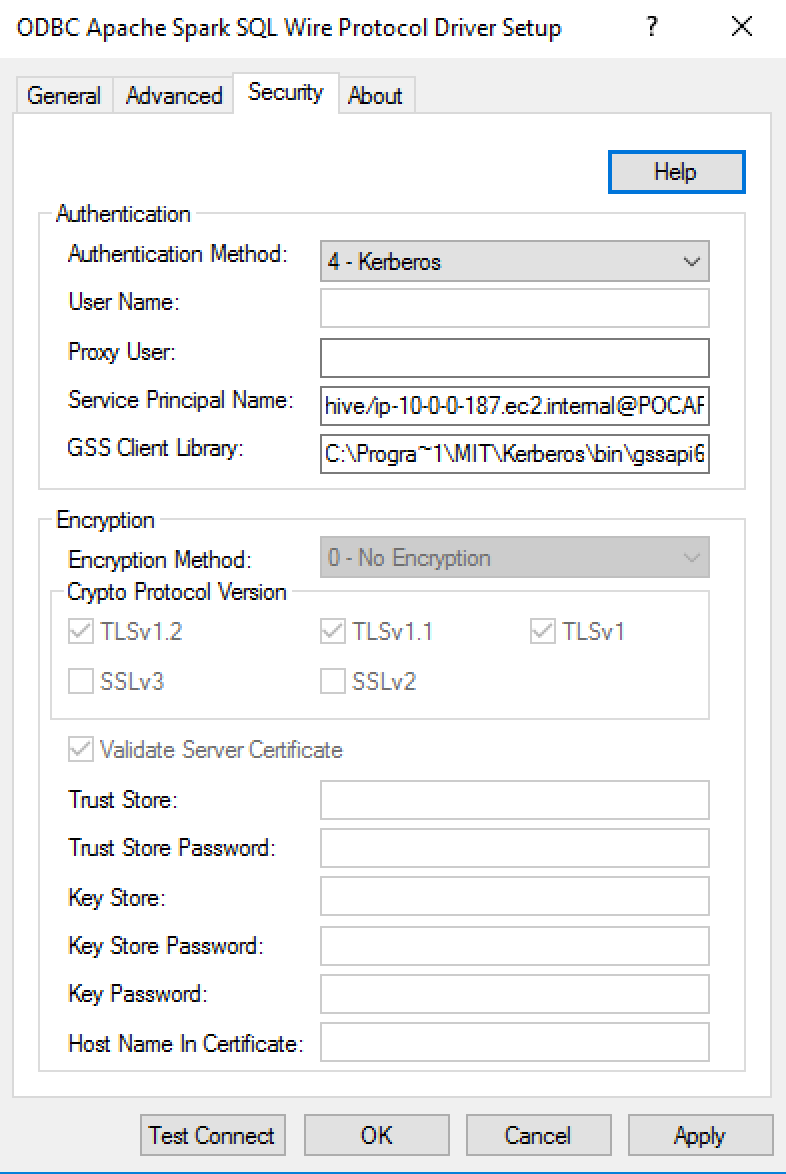
  • Go back to the DSN configuration dialog, then go to the Security tab
  • Change the authentication mode to "Kerberos". Add the principal name. Also add the GSSClient library to the GSS library installed with the MIT Kerberos client package (if installed in default folder, it is: C:\Program Files\MIT\Kerberos\bin\gssapi64.dll ; and in order to avoid spaces in path, we use path: c:\Progra~1\MIT\Kerberos\bin\gssapi64.dll).
ka02R000000btXsQAI_0EM440000002WkT.png
  • Click test connection and we should see the "Connection established!" message. Click Ok, we are ready to use this DSN in Strategy.
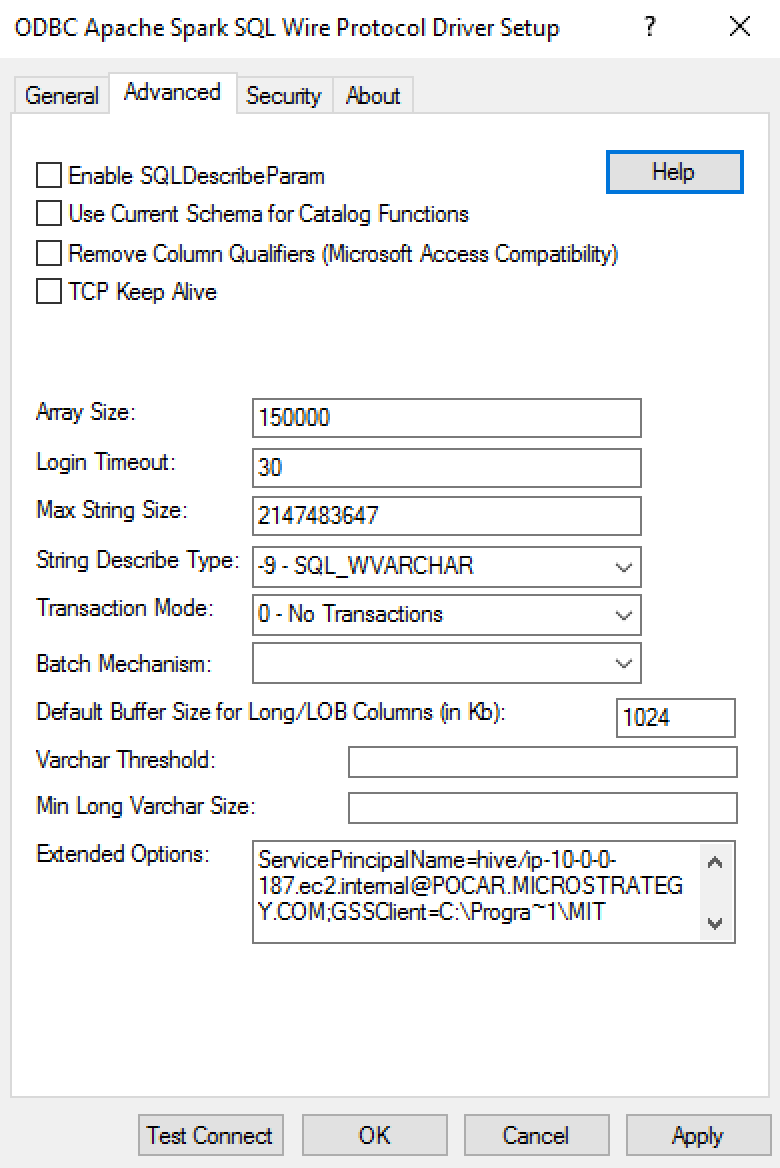
  • In case your Strategy version is 10.4 or earlier, we might see the issue that both the “Service Principal Name” and the “GSSClient” fields are greyed out ( defect: DE50180, tech note: KB318709). If that is the case, add the properties in the “Extended options” field in “Advanced” tab like in following:

    "ServicePrincipalName=hive/ip-10-0-0-187.ec2.internal@POCAR.Strategy.COM;GSSClient=C:\Progra~1\MIT\Kerberos\bin\gssapi64.dll"

​           

ka02R000000btXsQAI_0EM440000002WkY.png

Comment

0 comments

Details

Knowledge Article

Published:

August 9, 2017

Last Updated:

July 31, 2020