1. Topic log
The Topic log files are the data saved in Kafka Server and can be consumed by Kafka Consumer. There are two kinds of configurations related to the broker: broker configs and per-topic configs. There are some settings to control the log size:
Timeout: The minimum age of a log file to be eligible for deletion due to age. The default value is 168 hours, “log.retention.hours=168”. Please note that since the Diagnostics log configuration in the Intelligence Server is synchronized with Kafka Server at a frequency of 23 hours, the retention time should be set to be longer than 23 hours.
Size: Segments are pruned from the log unless the remaining segments drop below log.retention.bytes. Functions independently of log.retention.hours. The default value is 1073741824 bytes (1GB), “log.retention.bytes=1073741824”
Backup log size: The maximum size of a log segment file. When this size is reached, a new log segment will be created. The default value is 1073741824 bytes (1GB), “log.segment.bytes=1073741824”.
The above related settings can be modified in file “<install path>/Strategy/MessagingServices/Kafka/kafka_2.11-1.1.0/config/server.properties”. The administration of topic logs is a common concern.
2. Kafka broker log
Besides the topic log files, there is another log direction for broker, controller and state-change. By default, this kind of log files will keep growing over time and will not be purged. The log files location is “<install path>/Strategy/MessagingServices/Kafka/kafka_2.11-1.1.0/logs”.
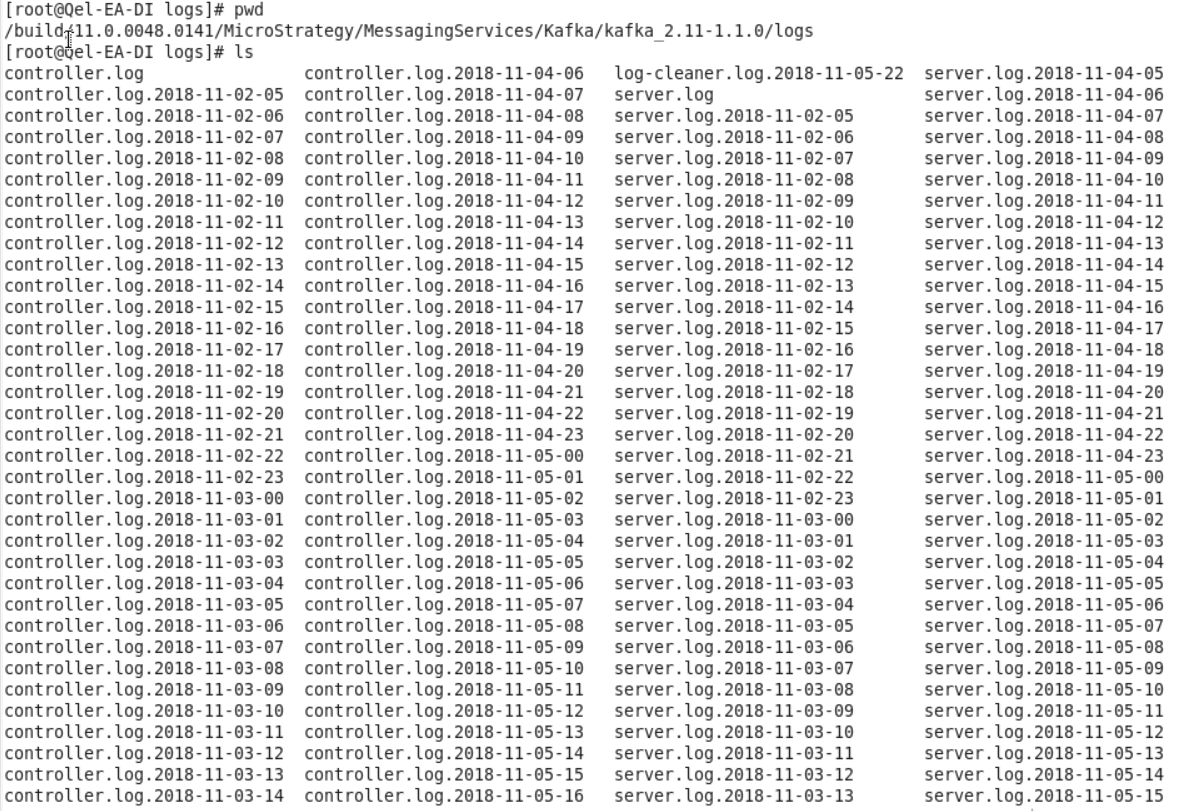
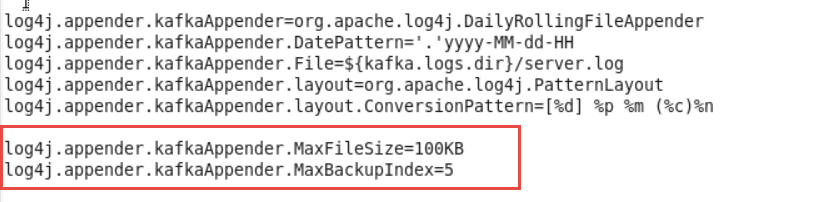
Administrator can modify the configuration file “<install path>/Strategy/MessagingServices/Kafka/kafka_2.11-1.1.0/config/ log4j.properties” to control the log files number and size. Such as below example, by adding the two lines in the rectangle read mark, the maximum number of server.log file will be 5, and each file size is 100KB.
3. Zookeeper Snapshot and Transition log
Administrator can configure Zookeeper related settings in file “<install path>/Strategy/MessagingServices/Kafka/kafka_2.11-1.1.0/config/ zookeeper.properties”. By default, it includes the minimum configuration keywords that must be defined in the configuration file: a) dataDir, the default value is “<install path>/Strategy/MessagingServices/Kafka/tmp/zookeeper”; b) tick time, default value is 20; c) client port. For advanced setting please refer to https://zookeeper.apache.org/doc/r3.4.2/zookeeperAdmin.html#sc_advancedConfiguration.
The ZooKeeper Data Directory contains files which are a persistent copy of the znodes stored by a particular serving ensemble. These are the snapshot and transactional log files. As changes are made to the znodes these changes are appended to a transaction log, occasionally, when a log grows large, a snapshot of the current state of all znodes will be written to the filesystem. This snapshot supersedes all previous logs.
A ZooKeeper server will not remove old snapshots and log files when using the default configuration. Thus, user can find the disk usage of folder “dataDir” continually increasing. Following advanced settings can be used to control the log directory’s size.
When enabled, ZooKeeper auto purge feature retains the autopurge.snapRetainCount most recent snapshots and the corresponding transaction logs in the dataDir and dataLogDir respectively and deletes the rest. Defaults to 3. Minimum value is 3.
The time interval in hours for which the purge task has to be triggered. Set to a positive integer (1 and above) to enable the auto purging. This setting’s default value is 0. (Auto purge seems not work on Windows, we can refer to related defect https://issues.apache.org/jira/browse/ZOOKEEPER-2844 )
There are two settings to limit the zookeeper transaction log size:
One example is below. Please note that these settings are static ones, user need to restart Zookeeper to make them take effect.
autopurge.snapRetainCount=3
autopurge.purgeInterval=24
snapCount=5000
preAllocSize=1000
Article Reference Number: KB442206
