EducationSoftwareStrategy.com
StrategyCommunity

Knowledge Base

Product

Community

Knowledge Base

TopicsBrowse ArticlesDeveloper Zone

Product

Download SoftwareProduct DocumentationSecurity Hub

Education

Tutorial VideosSolution GalleryEducation courses

Community

GuidelinesGrandmastersEvents
x_social-icon_white.svglinkedin_social-icon_white.svg
Strategy logoCommunity

© Strategy Inc. All Rights Reserved.

LegalTerms of UsePrivacy Policy
  1. Home
  2. Topics

How to Deploy Real-time Analytics Applications with Storm and Spark Streaming


Diego Patterson

Account Executive • MicroStrategy


MicroStrategy enables organizations to deploy real-time analytics and mobility applications that support fast decision-making.

SYMPTOM:
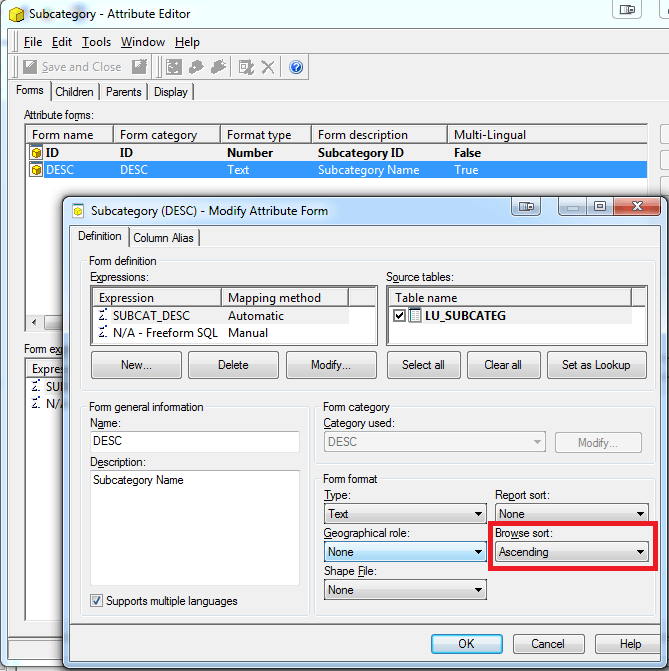
View filters on reports can be of type "In List". This type of view filter will display the full list of attribute elements for the user to select for the filtering condition. In Strategy Developer 9.x, the list from the view filter can be sorted alphabetically ascending or descending by manipulating the attribute's "Browse sorting" property, like shown below:
 

ka04W000000Odi7QAC_0EM4400000026jp.png

 
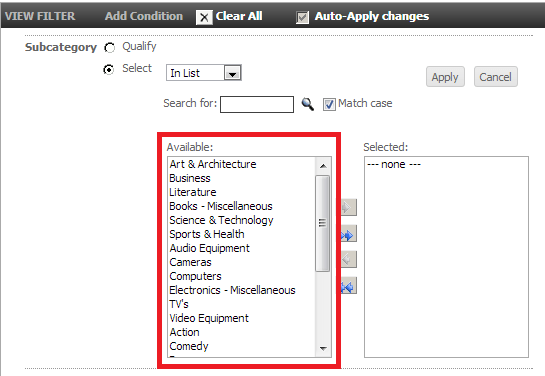
However, in Strategy Web 9.x, the sorting for the view filter list does not seem to be affected by this property.
 
STEPS TO REPRODUCE:
Follow these steps in Strategy Tutorial 9.x to reproduce:
  • In Strategy Developer, edit the "Subcategory" attribute, highlight the "DESC" form, click "Modify", and set the browse sort to "Ascending", as shown below:
     
ka04W000000Odi7QAC_0EM4400000026jp.png
  • Click "OK", and then "Save and close". Update the Schema in Strategy Developer.
  • Still in Strategy Developer, create a new report with "Subcategory" in the rows, and run the report.
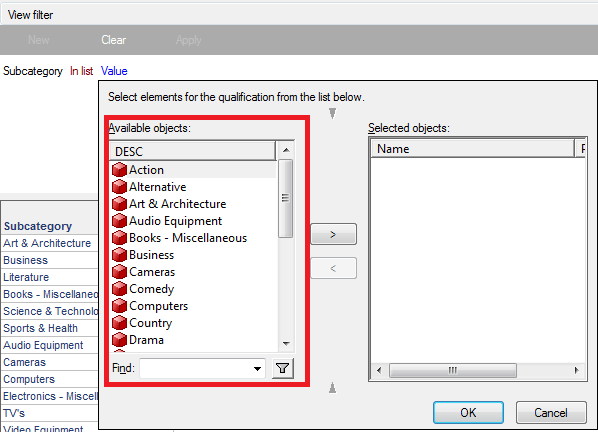
  • Add an "In List" attribute element view filter using "Subcategory", and notice the list of elements are sorted alphabetically, as shown below:
     
ka04W000000Odi7QAC_0EM4400000026jn.png
  • Run the same report in Strategy Web 9.x, create the same view filter, and notice that the elements are not sorted alphabetically, as shown below:
     
ka04W000000Odi7QAC_0EM4400000026jl.png

 
CAUSE:
This is a known issue in Strategy Web 9.x.
 
ACTION:
Strategy will continue to investigate and post updates as soon as they are available.
 
WORKAROUND:
In the attribute editor in Strategy Developer 9.x, set the "Report sort" to "Ascending" as well. This will make the elements in the view filter in Strategy Web sort correctly.


Comment

0 comments

Details

Knowledge Article

Published:

May 23, 2017

Last Updated:

May 23, 2017