EducationSoftwareStrategy.com
StrategyCommunity

Knowledge Base

Product

Community

Knowledge Base

TopicsBrowse ArticlesDeveloper Zone

Product

Download SoftwareProduct DocumentationSecurity Hub

Education

Tutorial VideosSolution GalleryEducation courses

Community

GuidelinesGrandmastersEvents
x_social-icon_white.svglinkedin_social-icon_white.svg
Strategy logoCommunity

© Strategy Inc. All Rights Reserved.

LegalTerms of UsePrivacy Policy
  1. Home
  2. Topics

KB485197: How to Enable Crash Dumps for the MJMulPrc process on Windows Server 2008 and above


Oliver Hingst

Principal Product Specialist • MicroStrategy


This technical note explains how to capture crash dumps for the MJMulPrc on Windows Server.

NOTE: Administrator privileges are required to perform actions described below.
 

Steps to follow:

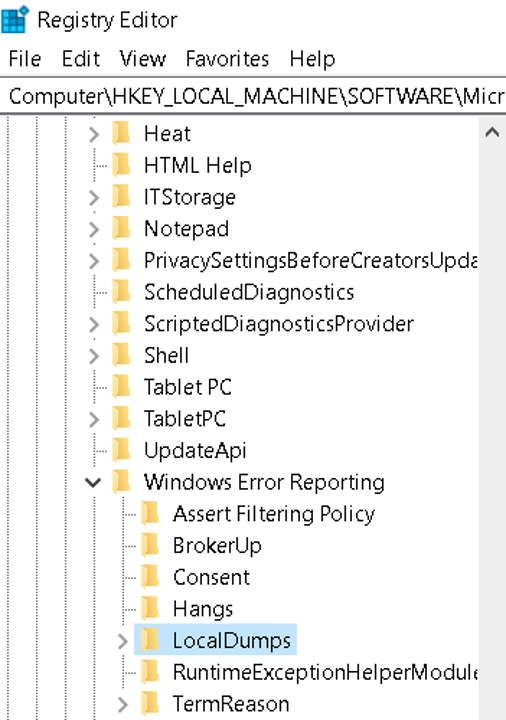
  • Open the Windows registry (Start > Run > regedit) and navigate to the following key: "HKEY_LOCAL_MACHINE\SOFTWARE\Microsoft\Windows\Windows Error Reporting\" and create a "LocalDumps" key (unless it has been created already)
ka04W000001Is6nQAC_0EM4W0000038zfi.jpeg


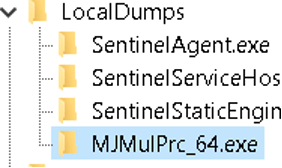
  • Create a new key for the MJMulPrc_64.exe under HKEY_LOCAL_MACHINE\Software\Microsoft\Windows\Windows Error Reporting\LocalDumps (for example, HKEY_LOCAL_MACHINE\Software\Microsoft\Windows\Windows Error Reporting\LocalDumps\MJMulPrc_64.exe).
ka04W000001Is6nQAC_0EM4W0000038zgH.jpeg


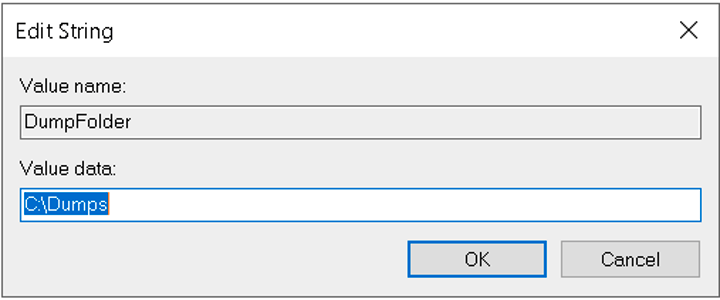
  • Create a new Expandable String value (REG_EXPAND_SZ) named DumpFolder under MJMulPrc_64.exe and specify the path where the dump files are to be stored (e.g. C:\Dumps).
ka04W000001Is6nQAC_0EM4W0000038zgM.jpeg


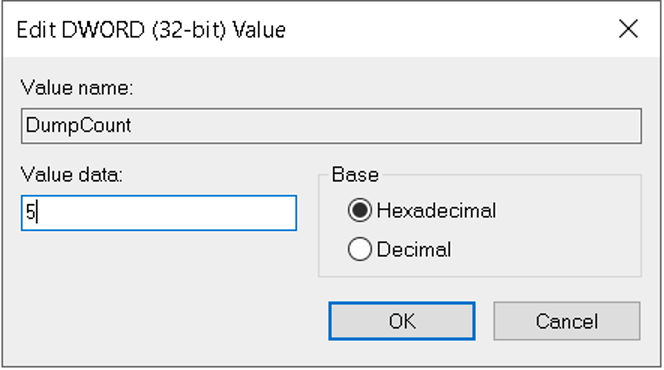
  • Create a new DWORD value (REG_DWORD) named DumpCount under MJMulPrc_64.exe, and specify a value representing the maximum number of dump files in the folder. When the maximum value is exceeded, the oldest dump file in the folder will be replaced with the new dump file. Use the value of 5.
ka04W000001Is6nQAC_0EM4W0000038zgb.jpeg


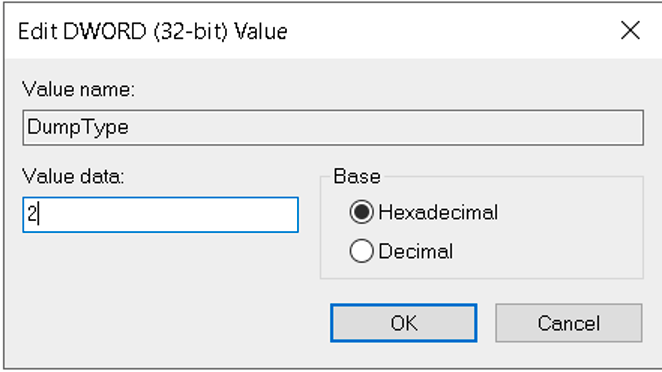
  • Create a new DWORD value (REG_DWORD) named DumpType under MJMulPrc_64.exe, and specify a value of 2 to collect a Full dump when the MJMulPrc process crashes.
ka04W000001Is6nQAC_0EM4W0000038zhe.jpeg


  • Once all the keys have been created, it should look like this
ka04W000001Is6nQAC_0EM4W0000038zhj.jpeg

Once this is all set, every time the MJMulPrc process crashes it will create a dump in the C:\Dumps folder.  This file can then be sent to Strategy Support alongside the DSSErrors.log to determine the root of the crash.


Comment

0 comments

Details

Knowledge Article

Published:

October 11, 2021

Last Updated:

October 11, 2021