EducationSoftwareStrategy.com
StrategyCommunity

Knowledge Base

Product

Community

Knowledge Base

TopicsBrowse ArticlesDeveloper Zone

Product

Download SoftwareProduct DocumentationSecurity Hub

Education

Tutorial VideosSolution GalleryEducation courses

Community

GuidelinesGrandmastersEvents
x_social-icon_white.svglinkedin_social-icon_white.svg
Strategy logoCommunity

© Strategy Inc. All Rights Reserved.

LegalTerms of UsePrivacy Policy
  1. Home
  2. Topics

How to Fine-tune Mobile Apps for Optimal Performance


Tianfeng (Jimmy) Jiang

Quality Engineer, Principal • MicroStrategy


Organizations need to deliver sub-second response times for end users looking to explore, analyze, and act on their data wherever they are. This presentation demonstrates how to configure MicroStrategy Mobile apps to ensure your users have optimized, fast, and easy access, regardless of connectivity. You could Learn about best practices for caching and offline strategies, networks, and other factors that can affect your overall mobile app experience. And, learn about performance, scalability tuning, and governance settings to help improve average response times.

SYMPTOM:
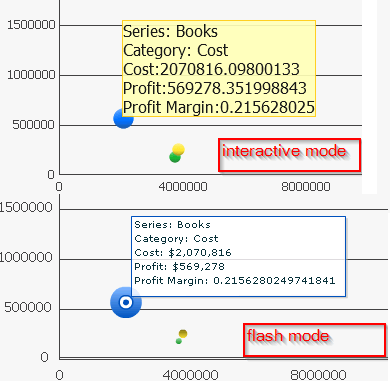
Maximum and Minimum Value does not get applied for bubble graph in flash mode in Report Services Document in Strategy Web 9.4.x-10.x
 
STEPS TO REPRODUCE:
Follow the steps below to reproduce the issue in Strategy Tutorial project:
  • Create a report with Category in Rows and Cost, Profit and Profit Margin in Columns, convert it to bubble graph report;
  • Covert the report above to document, in graph Preferences > Axes > Z, set the Maximum Value to 1;
  • Run the document in Strategy Web, note that the bubble size in Interactive mode is correct sized based on the Z axes minimum value, however in flash mode it does not get applied, as shown below: 
ka04W000000Oev2QAC_0EM440000002SDt.png


CAUSE:
This is a known issue in Strategy Web 9.4.x-10.x
 
ACTION:
Strategy will continue to investigate and post updates as soon as they are available.


Comment

0 comments

Details

Knowledge Article

Published:

May 17, 2017

Last Updated:

May 17, 2017