EducationSoftwareStrategy.com
StrategyCommunity

Knowledge Base

Product

Community

Knowledge Base

TopicsBrowse ArticlesDeveloper Zone

Product

Download SoftwareProduct DocumentationSecurity Hub

Education

Tutorial VideosSolution GalleryEducation courses

Community

GuidelinesGrandmastersEvents
x_social-icon_white.svglinkedin_social-icon_white.svg
Strategy logoCommunity

© Strategy Inc. All Rights Reserved.

LegalTerms of UsePrivacy Policy
  1. Home
  2. Topics

How to Generate a MicroStrategy Connection File to Connect to Environments on Workstation


Amanda Gordon

Quality Engineer, Senior • MicroStrategy


This article describes how to generate a MicroStrategy connection file to quickly connect Workstation to a MicroStrategy environment.

A Strategy connection file (.mstrc) is a text file that contains all of the information needed to connect Workstation to a Strategy environment. Once you connect to an environment, you can generate the .mstrc file for that environment as a backup or share it so others can connect.
  • Open Strategy Workstation.
  • In the left pane, click Environments.
  • Right-click an existing environment and choose Properties. If an environment does not already exist, one needs to be created first.
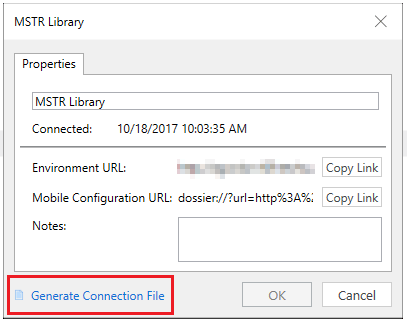
  • In the bottom left corner, click Generate Connection File.
ka02R000000g4mSQAQ_0EM44000000Q3bs.png
  • You can now share your connection file with others to allow them access to the environment.

Comment

0 comments

Details

Knowledge Article

Published:

October 25, 2017

Last Updated:

November 22, 2019