EducationSoftwareStrategy.com
StrategyCommunity

Knowledge Base

Product

Community

Knowledge Base

TopicsBrowse ArticlesDeveloper Zone

Product

Download SoftwareProduct DocumentationSecurity Hub

Education

Tutorial VideosSolution GalleryEducation courses

Community

GuidelinesGrandmastersEvents
x_social-icon_white.svglinkedin_social-icon_white.svg
Strategy logoCommunity

© Strategy Inc. All Rights Reserved.

LegalTerms of UsePrivacy Policy
  1. Home
  2. Topics

KB483985: How to Hide the Map or Geospatial Service Visualization Icon in the Visualization Gallery


Haifeng Wang

Software Architect • MicroStrategy


This article explains how to hide the Map or Geospatial Service visualization icon from the visualization gallery.

Starting with the release of Strategy ONE (March 2024), dossiers are also known as dashboards.
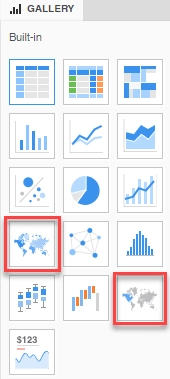
As of Strategy 2020, there are two out-of-the-box map visualizations available in a dossier: Geospatial Service (Mapbox) and Map (ESRI).
 

ka0PW0000003S1NYAU_0EM2R000000nX0r.jpeg

Should you only want to use one type of map, you can hide the other map icon in the visualization gallery using the following steps.

How to Hide a Map Icon in the Visualization Gallery

  1. Go to
    Strategy\WEB-INF\xml\config
    and find the visualizations.xml file.  Make a backup and edit the original.
  2. Locate the
    ajax 
    list group and remove the configuration line of the map visualization you want to hide.

    To hide Geospatial Service (Mapbox), remove: 

    <visualization id="Mapbox" desc="Geospatial Service" desc-id="mstrWeb.15751" scope="18" style-name="MapboxVisualizationStyle" propsEditor="" is-mojo="true" widget-type="8" position="2"/>

     
    To hide ESRI Map, remove:
    <visualization id="Map" desc="Map" desc-id="mstrWeb.7736" scope="19" style-name="GoogleMapVisualizationStyle" propsEditor="visPropsIPhoneMapStyle" is-mojo="true" widget-type="6" position="5"/>


  3. Restart the Web Server. The icon should be hidden from the gallery.

Comment

0 comments

Details

Knowledge Article

Published:

January 20, 2020

Last Updated:

October 17, 2024