EducationSoftwareStrategy.com
StrategyCommunity

Knowledge Base

Product

Community

Knowledge Base

TopicsBrowse ArticlesDeveloper Zone

Product

Download SoftwareProduct DocumentationSecurity Hub

Education

Tutorial VideosSolution GalleryEducation courses

Community

GuidelinesGrandmastersEvents
x_social-icon_white.svglinkedin_social-icon_white.svg
Strategy logoCommunity

© Strategy Inc. All Rights Reserved.

LegalTerms of UsePrivacy Policy
  1. Home
  2. Topics

KB483312: How to Load Metadata Object Information to the Platform Analytics Warehouse in an Environment where a Platform Analytics Project Does Not Exist


Mari Sugimura

Senior Cloud Support Engineer III • MicroStrategy


This article explains how to load metadata object information from which Platform Analytics statistics are collected to a shared warehouse but the Platform Analytics project does not exist.

When configuring Platform Analytics, one of the final steps is to tune the Platform Analytics project configuration. In this step, a Command Manager script is run to create multiple cube subscriptions followed by triggering an event called Load Metadata Object Telemetry.
For example, in the PlatformAnalyticsProjectConfiguration.scp located in C:\Program Files (x86)\MicroStrategy\Platform Analytics\util:

// Run after Platform Analytics Project has been created through Configuration Wizard:TRIGGER SUBSCRIPTION "Remote Diagnostic Cube Every Hour_20"  MANAGE ALL OWNER "Administrator" FOR PROJECT "Platform Analytics";TRIGGER SUBSCRIPTION "Compliance Telemetry Cube Every Hour_00"  MANAGE ALL OWNER "Administrator" FOR PROJECT "Platform Analytics";TRIGGER EVENT "Load Metadata Object Telemetry";
However, this event does not exist in metadata without a Platform Analytics project. As a result, metadata object information is not loaded to the Platform Analytics warehouse.

How to Load Metadata Object Information to Platform Analytics Warehouse Without a Platform Analytics Project

  • In Developer, create an event called Load Metadata Object Telemetry. 
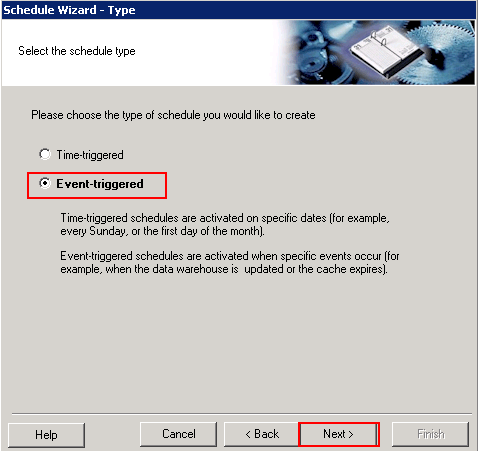
  • Open the Schedule Wizard to create an event-based schedule.
ka02R000000g52kQAA_0EM2R000000n3eg.jpeg
  • Schedule an Administration Task.
ka02R000000g52kQAA_0EM2R000000n3el.jpeg
  • While scheduling the Administration Tasks, set the task Send MD Object Telemetry to Messaging Services and choose Load Metadata Object Telemetry as the Schedule.
ka02R000000g52kQAA_0EM2R000000n3f0.jpeg
  • Click OK.
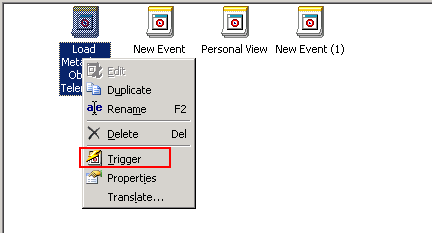
  • Right-click the event and select Trigger. The metadata object information should be loaded into your Platform Analytics warehouse.
ka02R000000g52kQAA_0EM2R000000n3f5.jpeg

Comment

0 comments

Details

Knowledge Article

Published:

May 23, 2019

Last Updated:

December 6, 2019