EducationSoftwareStrategy.com
StrategyCommunity

Knowledge Base

Product

Community

Knowledge Base

TopicsBrowse ArticlesDeveloper Zone

Product

Download SoftwareProduct DocumentationSecurity Hub

Education

Tutorial VideosSolution GalleryEducation courses

Community

GuidelinesGrandmastersEvents
x_social-icon_white.svglinkedin_social-icon_white.svg
Strategy logoCommunity

© Strategy Inc. All Rights Reserved.

LegalTerms of UsePrivacy Policy
  1. Home
  2. Topics

KB442342: How to Modify a Specific Selector in Chrome Developer Tools to Change the Look and Feel of MicroStrategy using the Web SDK


David Dechent

Senior Product Specialist • Strategy


The purpose of this tutorial is to take a basic knowledge of CSS and to make a simple change in a live browser using Chrome Developer Tools.

Starting with the release of Strategy ONE (March 2024), dossiers are also known as dashboards.
This Tutorial focuses on how to test CSS changes in a live Chrome browser using Developer Tools after you have already identified the CSS Selector you would like to modify. For assistance with identifying a specific or desired CSS Selector, please review the KB Article under Recommended Reading:
 

Recommended Reading

KB Article: https://community.Strategy.com/s/article/Finding-CSS-to-Change-the-Look-and-Feel-of-Strategy-Web-Using-the-Web-SDK


Testing live CSS to affect a specific selector on the page


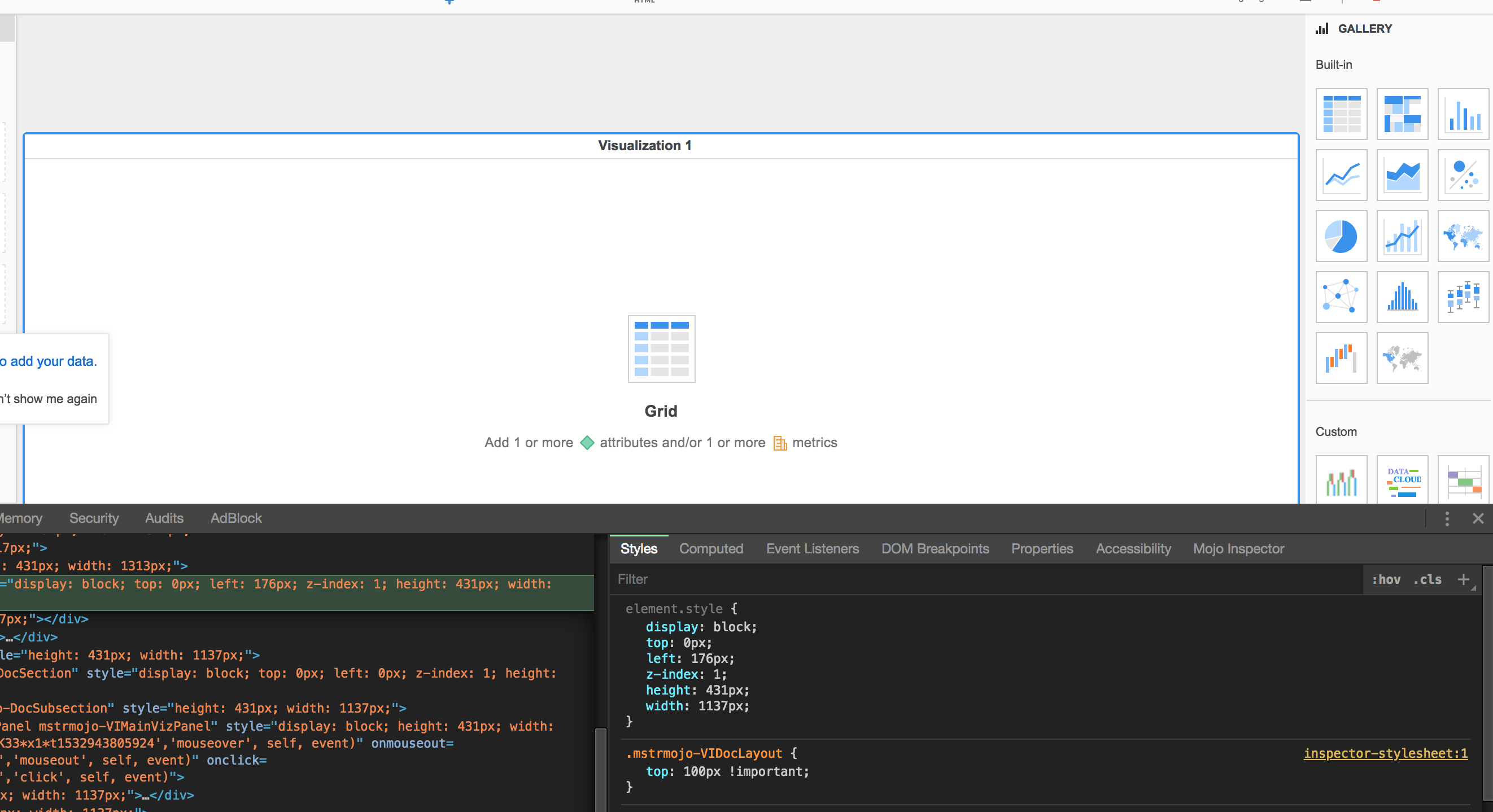
Developer tools exposes the functionality to live-test CSS on the page. Any changes made here are temporary and are reset as soon as the page is refreshed. This can be done using the "Styles" tab:
ka0PW0000001JVaYAM_0EM44000000WdXW.png

In the example above, I added a new CSS rule to the page:

  • The target is any element that contains the class value "mstrmojo-VIDocLayout".
  • Only one property was added, setting the property "top" to the value "100px !important".


This feature is extremely useful to find and experiment with the CSS rules that achieve the desired goal.

!important

This a useful feature to prioritize a custom rule if there are conflicting built-in CSS rules.
However, it should only be used as a last-resort if no other options are available. Read more here: https://developer.mozilla.org/en-US/docs/Web/CSS/Specificity
 

Notes & Considerations

Relying on id="mstr86"


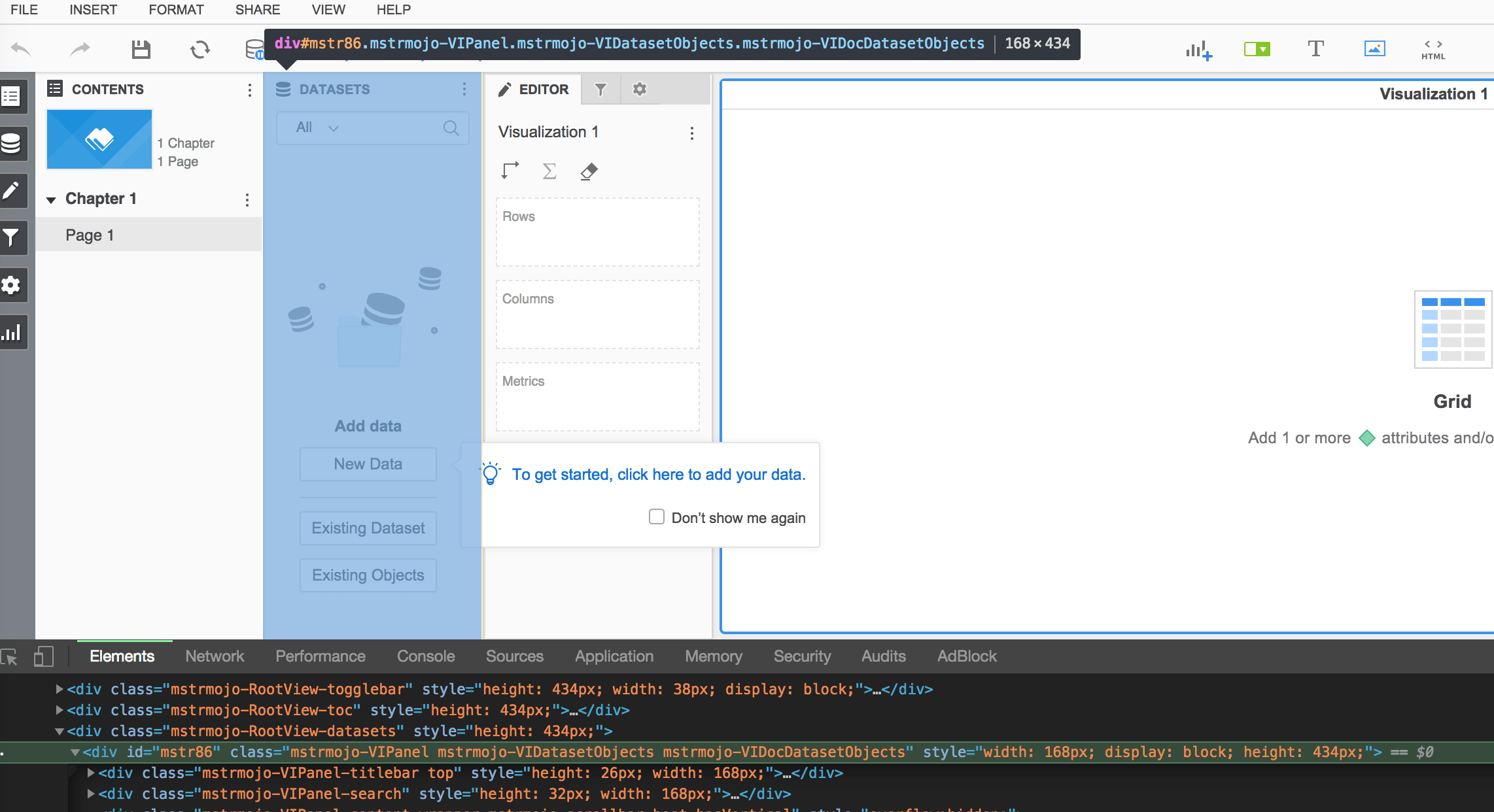
Parts of Strategy Web heavily driven in Javascript often use ID values starting with "mstr" followed by a number. Here is an example from the Dossier page:
ka0PW0000001JVaYAM_0EM44000000WdWO.png

We can see there is a unique id value for this dataset objects panel "mstr86", and there are 3 class values "mstrmojo-VIPanel mstrmojo-VIDatasetObjects mstrmojo-VIDocDatasetObjects".
When finding a HTML element with an ID value of "mstr" and a number, such as "mstr86", consider that:

  • These ID values of "mstrxx" are unique on the page.
  • These values are automatically generated during page load.
  • Since these are automatically generated, they are temporary and may change.
  • They may not change immediately after refresh, but they are more likely to change after:
    • Logging out and back into Strategy Web using the same user.
    • Logging out and back into Strategy Web using a different user.
    • Restarting the server hosting Strategy Web.
    • Upgrading Strategy Web to a newer version.


In summary, these type of ID values cannot be relied on as they will change under varying conditions, which cannot be controlled. It's recommended to avoid building customizations that depend on #mstrxx values.
Alternatives
Instead of relying on this kind of ID value, we need to rely on the alternatives. This is what we found from looking at the HTML driving this part of the page:

  • #mstr86
    • It has this unique ID, but we know that "mstrxx" style ID values cannot be relied on as they are temporary & subject to change.
  • .mstrmojo-VIPanel
    • This class value would allow you to target this element but the naming is not specific.
    • It's likely this will affect any panel on this page.
  • .mstrmojo-VIDatasetObjects
    • This class value allows you to target any matching element on the page.
    • The name is more specific, and likely only affects any kind of "dataset objects" panel.
    • This is likely to be useful in the scenario of targeting only the dataset objects panel on this page.
  • .mstrmojo-VIDocDatasetObjects
    • This class value is also more specific, and likely also only affects any kind of "dataset objects" panel.
    • This is also likely to be useful.


We can see in the above example there are two specific alternatives we can try instead of relying on the id value. 

Relying on id="*kK36*t1532943805924"

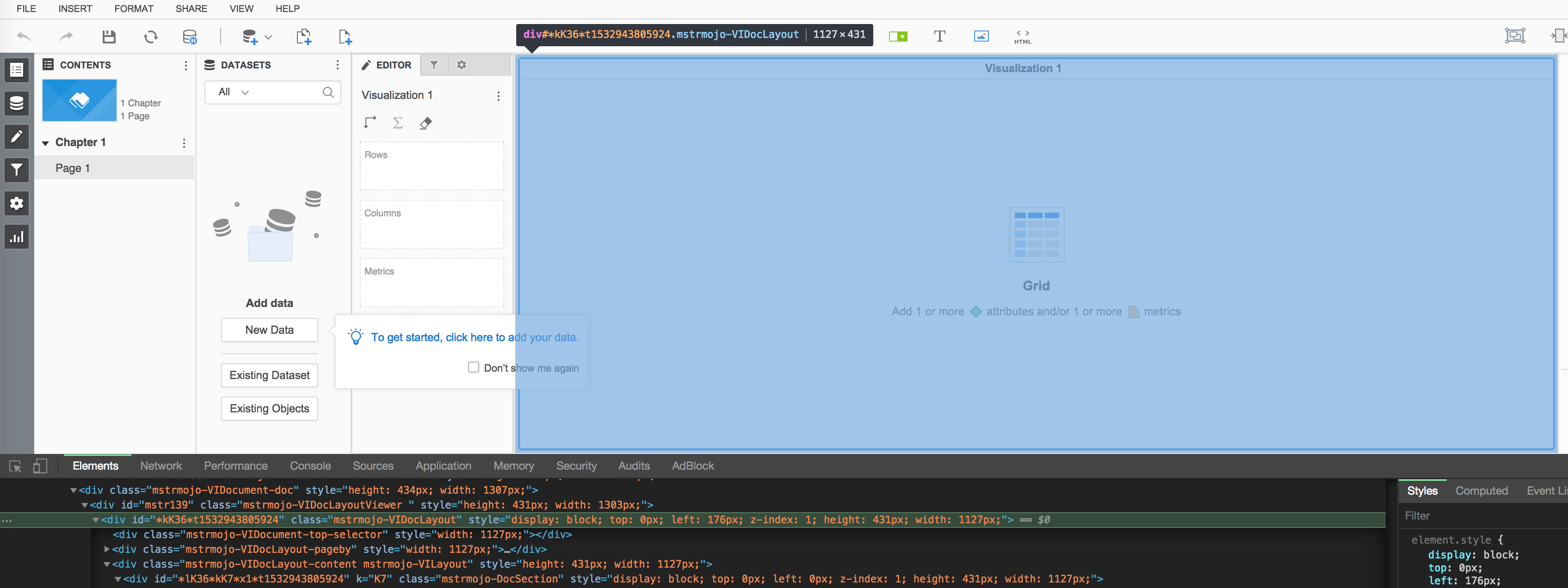
In addition to "mstrxx" style ID values, coded id values may also be seen on some pages, as shown in the example screenshot below:
ka0PW0000001JVaYAM_0EM44000000WdX7.png

These are also dynamically generated, similar to the mstrxx, and represent internal references to objects rendered through javascript. These cannot be relied on either, and instead the same alternatives as those described above should be explored.
 

Related Topics:

KB Article: https://community.Strategy.com/s/article/Implementing-a-Plugin-to-Change-the-Look-and-Feel-of-Strategy-Web-using-Web-SDK


Comment

0 comments

Details

Knowledge Article

Published:

December 1, 2018

Last Updated:

March 21, 2024