It's possible to set the configuration URLs for the Strategy iOS app secured with Blackberry when added as a Partner application in the Good control as detailed in this article. However, in some cases it may be required to have multiple Strategy applications that have different branding and provide each app a different configuration URL via the App Policy in Blackberry. In such case it's possible to add the Strategy iOS app secured with Blackberry as a custom application. More details on how to customize Strategy Mobile can be found here. Here are the steps for setting up the Strategy Mobile project:
However, since the GDApplicationID will be changed the option to enter a configuration URL will not appear by default in the app policy similar to what the Strategy Mobile secured with Blackberry partner app has. In such case, a custom App Policy must be created and uploaded in order to be able to set the configuration URL for those custom apps as well. The App Policy definition that is loaded onto the Good Control is defined in XML. Below are the steps on how to create and upload it:
<?xml version="1.0" encoding="UTF-8"?>
<apd:AppPolicyDefinition xmlns:apd="urn:AppPolicySchema1.good.com" xmlns:xsi="http://www.w3.org/2001/XMLSchema-instance" xsi:schemaLocation="urn:AppPolicySchema1.good.com AppPolicySchema.xsd">
   <pview>
      <pview type="normal" key="settings">
         <!-- <pe ref="gfeemail" /> -->
         <pe ref="cfgurl" />
      </pview>
      <pe ref="policyVersion" />
   </pview>
   <setting name="policyVersion">
      <hidden>
         <key>version</key>
         <value>1.0</value>
      </hidden>
   </setting>
   <!--
<setting name="gfeemail">
<checkbox>
<key>gfeemail</key>
<label>Enable Good for Enterprise e-mail integration</label>
<value>true</value>
</checkbox>
</setting>
-->
   <setting name="cfgurl">
      <textarea>
         <key>cfgurl</key>
         <label>Configuration URLs. To support multiple devices types, i.e. declarations for the iPad (type is mstripad://) and iPhone (type is mstr://), specify each one on a separate line.</label>
      </textarea>
   </setting>
</apd:AppPolicyDefinition>
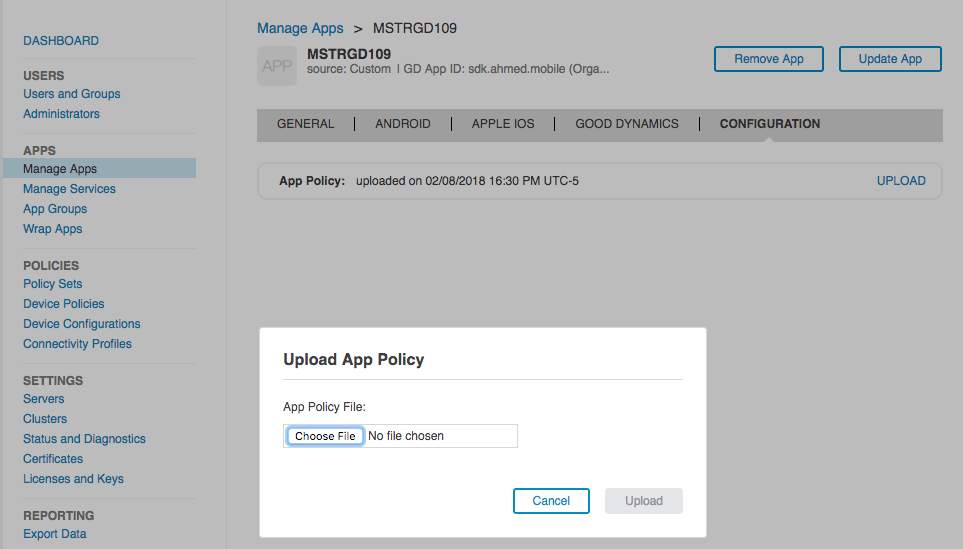
For more details on how to create a custom Application Policy in BlackBerry refer to Custom App Policies in Good Dynamics Applications.
Note: The Blackberry secured app (formerly known as Good) can only accept the following URL schemes mstr:// or mstripad:// in the Good policy regardless if these URL schemes are set in the Info_IPhone_GD.plist for iPhone or Info_IPad_GD.plist for iPad files. Custom URL schemes can still be set in those files when using different configuration methods.
The example provided in this document is provided “as-is” and user has read the following customization warning:
ADDITIONAL INFORMATION:
The Strategy SDK allows you to customize several Strategy products and extend and integrate the Strategy business intelligence functionality into other applications. However, before changing the way Strategy products look or behave, it is helpful to understand how the application is built. For more information regarding the Strategy products or the process of customizing Strategy products, please refer to the Strategy Developer Hub.
To access the Strategy Developer Hub, you must have access to the Strategy Knowledge Base, you must have purchased the Strategy SDK, and you must be current on your Strategy maintenance agreement. If you are a US-based business and believe that you satisfy all three of these conditions but you do not have access to the Strategy Developer Hub, please contact Strategy Technical Support at support@microstrategy.com or at (703) 848-8700. If you are an international business, please contact Strategy Technical Support at the appropriate email address or phone number found at https://www.microstrategy.com/us/services/support/contact.
CUSTOMIZATION WARNING:
This customization is provided as a convenience to Strategy users and is only directly applicable to the version stated. While this code may apply to other releases directly, Strategy Technical Support makes no guarantees that the code provided will apply to any future or previous builds. In the event of a code change in future builds, Strategy Technical Support makes no guarantee that an updated version of this particular customization will be provided. In the event of a code change in future builds, Strategy may not be able to provide additional code on this matter even though this customization is provided at this time for this specific build. For enhancements to this customization or to incorporate similar functionality into other versions, contact your Account Executive to inquire about Strategy Consulting assistance. KB439845
