EducationSoftwareStrategy.com
StrategyCommunity

Knowledge Base

Product

Community

Knowledge Base

TopicsBrowse ArticlesDeveloper Zone

Product

Download SoftwareProduct DocumentationSecurity Hub

Education

Tutorial VideosSolution GalleryEducation courses

Community

GuidelinesGrandmastersEvents
x_social-icon_white.svglinkedin_social-icon_white.svg
Strategy logoCommunity

© Strategy Inc. All Rights Reserved.

LegalTerms of UsePrivacy Policy
  1. Home
  2. Topics

How to Provision Environments with Multiple Nodes


Umar Ghazi

Software Engineer, Senior • MicroStrategy


You can now provision Enterprise environments with 2, 3, or 4 clustered nodes. A new dropdown option is available when creating an Enterprise environment in which you can specify the number of nodes you want in the environment.

To create an environment with multiple nodes, follow these steps:
1. On the Provisioning Console, click New Environment

ka02R000000kb4hQAA_0EM44000000RBTJ.png

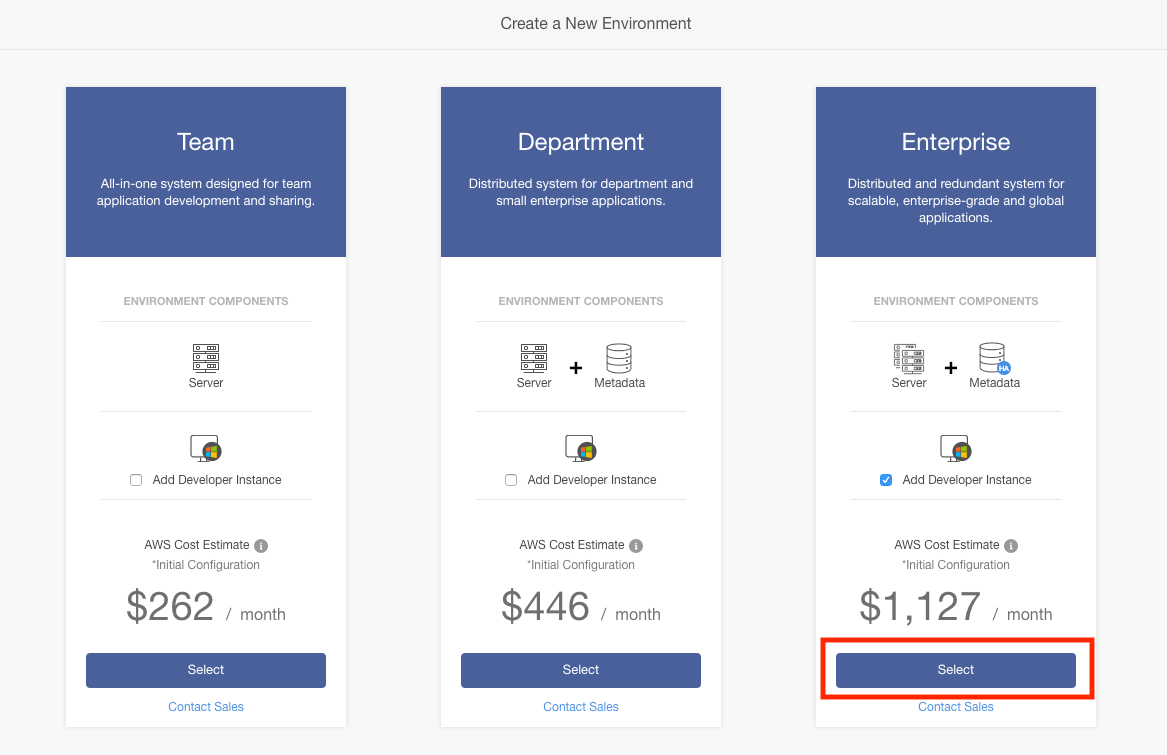
2. The multiple node option is only available on Enterprise environments. Click the Select button under Enterprise.
ka02R000000kb4hQAA_0EM44000000RBTO.png

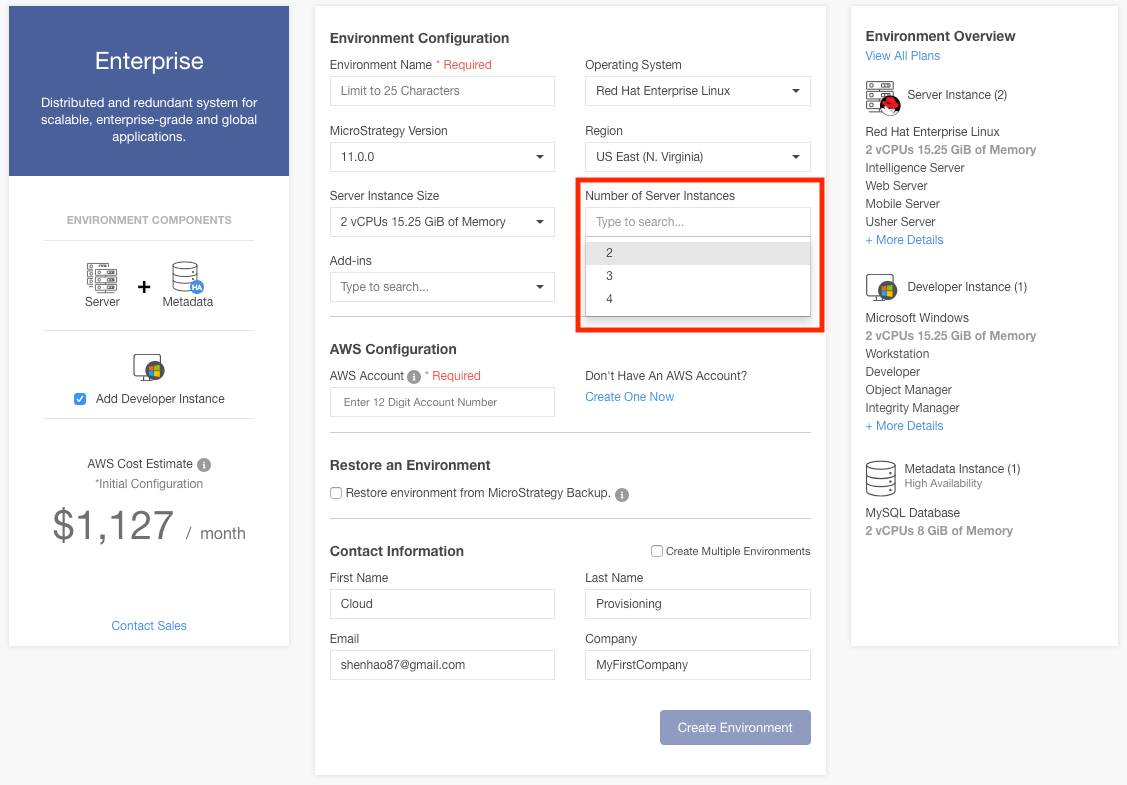
3. Fill out all required fields and choose which Strategy Version, OS, and region you want. To increase the number of server nodes, click the 'Number of Server Instances' dropdown. Enterprise environments can have up to 4 clustered nodes. Once you have finished choosing your options, click Create Environment and wait for your environment to provision.
ka02R000000kb4hQAA_0EM44000000RBTT.png

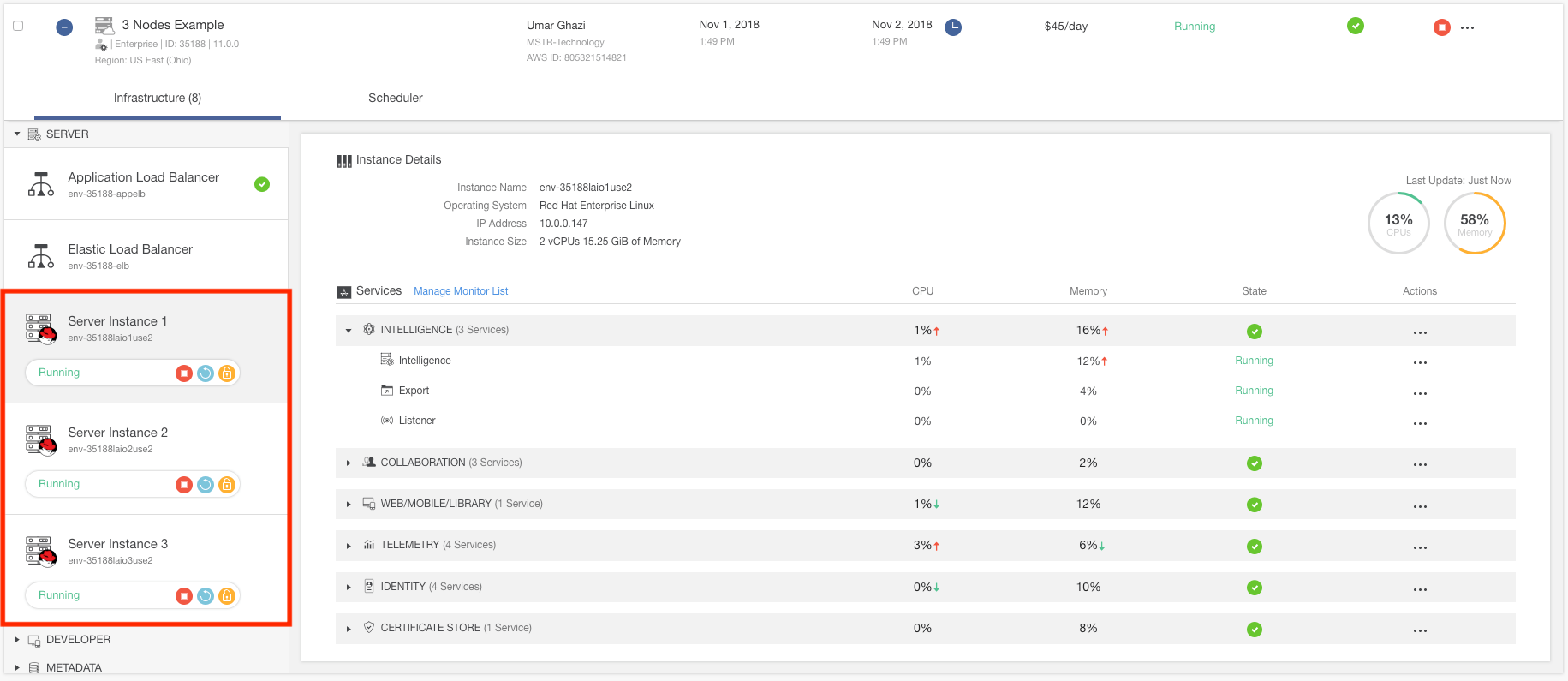
4. After provisioning, you will be able to see your multi-node in the environment details. You can interact with each instance individually or, to perform actions on all instances, you can conduct environment level actions.
ka02R000000kb4hQAA_0EM44000000RBUb.png

Just like other environments, all of the following features are available on multi-node environments:


 Vertica 7.0 32-Bit Vertica 7.0.x ODBC Driver CertifiedEnvironment-Level ActionsStartStopRebootResizeInstance-Level ActionsStartStopReboot


 Vertica 7.0 32-Bit Vertica 7.0.x ODBC Driver CertifiedEnvironment-Level ActionsStartStopRebootResizeInstance-Level ActionsStartStopReboot


 Vertica 7.0 32-Bit Vertica 7.0.x ODBC Driver CertifiedEnvironment-Level ActionsStartStopRebootResizeInstance-Level ActionsStartStopReboot


 Vertica 7.0 32-Bit Vertica 7.0.x ODBC Driver CertifiedEnvironment-Level ActionsStartStopRebootResizeInstance-Level ActionsStartStopReboot


 Vertica 7.0 32-Bit Vertica 7.0.x ODBC Driver CertifiedEnvironment-Level ActionsStartStopRebootResizeInstance-Level ActionsStartStopReboot


 Vertica 7.0 32-Bit Vertica 7.0.x ODBC Driver CertifiedEnvironment-Level ActionsStartStopRebootResizeInstance-Level ActionsStartStopReboot


 Vertica 7.0 32-Bit Vertica 7.0.x ODBC Driver CertifiedEnvironment-Level ActionsStartStopRebootResizeInstance-Level ActionsStartStopReboot


 Vertica 7.0 32-Bit Vertica 7.0.x ODBC Driver CertifiedEnvironment-Level ActionsStartStopRebootResizeInstance-Level ActionsStartStopReboot


 Vertica 7.0 32-Bit Vertica 7.0.x ODBC Driver CertifiedEnvironment-Level ActionsStartStopRebootResizeInstance-Level ActionsStartStopReboot


Comment

0 comments

Details

Blog Post

Published:

November 2, 2018

Last Updated:

November 2, 2018