EducationSoftwareStrategy.com
StrategyCommunity

Knowledge Base

Product

Community

Knowledge Base

TopicsBrowse ArticlesDeveloper Zone

Product

Download SoftwareProduct DocumentationSecurity Hub

Education

Tutorial VideosSolution GalleryEducation courses

Community

GuidelinesGrandmastersEvents
x_social-icon_white.svglinkedin_social-icon_white.svg
Strategy logoCommunity

© Strategy Inc. All Rights Reserved.

LegalTerms of UsePrivacy Policy
  1. Home
  2. Topics

KB483931: How to Stop and Start the MicroStrategy Repository in Windows and Linux in MicroStrategy 2021


Frederick Kellerman

Cloud Support Expert I • MicroStrategy


This article provides steps to stop and start the MicroStrategy Repository.

Beginning in Strategy 2020 and onwards, the Strategy Repository is installed when Platform Analytics is installed. The Strategy Repository is a PostgreSQL database server that contains the Platform Analytics Warehouse. For more general information about the Strategy Repository, click here.
To stop and start the Strategy Repository, use the following instructions.

How to Stop and Start the Repository on Linux


On Linux, you can stop, start, and restart the repository service using the following commands.
Note: These three commands only work if the process is registered as a service.
To stop the service:

# service Strategy repository-serverstop 

To start the service:
# service Strategy repository-serverstart 

To restart the service:
# service Strategy repository-serverrestart

If the repository is not registered as a service, then you can stop, start, and restart the service using the
mstr_pg_ctl
script located in the /opt/mstr/Strategy/install/Repository/bin directory.
To start the service:
$ ./mstr_pg_ctl start

To stop the service:
$ ./mstr_pg_ctl stop

To restart the service:
$ ./mstr_pg_ctl restart


How to Stop and Start the Repository on Windows


On Windows, you can stop and start the Repository Server through Windows Services (services.msc). 
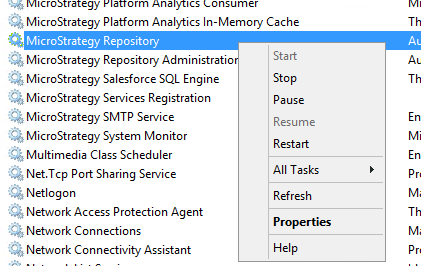
  • On your Windows machine, search for Windows Services.
  • Locate Strategy Repository.
  • Right-click Strategy Repository and click Start, Stop, or Restart.
ka0PW0000000rxBYAQ_0EM2R000000nHEi.jpeg

Comment

0 comments

Details

Knowledge Article

Published:

December 23, 2019

Last Updated:

February 26, 2024