If your AWS Enterprise or Department environment is deploy on Strategy Cloud Platform, you can use the following instructions to update your RDS certificate from rds-ca-2015 to rds-ca-2019.
If you are using Strategy 2020, you must perform two steps to update your RDS certificate to 2019: (1) update the RDS database instance certificate and (2) update the certificates of the Platform Analytics Consumer Service and the Collaboration Service. If you are using a version of Strategy earlier than 2020, you only need to update the RDS database instance certificate.
env-{env-id}-postgres. You may also have another database name called env-{env-id}-mysql if you selected Strategy Identity when provisioning the environment.env-{env-id}-mysql.
Note: You only need to perform these steps if you are using a Strategy environment version 2020 or later.
For Enterprise environments, you must perform the following steps on two platform instances. For
Department environments, you only need to perform these steps on your platform instance.
/opt/mstr/MicroStrategy/rds-ca-2019-root.pem.
/opt/mstr/MicroStrategy/install/CollaborationServer/config.json.
DataSource. Set the following parameter:
sslRootCertFile=<PATH>/rds-ca-2019-root.pem


For Enterprise environments, you must perform the following steps on platform instance 1. For
Department environments, you only need to perform these steps on your platform instance.
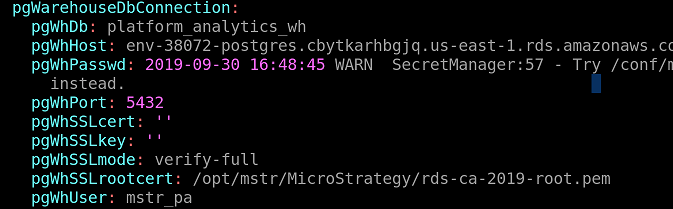
/opt/mstr/MicroStrategy/rds-ca-2019-root.pem.
/opt/mstr/PlatformAnalytics/conf/PAConsumerConfig.yaml.
pgWarehouseDbConnection. Set the following parameters:
pgWhSSLmode=verify-full
pgWhSSLrootcert=<PATH>/rds-ca-2019-root.pem