EducationSoftwareStrategy.com
StrategyCommunity

Knowledge Base

Product

Community

Knowledge Base

TopicsBrowse ArticlesDeveloper Zone

Product

Download SoftwareProduct DocumentationSecurity Hub

Education

Tutorial VideosSolution GalleryEducation courses

Community

GuidelinesGrandmastersEvents
x_social-icon_white.svglinkedin_social-icon_white.svg
Strategy logoCommunity

© Strategy Inc. All Rights Reserved.

LegalTerms of UsePrivacy Policy
  1. Home
  2. Topics

How to add a non Youtube video in a Dossier


Laurent Lee A Sioe

Director, Sales Engineering • MicroStrategy


This example shows you how to embed a video that is not stored on Youtube or other video services. The format should be MP4.

Starting with the release of Strategy ONE (March 2024), dossiers are also known as dashboards.
It's easy to add a Youtube video as Youtube will provide the embedding code to add in a HTML Frame.
But how to add a video file that is not on Youtube ?
When you have a MP4 video stored on the internet or on your network, you can use HTML5 video tags to include it in your Dossier.

  1. In the Web Dossier authoring interface, add a new visualization of type HTML container
  2. Select the type to be HTML Text
  3. Type the following HTML code, adapt it with the link to your MP4 video
  4. 
    <video autoplay muted loop width="100%" height="100%">
    <source src="http://images-assets.nasa.gov/video/GRC-2024-CM-0121.1/GRC-2024-CM-0121.1~orig.mp4" type="video/mp4">
    </video>
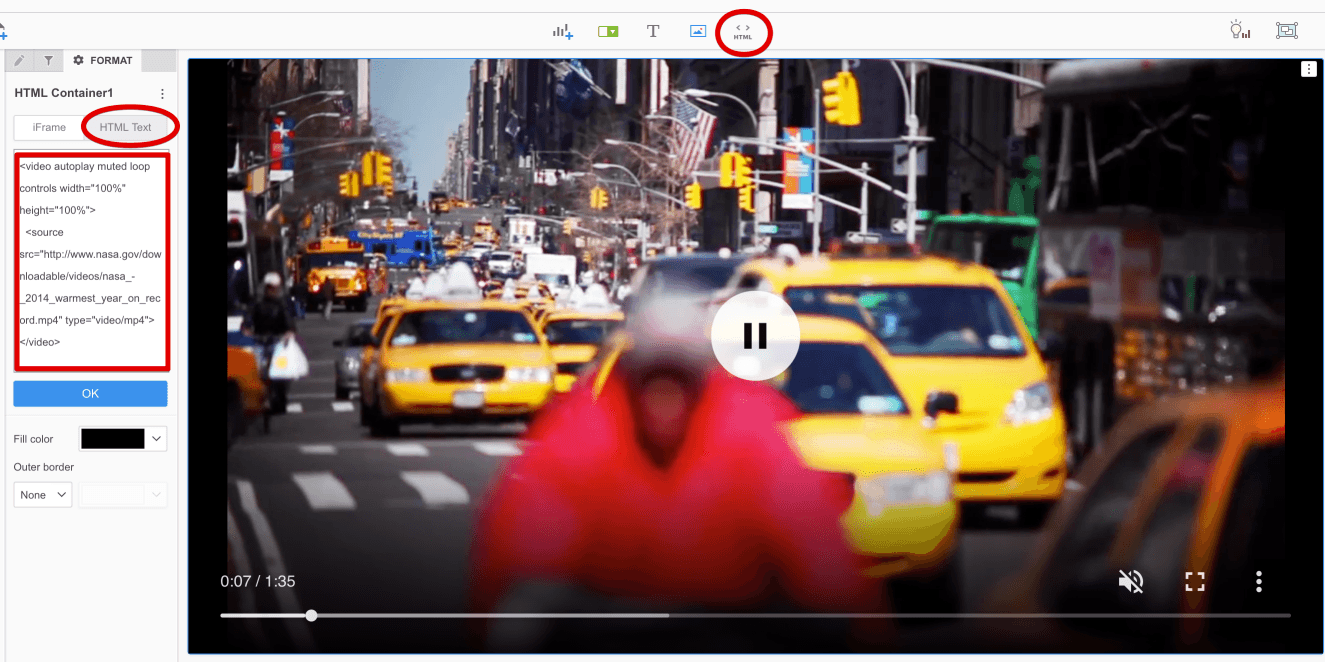
  5. The "video" tag has some parameters that you can modify to have more control (e.g. autoplay, muted, loop, etc). For more information you can check HTML Audio/Video DOM Reference .
ka0PW0000001JmtYAE_0EM44000000ROn9.png


Comment

0 comments

Details

Example

Published:

December 3, 2018

Last Updated:

March 21, 2024