EducationSoftwareStrategy.com
StrategyCommunity

Knowledge Base

Product

Community

Knowledge Base

TopicsBrowse ArticlesDeveloper Zone

Product

Download SoftwareProduct DocumentationSecurity Hub

Education

Tutorial VideosSolution GalleryEducation courses

Community

GuidelinesGrandmastersEvents
x_social-icon_white.svglinkedin_social-icon_white.svg
Strategy logoCommunity

© Strategy Inc. All Rights Reserved.

LegalTerms of UsePrivacy Policy
  1. Home
  2. Topics

KB439890: How to add a prompt to a Visual Insight created with Direct Data Access option with MicroStrategy 10.4


Mari Sugimura

Senior Cloud Support Engineer III • MicroStrategy


This article explains the design of the 10.4 Visual Insight with Direct Data Access (Live connection to Warehouses) where a prompt object is not supported to be added directly to the Visual Insight and a workaround is suggested.

QUESTION:
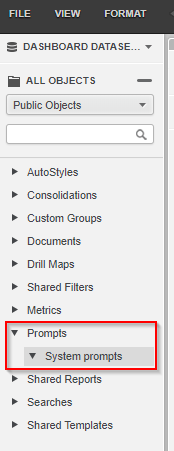
Is "Prompt" a supported object type with Visual Insight dashboard created with Direct Data Access option? No prompt objects are listed as available when navigated into Prompts folder using Visual Insight editor with "Browse All Objects" option as shown below:
ka044000000kUO9AAM_0EM44000000YWWX.png

ANSWER:
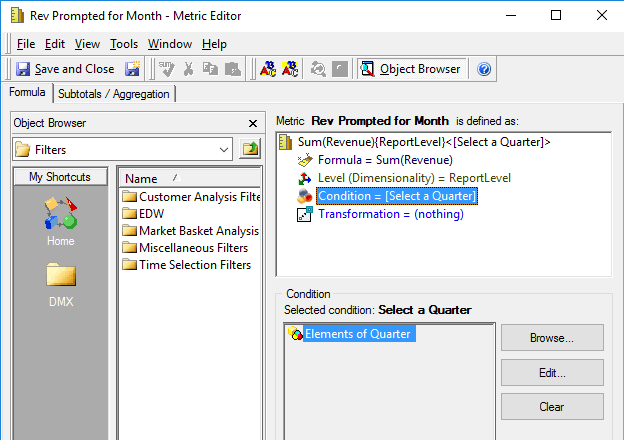
While Prompt is not a supported Object type when Visual Insight is created with Direct Data Access (Live), a metric can be created with a prompt embedded with which, the users get prompted to select an answer. For example, 
1. Create a filter defined with an attribute element prompt with Quarter attribute.
2. Create a metric with the filter. 
ka044000000kUO9AAM_0EM44000000YWWh.png

3. Select the metric in Visual Insight 
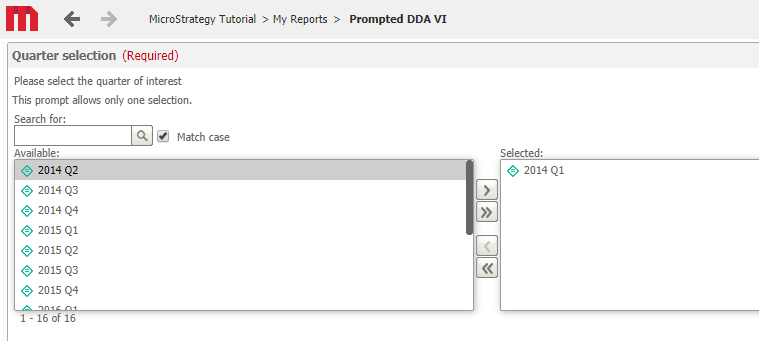
4. Notice that the prompt page displayed and the user can select a quarter prior to the execution of Visual Insight with Direct Data Access option. 
ka044000000kUO9AAM_0EM44000000YWWm.png

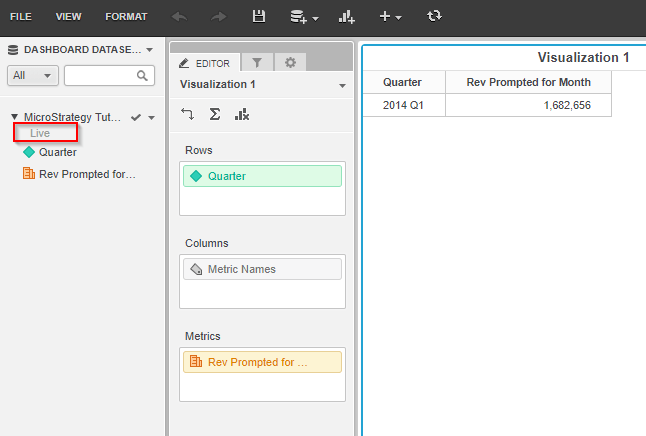
5. And the Visual Insight still havs "Live" option enabled.
ka044000000kUO9AAM_0EM44000000YWWr.png

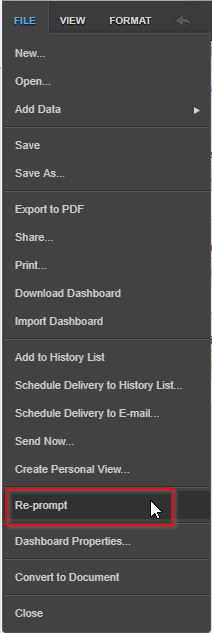
6. "Re-prompt" option is also available under "File" menu.
ka044000000kUO9AAM_0EM44000000YWWw.png

For more information about Direct Data Access, refer to: KB307514: In MicroStrategy Secure Enterprise 10.x, what is the difference between the "Create New Report" option and the "Browse All Objects" option when creating a VI Dashboard
KB39890 KB439890


Comment

0 comments

Details

Knowledge Article

Published:

March 9, 2018

Last Updated:

March 31, 2019