EducationSoftwareStrategy.com
StrategyCommunity

Knowledge Base

Product

Community

Knowledge Base

TopicsBrowse ArticlesDeveloper Zone

Product

Download SoftwareProduct DocumentationSecurity Hub

Education

Tutorial VideosSolution GalleryEducation courses

Community

GuidelinesGrandmastersEvents
x_social-icon_white.svglinkedin_social-icon_white.svg
Strategy logoCommunity

© Strategy Inc. All Rights Reserved.

LegalTerms of UsePrivacy Policy
  1. Home
  2. Topics

KB484372: How to change ASP session SameSite cookie settings in IIS


Community Admin

• Strategy


This article provides steps for changing the ASP sessions SameSite cookie settings in IIS.

Note: The settings demonstrated in this Knowledge Base article require a fully up-to-date Windows Server deployment, complete with a .NET framework of 4.7.2. If these settings are not in your IIS, make sure that there are no updates available in Windows Update and contact your systems administrator group.
To alter the samesite settings for the ASP session cookie, three samesite settings must be changed to the same state:
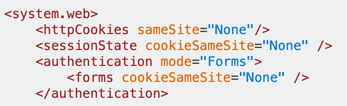
ka04W000001IwnXQAS_0EM2R000001Hxf6.jpeg


These will be added using the Configuration Editor on the Strategy application level:
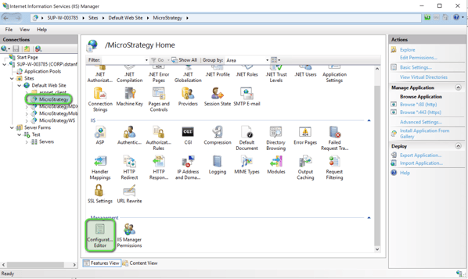
ka04W000001IwnXQAS_0EM2R000001HxfQ.jpeg


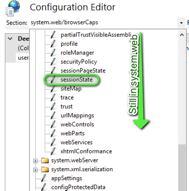
All three attributes to be edited are bundled under the system.web folder:
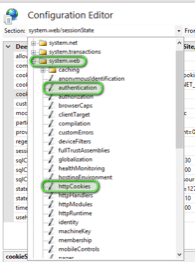
ka04W000001IwnXQAS_0EM2R000001Hxfk.jpeg
ka04W000001IwnXQAS_0EM2R000001Hxfz.jpeg


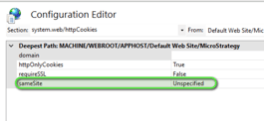
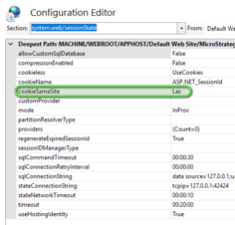
Below are the locations in each attribute:
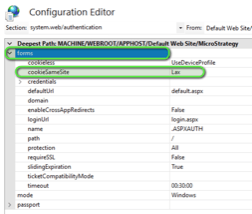
ka04W000001IwnXQAS_0EM2R000001Hxg4.jpeg
ka04W000001IwnXQAS_0EM2R000001Hxg9.jpeg
ka04W000001IwnXQAS_0EM2R000001HxgE.jpeg


All three must match for the setting to be effective.


Comment

0 comments

Details

Knowledge Article

Published:

July 1, 2020

Last Updated:

July 1, 2020