BACKGROUND:
When configuring a Strategy 2021 Intelligence Server cluster, special configuration must be made in order for the Intelligence Server cluster nodes to be able to access report and document caches, intelligent cubes, history list messages, and session recovery files that were created on other nodes of the cluster. Strategy has two options for the storage configuration; localized and centralized. While it is possible to use different configurations for different types of objects, Strategy considers it best practice to use the same configuration for everything for ease of administration.
With localized storage, each Intelligence Server node hosts its own files locally and other cluster nodes access these files via the network. The advantage of localized configuration is that the local machine will have faster read and write access to its locally hosted files. The disadvantages of localized configuration are that the setup process is more involved, that each cluster node will need to have sufficient available disk space to host its own files, and that the local read / write activities could potentially have a negative performance impact on the Strategy services running locally.
With centralized storage, all Intelligence Server nodes store their files in an external central location (i.e. a file server). The advantages of centralized configuration are the general benefits of using a file server. There can be hardware redundancy, backups, and fault tolerance, less disk space is needed on the actual Intelligence Server machines, and files will still be available in the event that one of the Intelligence Server machines goes down unexpectedly. The disadvantage is that all files will be read and written across the network which could result in slower performance, but with modern network infrastructure this disadvantage is largely or completely mitigated.
Regardless of the configuration and location chosen for file storage, the user account under which the Intelligence Server service is running must have full control of the relevant folders. Otherwise, Intelligence Server will have problems with file creation and access.
CONFIGURATION:
Localized:
When using localized storage, each Intelligence Server node will access its own local files at the path that is configured in Project Configuration (for cache and cube files) or Intelligence Server Configuration (for history list and session recovery files). Cluster nodes will access the remote files at hardcoded paths based on the hostnames of the remote nodes and determined by the operating system in use by the Intelligence Server. These paths cannot be changed, so the setup instructions must be followed exactly.
Windows
For each type of shared file (cache, cube, history list, and session recovery), the local location that is configured in Project or Server Configuration must be shared with a specific share name. The sharing must be performed on all cluster nodes. By default, the location configured will be a relative path where "." maps to the Intelligence Server working directory (when using default locations, this will be C:\Program Files (x86)\MicroStrategy\Intelligence Server).
The path for cache files must be shared as "ClusterCaches".
The path for cube files must be shared as "ClusterCube".
The path for history list files must be shared as "ClusterInBox".
The path for session recovery files must be shared as "ClusterWSRM".
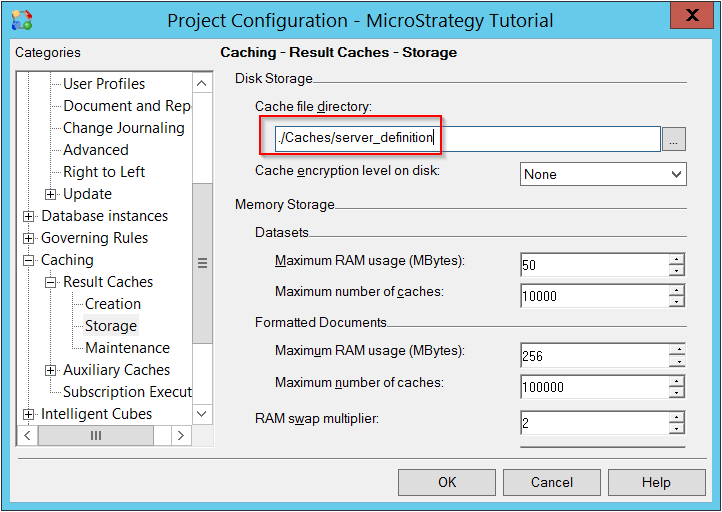
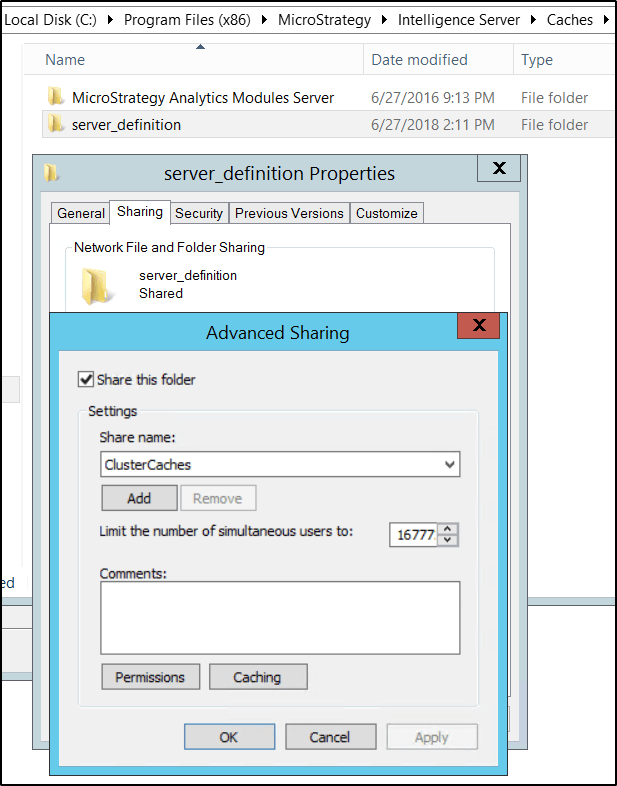
Cluster nodes will access the remote files via a UNC path based on the remote node machine names. Thus, to access locally stored cache files on a cluster node named MachineA, the remote nodes will attempt to access the path \\MachineA\ClusterCaches, and so on.
Linux
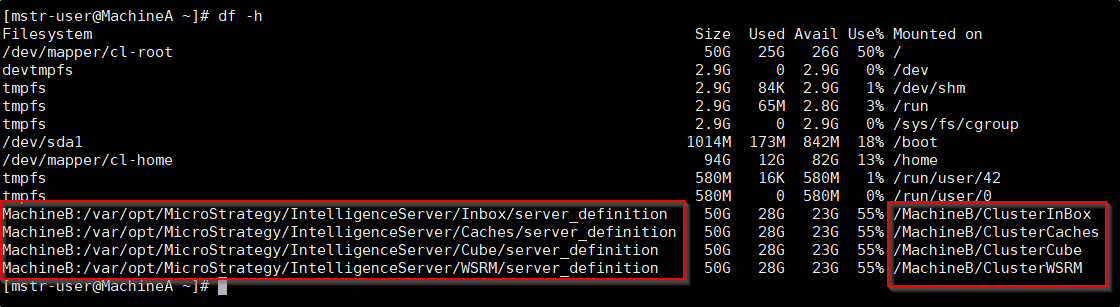
For each type of shared file (cache, cube, history list, and session recovery), the local location that is configured in Project or Server Configuration must be available via a filesystem mount on the remote nodes. The mounting must be performed on all cluster nodes. Cluster nodes will access the remote files via local paths with the remote node machine names as folders at the filesystem root level. Using a remote node named MachineB as an example:
The remote location for cache files must be available at "/MachineB/ClusterCaches"
The remote location for cube files must be available at "/MachineB/ClusterCube"
The remote location for history list files must be available at "/MachineB/ClusterInBox"
The remote location for session recovery files must be available at "/MachineB/ClusterWSRM"
NOTE: These locations are case-sensitive, so ClusterInBox will work but ClusterInbox will not.
Centralized:
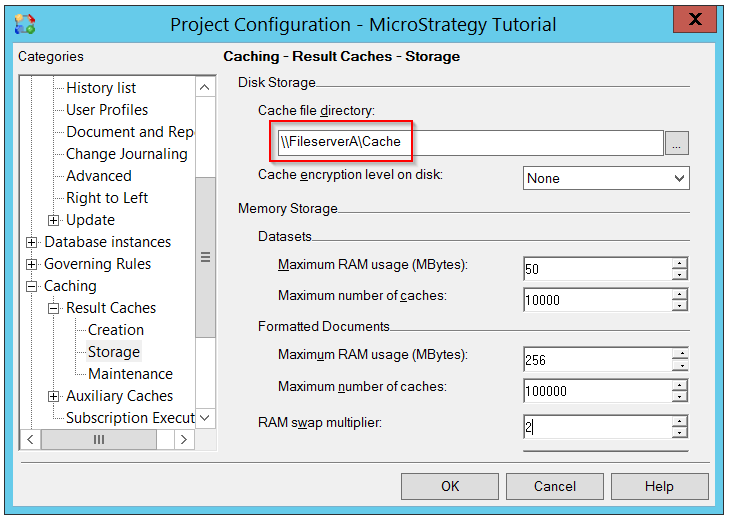
When using centralized storage, each Intelligence Server node will access local and remote files at the path that is configured in Project Configuration (for cache and cube files) or Intelligence Server Configuration (for history list and session recovery files). This path must be an absolute path and will be a UNC path for Windows or a local mount point for a remote location for Linux. It is critical that for Windows or Linux, there must be two backslashes (or slashes) at the beginning of the path. The two slashes signify to the Intelligence Server that a centralized storage configuration is in use.
Windows
For each type of shared file (cache, cube, history list, and session recovery), the location that is configured in Project or Server Configuration must be a UNC path for an accessible shared network location. The name(s) of the folder(s) in the path do not have any special requirements. Using a fileserver named FileserverA with shared folders named Cache, Cube, Inbox, and WSRM as an example:
The project configuration locations for cache files must be set to "\\FileserverA\Cache"
The project configuration locations for cube files must be set to "\\FileserverA\Cube"
The server configuration location for history list files must be set to "\\FileserverA\Inbox"
The server configuration location for session recovery files must be set to "\\FileserverA\WSRM
NOTE: The actual names of the shared locations can be anything, as long as the configured location matches the actual name of the shared location.
Linux
For each type of shared file (cache, cube, history list, and session recovery), the location that is configured in Project or Server Configuration must be a local path that has the remote network filesystem mounted, either individually or via a mounted parent directory. A UNC path will not work when the Intelligence Server is on Linux. Although the path specified will be a local path, two slashes must be used at the beginning of the path to signify to the Intelligence Server that a centralized storage configuration is in use.
Using a fileserver named FileserverB with shared locations named Cache, Cube, Inbox, and WSRM as an example, mounted to local folders /mnt/FileserverB/<object>:
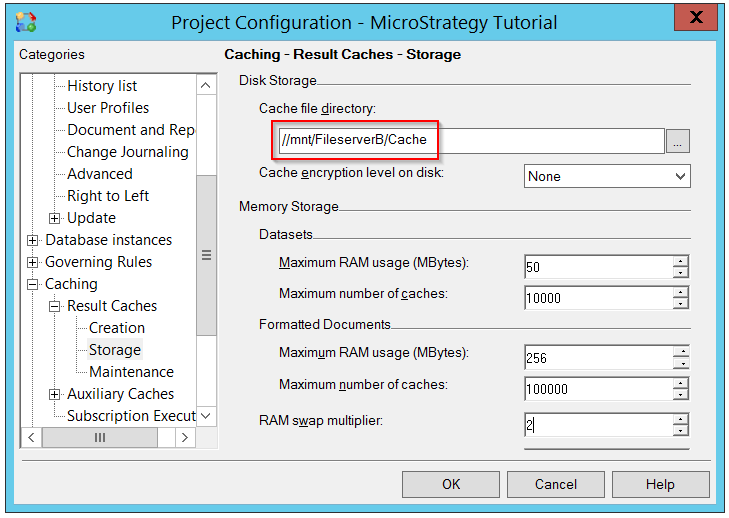
The project configuration locations for cache files must be set to "//mnt/FileserverB/Cache"
The project configuration locations for cube files must be set to "//mnt/FileserverB/Cube"
The server configuration location for history list files must be set to "//mnt/FileserverB/Inbox"
The server configuration location for session recovery files must be set to "//mnt/FileserverB/WSRM"
NOTE: The actual names of the shared locations and local mount points can be anything, as long as the configured location matches the actual name of the local mount point.
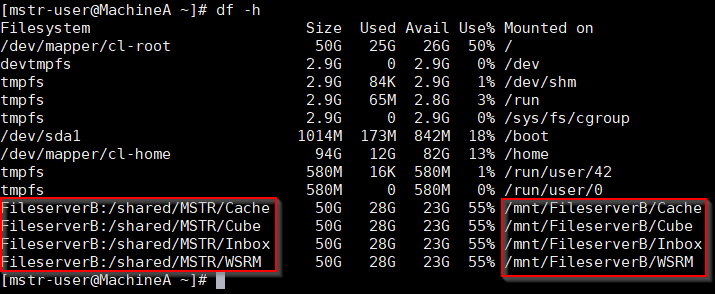
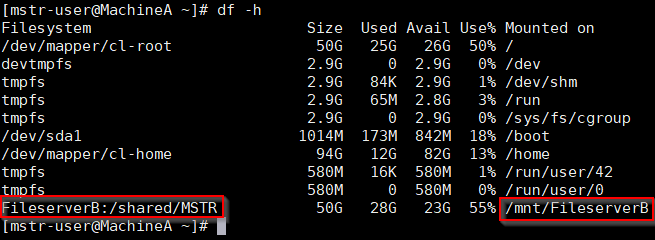
Alternatively, if the remote Cache, Cube, Inbox, and WSRM directories belong to a parent directory MSTR for example, the parent directory MSTR can be mounted to the local folder /mnt/FileserverB and the project / server configuration set the same as above.
Online help: Configuring Caches In a Cluster
