To deploy Strategy environments on a private subnet, some prerequisites are required to be met:
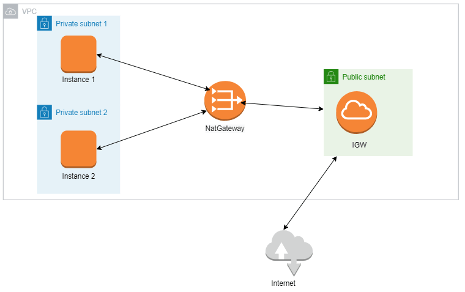
Begin by creating a VPC with a specified CIDR Range. For this example, 172.31.0.0/16 is used:

Next three subnets will be created. Two will be private and one will be public. Ensure that the two subnets that will become the private ones are in different availability zones.

Create a NAT gateway and place it into the public subnet that was created.

Create an internet gateway:

Two route tables are needed. One will be used by the private subnets and the other by the public subnets.
Each will have one route that points to local (the full CIDR range of the VPC) and the other will either point to the NAT gateway (private) or the internet gateway (public).
Private:

Public:

Move to the Strategy Cloud Provisioning Console account management page and click Configure New. Input the account number and region. Select the Use Existing VPC? checkbox.
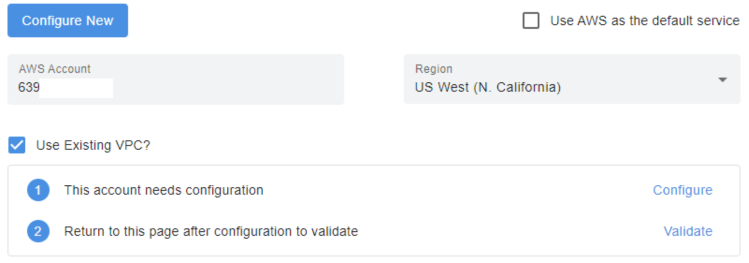
Click Configure and in the AWS page that comes up, click next to use the Strategy CloudFormation template.
On the next page, select the VPC created earlier and for the VPC CIDR block, input the CIDR block of the VPC.
Leave the two public subnets blank and for the private subnets use the two private subnets created earlier.
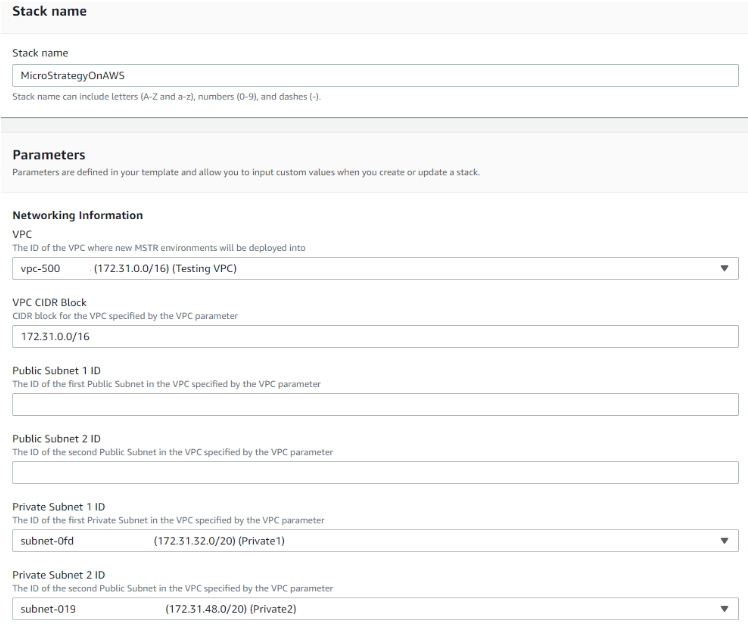
Click next through the rest of the pages and the Strategy on AWS CloudFormation will begin creating. After it is complete, return to the Cloud Provisioning Console, validate the account, and begin provisioning Strategy on AWS environments in private subnets.
Two parameter store configurations need to be changed in order to work with the proxy server.
Open the AWS console and navigate to Systems Manager > Parameter Store.
The first setting change will be in
/MicroStrategy/Proxy. Input the following value for the parameter details (with the IP changed to match the proxy configuration):
{
"HTTP_PROXY":"http://10.0.0.84:8080",
"HTTPS_PROXY":"http://10.0.0.84:8080"
}
/MicroStrategy/security-groups-platform. Input the following value for the parameter details (with the IP changed to match the proxy configuration):
{
   "SecurityGroupIngress":[
      {
         "IpProtocol":"tcp",
         "FromPort":"80",
         "ToPort":"80",
         "CidrIp":"10.0.0.0/24"
      },
      {
         "IpProtocol":"tcp",
         "FromPort":"443",
         "ToPort":"443",
         "CidrIp":"10.0.0.0/24"
      }
   ]
}
