EducationSoftwareStrategy.com
StrategyCommunity

Knowledge Base

Product

Community

Knowledge Base

TopicsBrowse ArticlesDeveloper Zone

Product

Download SoftwareProduct DocumentationSecurity Hub

Education

Tutorial VideosSolution GalleryEducation courses

Community

GuidelinesGrandmastersEvents
x_social-icon_white.svglinkedin_social-icon_white.svg
Strategy logoCommunity

© Strategy Inc. All Rights Reserved.

LegalTerms of UsePrivacy Policy
  1. Home
  2. Topics

How to Configure Universal Links with MicroStrategy Mobile and Library SDK for iOS


Menglu Xia

Product Owner, Principal • MicroStrategy


This article describes how to configure universal links with Microstrategy Mobile and Library SDK for iOS

Description

You can configure universal links with Strategy Mobile and Library SDK for iOS.
 

Solution

  • Create an 
    apple-app-site-association
     file that contains JSON data about the URLs that your app can handle. In this example, we use
    env-149760.customer.cloud.Strategy.com
    as our domain,
    com.Strategy.ipad
    as our appID, and
    5S85L38CPJ
    as our appPrefix. The corresponding JSON file is shown below.
        "applinks": {

            "apps": [],

            "details": [{

                "appID": "5S85L38CPJ.com.Strategy.ipad",

                "paths": ["*"]

                }

            ]

        }

    }

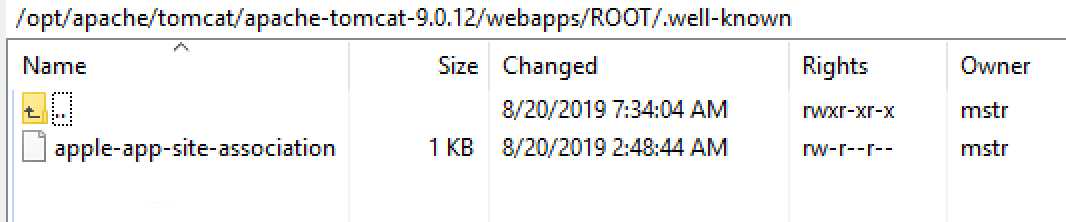
  • Upload the 
    apple-app-site-association
     file to your HTTPS web server. You can place the file at the root of your server or in the 
    .well-known
     subdirectory.
ka02R000000g1fsQAA_0EM2R000000lhYk.png
  • Download the Strategy Mobile SDK for iOS and open it in Xcode. Add an entitlement that specifies the domains your app supports.
ka02R000000g1fsQAA_0EM2R000000lhZ9.png
  • Update your app delegate to respond appropriately when it receives the 
    NSUserActivity
     object. If there is no need to customize behavior when tapping the website URL, you don't need to do anything else since this is handled internally. If you want to customize your own logic, you may need to override  
    application:continueUserActivity:restorationHandler: 
    in UIApplicationDelegate. 

See Support Univeral Links from Apple to learn more about using universal links in an iOS project. 


Comment

0 comments

Details

Knowledge Article

Published:

August 21, 2019

Last Updated:

August 21, 2019