EducationSoftwareStrategy.com
StrategyCommunity

Knowledge Base

Product

Community

Knowledge Base

TopicsBrowse ArticlesDeveloper Zone

Product

Download SoftwareProduct DocumentationSecurity Hub

Education

Tutorial VideosSolution GalleryEducation courses

Community

GuidelinesGrandmastersEvents
x_social-icon_white.svglinkedin_social-icon_white.svg
Strategy logoCommunity

© Strategy Inc. All Rights Reserved.

LegalTerms of UsePrivacy Policy
  1. Home
  2. Topics

KB482895: How to confirm Data Load schedule and the tasks/actions in EM_CONFIGURATION table


Community Admin

• Strategy


This document shows how to confirm Data Load schedule in the table of Enterprise Manager.

If you want to confirm the schedule, tasks/actions for existing Data Loads, you can find the information by running LIST ALL DATA LOADS command in Command Manager. There might be some scenario an administrator wants to find the information in the table of Enterprise Manager database.  
The information is stored in EM_CONFIGURATION table as below. You will find many tags in the column EM_CONFIGURATION_INFO in the table.

ka04W000000ObEPQA0_0EM44000000gPJ2.jpeg

Here is the value of the top row, "Dataload1":

<?xml version="1.0" encoding="UTF-8" standalone="yes"?><EMSchedule><ScheduleName>DataLoad1</ScheduleName><GUID>71E23FB31690A3CDAC05539206927816</GUID><DateBegin>Sat Dec 01 08:00:00 UTC 02018</DateBegin><DateEnd></DateEnd><Operation><Command>1</Command><Command>3</Command><Command>5</Command><Command>4</Command><ProjectList><MetadataGUID>BFC2EDCB49B1C0011EB4DCA0AE6899B8</MetadataGUID><ProjectGUID>B19DEDCC11D4E0EFC000EB9495D0F44F</ProjectGUID></ProjectList><Options><Options>0</Options></Options></Operation><ScheduleRecurrence><StartHour>Thu Jan 01 17:00:00 UTC 01970</StartHour><EndHour></EndHour><RecurrenceMins>0</RecurrenceMins><ExecutionDays>-******</ExecutionDays></ScheduleRecurrence><ScheduleType>Weekly</ScheduleType><Enabled>1</Enabled></EMSchedule> 

 
In the above example, Data Load "DataLoad1" runs every day except Sunday at 17:00(UTC) with Action UPDATEWAREHOUSE, UPDATEOBJECTDELETIONS, REPOPULATETABLES and CLOSESESSIONS.
 
Details of some tags are followings.
“Command” tag shows ACTIONS for Data Load:
1: Basic Action Fact lookup migration (UPDATEWAREHOUSE)
2: Update Database statistics (UPDATESTATS)
3: Advanced Metadata actions update folder and path (UPDATEOBJECTDELETIONS)
4: Advanced Metadata actions repopulate relate tables (REPOPULATETABLES)
5: Close orphan sessions (CLOSESESSIONS)
 
“ScheduleRecurrence” tag shows Data Load schedule, which you can see what time to start Data Load, recurrence and frequency. “ExecutionDays” tag shows which day of the week Data Load is executed.
Example: <ExecutionDays>-******</ExecutionDays>
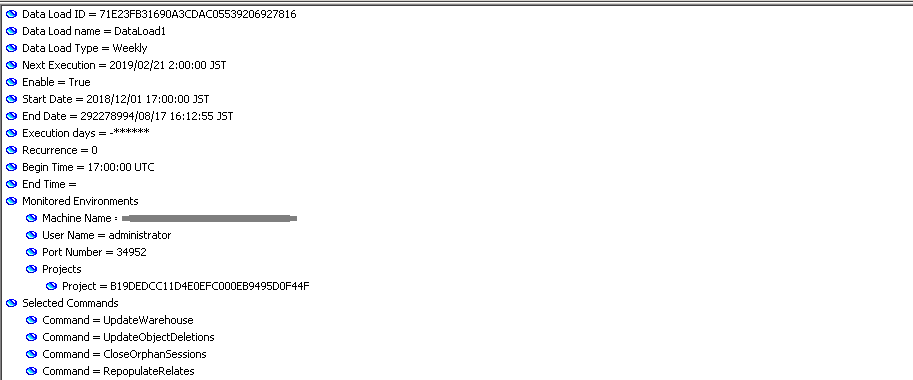
Beginning from Sunday, * (asterisk) stands for execution and -(hyphen) stands for no execution. In the above example, Data Load does not run on Sunday but run on Monday, Tuesday, Wednesday, Thursday, Friday and on Saturday. 
 
By executing LIST ALL DATALOAD command in Command Manager, the information of the same Data Load is displayed like below.

ka04W000000ObEPQA0_0EM44000000gPJ7.jpeg

  KB482895


Comment

0 comments

Details

Knowledge Article

Published:

February 21, 2019

Last Updated:

February 21, 2019