EducationSoftwareStrategy.com
StrategyCommunity

Knowledge Base

Product

Community

Knowledge Base

TopicsBrowse ArticlesDeveloper Zone

Product

Download SoftwareProduct DocumentationSecurity Hub

Education

Tutorial VideosSolution GalleryEducation courses

Community

GuidelinesGrandmastersEvents
x_social-icon_white.svglinkedin_social-icon_white.svg
Strategy logoCommunity

© Strategy Inc. All Rights Reserved.

LegalTerms of UsePrivacy Policy
  1. Home
  2. Topics

KB485030: How to connect to MongoDB by JDBC driver in MicroStrategy 2021 Update 2 with different port numbers


Jing Yang

Quality Engineer, Senior • Strategy


This article provides steps for connecting to MongoDB by JDBC driver with different port numbers.

Description


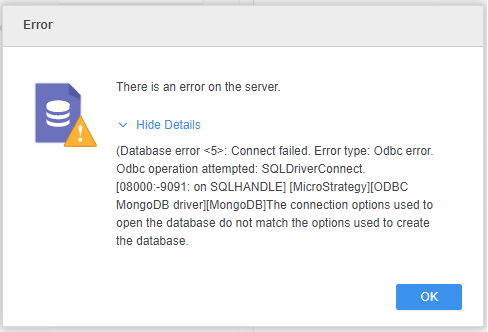
For MongoDB, server name and port number information are stored in the schema file. Therefore, when reusing this schema file to connect to the same MongoDB server with different port numbers, the following error is returned. 
The connection options used to open the database do not match the options used to create the database. 
ka04W000001Ev0jQAC_0EM4W00000284bR.jpeg

Solution 

Windows Intelligence server

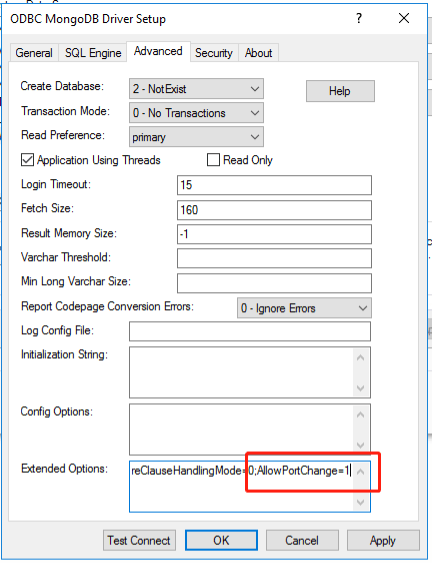
  • Go to ODBC Administrator > ODBC MongoDB Driver Setup > Advanced.
  • In the Extended Options field, set the parameter
    AllowPortNumber=1
    .
ka04W000001Ev0jQAC_0EM4W00000284bg.jpeg
  • Connection string format:
    JDBC;DRIVER={com.Strategy.jdbc.mongodb.MongoDBDriver};URL={jdbc:Strategy:mongodb://11.11.11.11:27017;DatabaseName=A;SchemaDefinition=C:\Users\Administrator\Downloads\schema\;ValidateServerCertificate=false;EncryptionMethod=noEncryption;AllowPortChange=true}


Linux Intelligence server

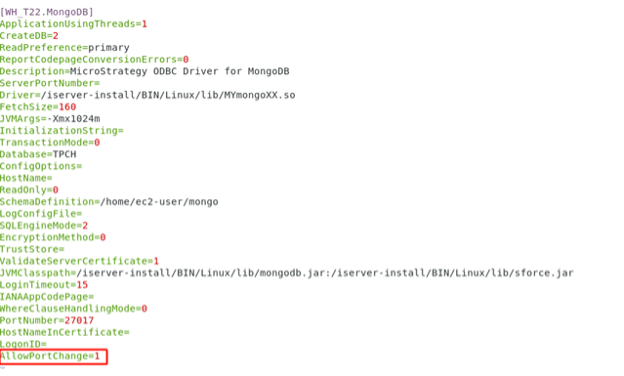
  • Open the
    odbc.ini
    config file. 
  • Add the parameter
    AllowPortNumber=1
    .
ka04W000001Ev0jQAC_0EM4W00000284c5.jpeg
  • Connection string format:
    JDBC;DRIVER={com.Strategy.jdbc.mongodb.MongoDBDriver};URL={jdbc:Strategy:mongodb://11.11.11.11:27017;DatabaseName=A;SchemaDefinition=/home/ec2-user/schema/;ValidateServerCertificate=false;EncryptionMethod=noEncryption;AllowPortChange=true};


Comment

0 comments

Details

Knowledge Article

Published:

May 18, 2021

Last Updated:

June 30, 2021