EducationSoftwareStrategy.com
StrategyCommunity

Knowledge Base

Product

Community

Knowledge Base

TopicsBrowse ArticlesDeveloper Zone

Product

Download SoftwareProduct DocumentationSecurity Hub

Education

Tutorial VideosSolution GalleryEducation courses

Community

GuidelinesGrandmastersEvents
x_social-icon_white.svglinkedin_social-icon_white.svg
Strategy logoCommunity

© Strategy Inc. All Rights Reserved.

LegalTerms of UsePrivacy Policy
  1. Home
  2. Topics

KB440777: How to convert a hexadecimal number from MSIReg to a decimal value in MicroStrategy 10.x


Community Admin

• Strategy


This outlines the steps on how to convert a hex value to a decimal value from registry key file.

In some scenario, registry file (MSIReg) is being exposed to check the setting directly.

 

ka04W000000OcNgQAK_0EM44000000WMfO.png

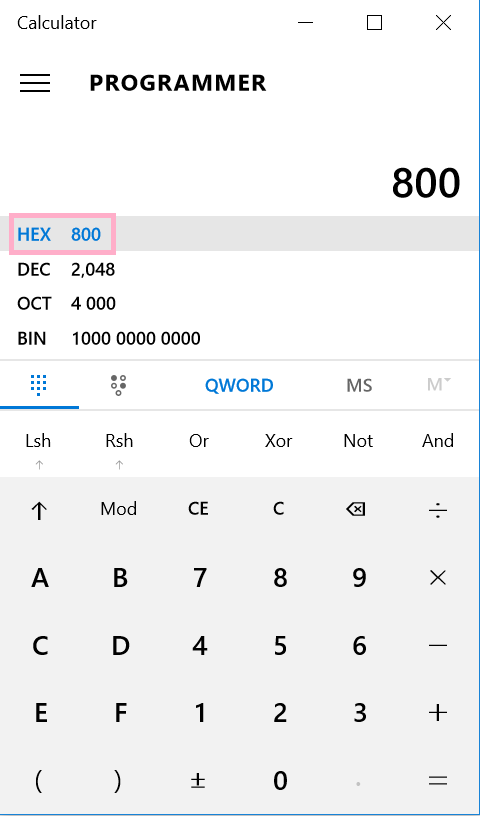
In case to tell from a hexadecimal number to a decimal value, for example
"MaxSize"=dword:00000800
Windows calculator could be used to convert to decimal value.  
 
Steps:
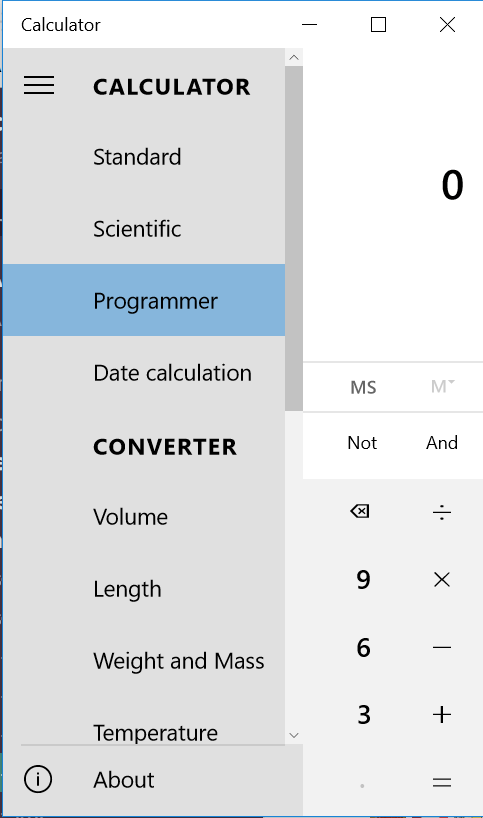
  •  Launch Windows calculator and switch mode to programmer as shown below.
ka04W000000OcNgQAK_0EM44000000WMfT.png
  • Input the number in hex as shown below; it will tell you how it converts to dec/octal/binary.
ka04W000000OcNgQAK_0EM44000000WMfY.png


WARNING:
Modifying registry values incorrectly may cause serious, system-wide problems that may require the re-installation of Microsoft Windows NT. Any edit of the registry is done at the user's own risk. Since these are user-initiated changes, they are not covered by any Strategy warranty. If using Microsoft Windows NT, the user should backup the registry and/or update an Emergency Repair Disk (ERD) prior to alterations.


Article Reference Number: KB440777


Comment

0 comments

Details

Knowledge Article

Published:

May 9, 2018

Last Updated:

November 9, 2018